
Amazon SES Email Marketing: Cost, Setup & Software (2026)
Can you use Amazon SES for email marketing? Yes. 2026 pricing (incl. the new SES plans), the software that runs on SES, setup, and Gmail/Yahoo bulk-sender rules.

On this page
TL;DR: Yes, you can use Amazon SES for email marketing. AWS allows newsletters and promotional email as long as recipients opted in and can unsubscribe. SES costs $0.10 per 1,000 emails on à-la-carte pricing (new accounts start on the $0.16 Essentials plan until they switch), so a weekly newsletter to 50,000 people costs about $22 a month, against $450 on Mailchimp. The catch: SES only sends. You need software on top for lists, campaigns and unsubscribes, such as mailtani, Sendy, listmonk or Mautic.
Most email marketing tools charge you for the size of your list. Amazon SES charges you only for what you send. That gap is why founders and lean teams look at SES once their newsletter or lifecycle emails start costing real money.
This guide covers what SES costs for marketing, which software runs on top of it, how to set it up so Gmail and Yahoo accept your mail, and when it's the wrong choice.
Can You Use Amazon SES for Email Marketing?
Yes. SES supports both transactional and marketing email; AWS even asks which type you send when you request production access. The rules are the same as any reputable sender's:
- Only mail people who opted in. AWS recommends double opt-in and prohibits bought, rented or shared lists.
- Make unsubscribing easy. Every marketing email needs a working unsubscribe link, and Gmail and Yahoo now require one-click unsubscribe headers too.
- Keep bounces and complaints low. AWS reviews accounts whose bounce rate reaches 5% or complaint rate reaches 0.1%.
SES is the sending engine, not a marketing app. It has no campaign editor, no list builder and no automation designer. That's where the software in the next sections comes in.
Amazon SES Pricing for Email Marketing (2026)
À-la-carte pricing: $0.10 per 1,000 emails, with no monthly fee and no charge per contact. Attachments cost $0.12 per GB, and a dedicated IP is $24.95 a month if you want one.
The new pricing plans: since July 21, 2026, new SES accounts start on the Essentials plan at $0.16 per 1,000. Pro ($0.22 per 1,000 plus $105 a month) and Enterprise ($0.23 plus $500) bundle extras like managed dedicated IPs and Virtual Deliverability Manager. You can switch to à-la-carte at any time; if you were placed on Essentials by default, the switch takes effect immediately. For a newsletter, à-la-carte is almost always the cheaper choice.
Free tier: new AWS accounts get up to $200 in credits for 6 months, which covers SES.
What a newsletter actually costs. A weekly email is about 4.3 sends per contact per month:
| List size | Emails/month | Amazon SES (à-la-carte) | SES Essentials plan | Mailchimp Standard |
|---|---|---|---|---|
| 5,000 contacts | ~21,700 | ~$2.17 | ~$3.47 | $100/month |
| 50,000 contacts | ~217,000 | ~$21.70 | ~$34.72 | $450/month |
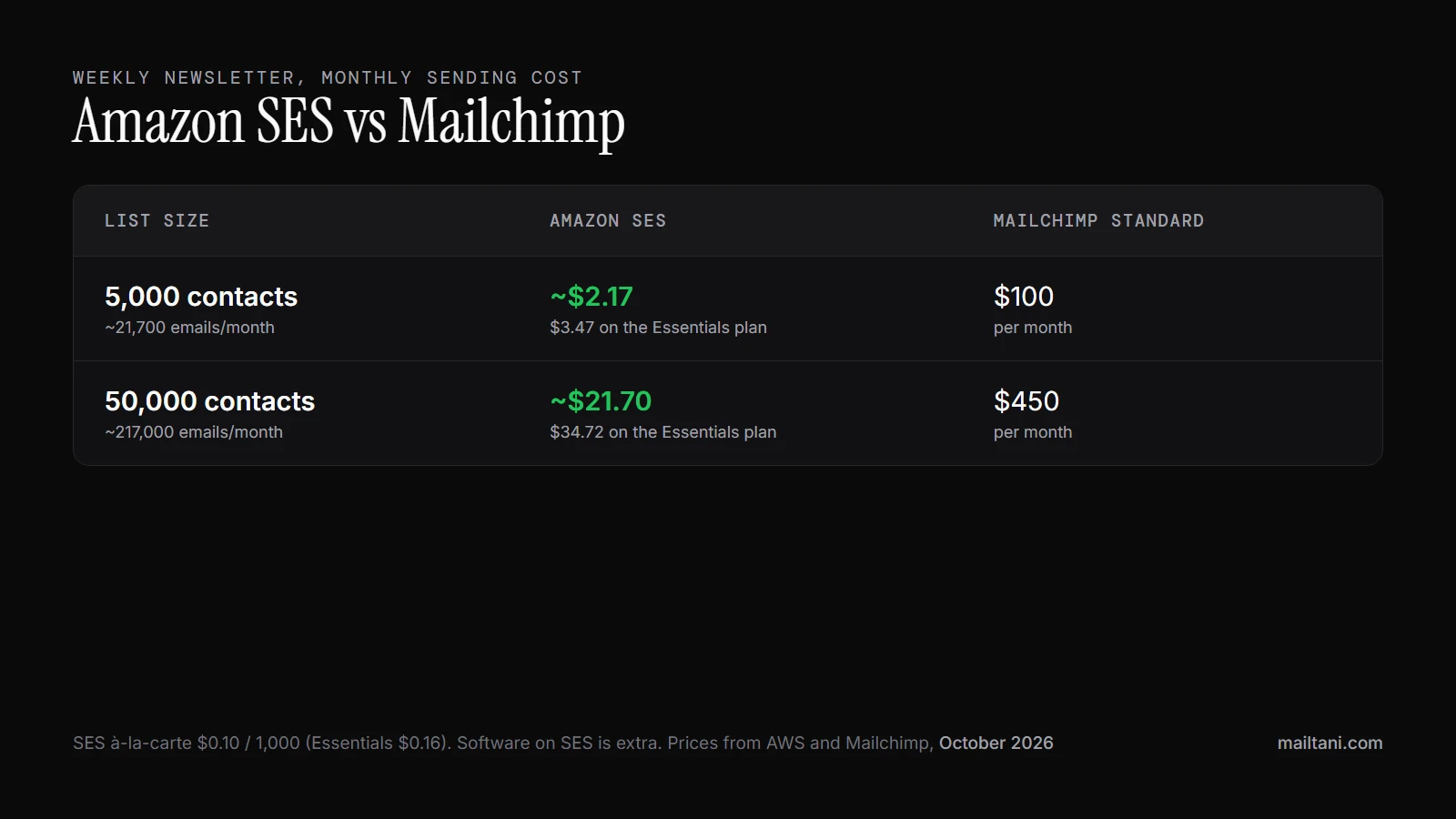
The software you run on top of SES is extra, but most options are free or one-time purchases, so the total stays far below a per-contact plan. For a wider view of sending services and their prices, see our email providers list, and for a head-to-head with a managed API, Amazon SES vs SendGrid.
Email Marketing Software That Runs on Amazon SES
Because SES only sends, you pair it with an app that handles lists, campaigns and unsubscribes. The main options:
| Software | Model | Price | Hosting | Best for |
|---|---|---|---|---|
| mailtani | Campaigns, sequences, flows, transactional API | €89 one-time | Hosted (no server) | Founders who want SES pricing without running a server |
| Sendy | Newsletters and autoresponders | $69 one-time | Self-hosted (PHP/MySQL) | People comfortable running a web server |
| listmonk | Newsletters and mailing lists | Free, open source (AGPLv3) | Self-hosted | Developers who want full control |
| Mautic | Full marketing automation | Free, open source | Self-hosted (SES via plugin) | Teams that need CRM-style automation |
Self-hosted tools cost little but need a server, updates, backups and your own bounce handling. Hosted tools like mailtani connect to your SES account, so you keep SES pricing and your sending reputation without maintaining anything. Whichever you choose, check that it handles bounce and complaint notifications and adds one-click unsubscribe headers; both are covered below.
What Is Amazon SES and Who Should Use It
SES is infrastructure, not a marketing suite
Amazon SES handles email delivery. It does not give you the full operating environment that marketers get in Mailchimp, Klaviyo, or ConvertKit.
That distinction matters. SES gives you APIs, SMTP access, domain authentication, reputation tooling, and event data. Your team still has to decide how campaigns are built, where templates live, how audiences are segmented, and what happens with bounces, complaints, and unsubscribes. AWS covers the sending rail. You build the system around it.
For technical teams, that is the appeal. You are not adapting your lifecycle email, product alerts, or internal data model to fit someone else's software. You can wire SES into your app, your warehouse, your CRM, and your own rules for suppression and reporting. If you are comparing it to a packaged provider, this AWS SES vs SendGrid comparison helps clarify where infrastructure ends and software begins.
The catch is obvious once you log in. SES feels closer to a cloud service than a marketer workspace. There is no built-in campaign center that hides the operational details. Teams that expect a polished UI on day one usually underestimate the setup work.
Who should choose it
SES fits teams that send enough email, or care enough about control, that building around the sending layer pays off.
- Product and engineering teams already running on AWS and comfortable owning authentication, webhooks, and event flows.
- SaaS companies sending transactional, lifecycle, and account emails that need one delivery layer tied closely to product data.
- High-volume ecommerce and DTC operators where ESP pricing starts rising faster than the value of the bundled software.
- Growth teams with technical support that want tighter control over reputation, suppression logic, and analytics.
It is a weaker fit for a small team that wants newsletters, automations, templates, forms, and reporting in one dashboard with minimal setup. In that case, you are paying for convenience, and that can be the right decision. For per-contact pricing, Mailchimp Standard costs $450 a month at 50,000 contacts.
A simple rule helps. If email is a side channel, renting the full platform is often fine. If email affects onboarding, retention, product communication, or revenue at scale, owning the sending layer starts to make financial and operational sense.
That is who SES is for. Teams willing to trade convenience for lower cost, tighter control, and a stack they can shape around the business instead of the other way around.
SES vs Traditional ESPs The Real Trade-Offs
The decision usually isn't "SES or not SES." It's whether the savings and control outweigh the setup and maintenance.
The decision usually comes down to three things
Cost is the obvious one. With SES, you pay for sending volume at the infrastructure layer. With traditional ESPs, you're paying for software, support, convenience, and a pricing model that often rises with contacts as much as sends.
Deliverability is less obvious, but often more important. On a large ESP, your account may sit on shared infrastructure. That's convenient, but it can create a noisy-neighbor problem. If someone else on the pool behaves badly, your inbox placement can suffer even if your own list is clean. With SES, especially when you move toward reputation ownership, you get more isolation and more direct responsibility.
Control is where the long-term difference shows up. In a bundled ESP, the vendor owns the workflow model. You adapt to their audience schema, automation logic, suppression handling, and UI limitations. With SES, you can shape the system around your app and your business logic. If you're comparing providers at that level, this AWS SES vs SendGrid comparison is a useful framing device because it highlights the infrastructure-first versus platform-first choice. The same split shows up in Mailchimp vs SendGrid: a marketing platform on one side, a sending API on the other.
A side by side view
| Factor | Amazon SES (DIY Approach) | Traditional ESP (e.g., Mailchimp, ConvertKit) |
|---|---|---|
| Cost model | Pay for raw sending infrastructure | Pay for sending plus bundled software and pricing tiers |
| Setup effort | Higher. You handle identity, authentication, monitoring, and workflow plumbing | Lower. Most core features are ready immediately |
| Deliverability ownership | More direct control over reputation and configuration | More abstraction, often with shared sending considerations |
| Analytics experience | Data-rich, but you may need to build the reporting layer | Better default dashboards for marketers |
| Flexibility | Strong if you want custom integrations and portable workflows | Strong if your needs fit the vendor's system |
| Vendor lock-in risk | Lower, because the sending layer is separate from the application layer | Higher, because your data and workflows often live inside one platform |
| Team fit | Better for technical teams or hybrid marketer-operator teams | Better for non-technical teams that need speed and simplicity |
A practical example makes this clearer. Suppose you run a brand with a list around the size where ESP invoices start to get annoying, and you send a mix of campaigns, post-purchase flows, and product alerts. A traditional ESP may still save time. But if your team can handle setup, the economics of SES plus a lighter application layer usually become hard to ignore.
The mistake is assuming there are only two extremes. There aren't. You can own the infrastructure without building every dashboard, workflow, and reply view from scratch. That middle path is usually where SES becomes compelling.
Your Essential SES Setup Checklist for High Deliverability
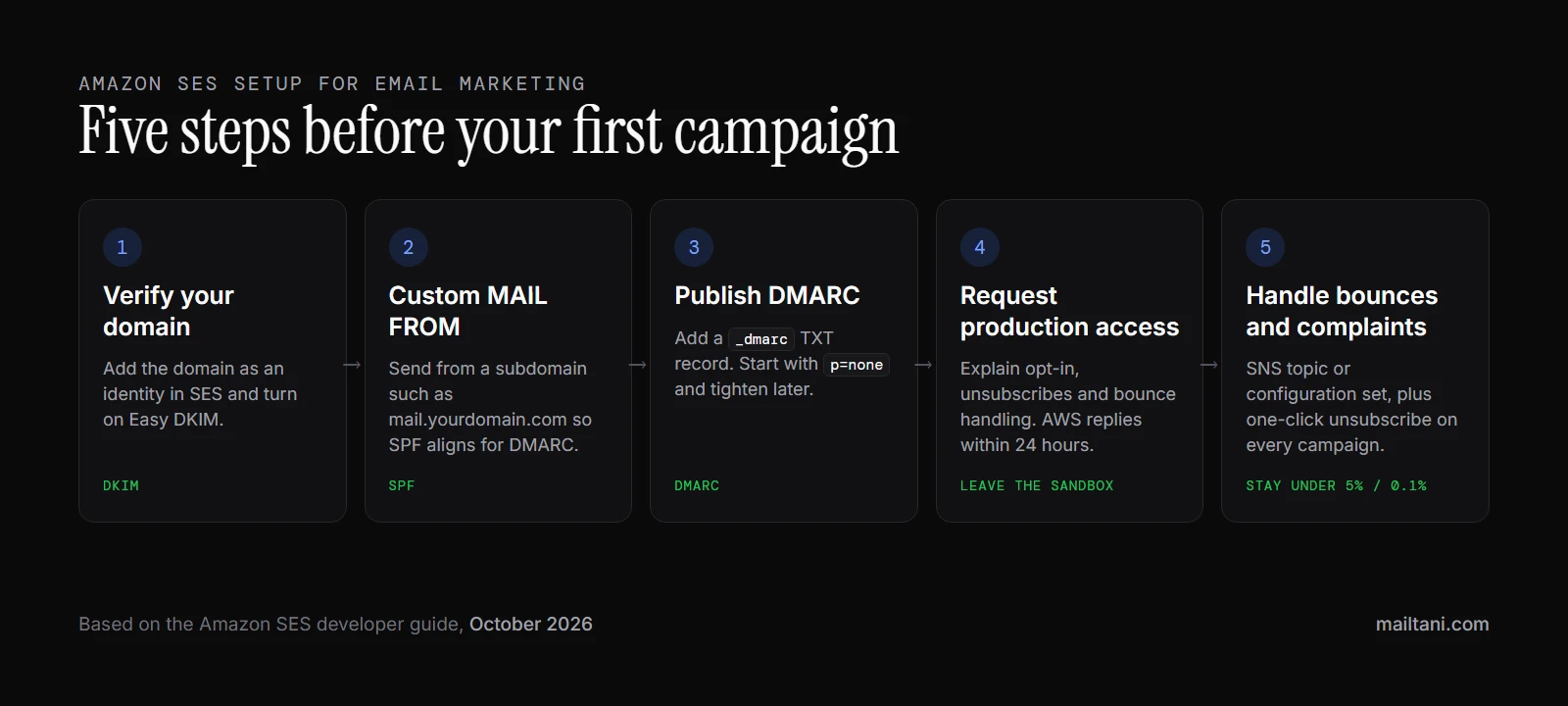
A surprising number of SES problems start before the first campaign. The account is technically active, but the trust signals aren't in place, complaint handling is incomplete, and the sender assumes AWS will smooth it over.
It won't. SES gives you serious sending power, but it expects you to behave like a serious sender.
Start with identity and trust
First, verify the domain you plan to send from. This tells mailbox providers and AWS that you control the identity behind the mail. Sending from a domain you haven't fully prepared is one of the fastest ways to create avoidable distrust.
Then set up DKIM and DMARC. The simple explanation is that these records act like an identity layer for your email. They help receiving servers evaluate whether the message is really from your domain and whether it has been altered along the way.
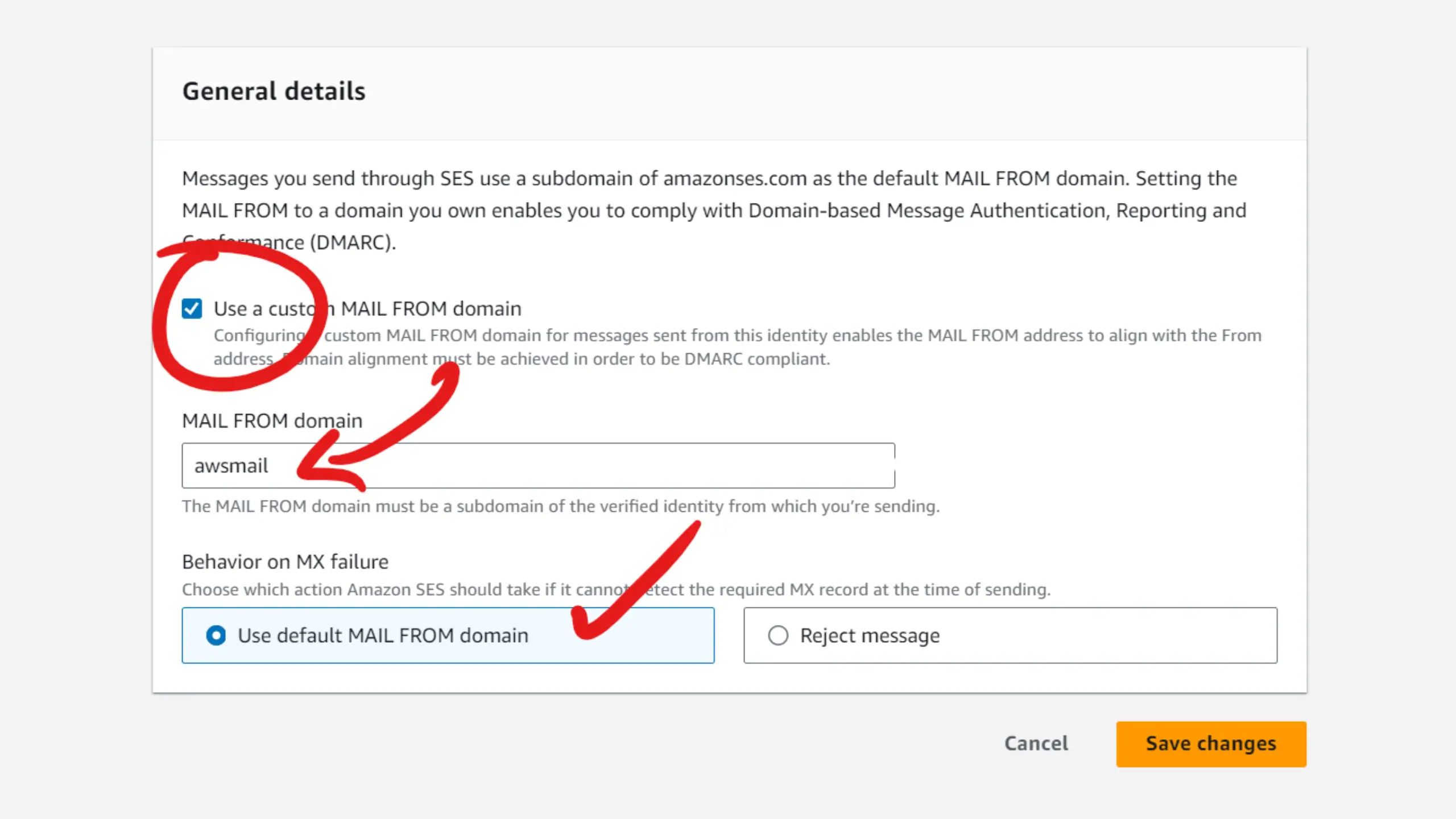
For SPF, turn on a custom MAIL FROM domain in SES (for example mail.yourdomain.com) and publish v=spf1 include:amazonses.com ~all on that subdomain. That is where SES checks SPF, so it is what lets SPF align for DMARC. Adding the include to your root domain does not. Our SPF record builder gives you that subdomain record alongside your root one.
If you want to simplify the record creation step, a tool like this DKIM record generator can help reduce manual formatting mistakes. The important part isn't the tool itself. It's that authentication gets done cleanly and early.
Monitor the signals that can shut you down
AWS is unusually explicit about the metrics that matter. According to Amazon SES documentation on monitoring sending activity, bounce rates must stay under 5% and complaint rates below 0.1% to protect sender reputation and avoid suspension risk.
That means bounce and complaint handling isn't admin work. It's core deliverability work.
A practical baseline looks like this:
- Use SNS notifications for events so bounces and complaints don't sit unseen in a console.
- Suppress bad addresses quickly rather than retrying people who have already signaled failure.
- Watch the Reputation Metrics page after every meaningful send, especially early on.
- Treat complaints as a system bug rather than a reporting metric. Something about targeting, consent, cadence, or messaging is off.
For list hygiene, our email list management best practices cover cleaning and re-engagement.
If your bounce rate climbs, don't start with subject lines. Start with list quality, collection source, and whether you're mailing people who expected to hear from you.
Get out of the sandbox with a clean story
New SES accounts start in sandbox mode. In practice, that means your early setup work should focus on proving that your sending use case is legitimate and controlled.
When you request production access, have clear answers ready:
- What are you sending? Transactional mail, campaigns, lifecycle emails, outreach, or a mix.
- How did recipients get on the list? Be specific about consent and collection.
- How do you handle unsubscribes, bounces, and complaints? AWS wants operational maturity here.
- What domain and identity controls are already in place? This reinforces that you're not improvising.
Most deliverability problems blamed on SES are operator problems. Bad lists, rushed authentication, no suppression logic, and poor complaint handling will fail on any provider. SES just exposes that reality faster. If you are still choosing where to send from, our comparison of 10 email service providers puts SES next to Resend, Postmark, Mailgun and the rest on price.
Gmail and Yahoo Bulk-Sender Rules on Amazon SES
Since 2024, Gmail and Yahoo require bulk senders (Gmail's threshold is 5,000 messages a day to its users) to meet three rules. They apply to any newsletter, whatever service sends it:
- Authenticate with SPF, DKIM and DMARC. On SES that means Easy DKIM, a custom MAIL FROM domain for SPF alignment, and a DMARC record. Our DMARC record generator builds one.
- Support one-click unsubscribe. Marketing emails need
List-UnsubscribeandList-Unsubscribe-Post: List-Unsubscribe=One-Clickheaders, plus a visible unsubscribe link. SES's subscription management feature can add these for you when you send with a contact list, or your marketing software adds them (mailtani does on every campaign, flow and one-off email). - Keep spam complaints low. Gmail's hard limit is a 0.30% spam rate in Postmaster Tools, and it recommends staying under 0.10%. AWS's own review threshold is 0.1%, so aim for that.
Mastering Your Sending Reputation with IP Warm-Up
IP warm-up is the part most first-time SES senders underestimate. They treat a new sending setup like a switch. Authenticate the domain, upload the list, hit send.
Mailbox providers don't see it that way. They see a new sender identity and ask whether this traffic pattern looks trustworthy.
Why warm-up matters
A good analogy is a credit score. You don't build trust by taking out the largest possible loan on day one. You build it by showing consistent, predictable behavior over time.
If you buy dedicated IPs, SES warms them up automatically by default: according to AWS's dedicated IP warming docs, it gradually shifts your traffic from shared IPs to the new ones over about 45 days. On shared IPs there is no IP to warm, but your domain still needs a gradual ramp, and AWS's thresholds still apply: a 5% bounce rate or 0.1% complaint rate puts your account under review.
That tells you two things. First, warm-up isn't optional for serious volume. Second, reputation is shaped by behavior, not just configuration.
If you're using shared SES infrastructure for small or mixed traffic, you may not need to obsess over every step. But once email becomes material to revenue, reputation ownership matters more. Dedicated infrastructure gives you cleaner accountability. If deliverability improves, you earned it. If it drops, you can diagnose your own system instead of guessing what happened in a shared pool.
A practical ramp approach
A sane warm-up plan starts with your best recipients. Send first to the most engaged users, recent buyers, active customers, or people who reliably open and click. Do not begin with cold segments, old imports, or broad blasts.
A simple operating pattern looks like this:
- Begin small with a narrow, high-confidence segment.
- Increase volume gradually only if bounce and complaint signals stay healthy.
- Hold or slow down if engagement weakens or failure signals rise.
- Expand outward from your strongest audience to less proven segments.
This short walkthrough is a useful primer before you map your own cadence:
Warm-up isn't about reaching volume fast. It's about proving you deserve volume.
What doesn't work is trying to compress trust-building into one campaign week. Amazon ses email marketing rewards disciplined ramping. It punishes sudden ambition.
Integrating and Analyzing Your Email Performance
There are two practical ways to send through SES: SMTP and API. SMTP is usually the easier fit when you're plugging SES into software that already expects a mail server. The API is the better option when you want tighter control over application logic, event handling, templating, and automation.
SMTP is simpler, API is cleaner
For many teams, SMTP gets the first send out faster. That's useful when you're connecting an existing CMS, commerce tool, or internal app that already supports SMTP credentials. Use port 587 with STARTTLS for SES SMTP unless your network blocks it. See which SMTP port to use for the 465 and 2525 fallbacks.
The API is usually the stronger long-term choice. It gives product and engineering teams cleaner control over message generation, event pipelines, and system-level behavior. If you're already building lifecycle messaging inside your application, API-based sending tends to age better than patching together SMTP connections across multiple tools.
SES gives you event data, not a marketer friendly control room
Where teams often get surprised is analytics. SES does collect meaningful engagement data. According to the Amazon SES metrics FAQ, open and click metrics are retained for 60 days, opens use an invisible pixel, clicks use a redirection proxy, and events can be published in near real time to AWS services such as SNS for analytics and automation.
That's useful infrastructure. It is not the same thing as a polished reporting layer.
You still need to decide where that data goes and who sees it. Engineers may be happy pushing events into an internal warehouse or AWS-native workflow. Marketers usually want campaign views, segment performance, link-level reporting, and fast feedback without opening developer tools.
A practical stack often looks like this:
- SMTP or API for sending
- SNS or related event flows for delivery and engagement events
- A separate dashboard or app layer for reporting
- A process for reply handling and customer follow-up
That last point matters more than teams expect. Metrics tell you what happened. Replies tell you why. If you're running campaigns that can trigger confusion, complaints, or customer frustration, the operational side matters as much as the send itself.
The Smart Shortcut: Running SES With mailtani
Owning SES gives you low send costs and direct control over the infrastructure. The friction shows up one layer above that. Marketers still need a place to build campaigns, review replies, track performance, and act on what happened without wiring together AWS services by hand.
As noted on Amazon SES product materials, SES supports outbound email and event publishing, but raw SES does not give marketing teams a single workspace for campaign operations and inbound reply handling. That gap matters quickly for outbound campaigns, lifecycle programs, and any workflow where reply context changes the next step.
mailtani sits in that middle layer. SES stays the sending engine; mailtani adds broadcasts, sequences and flows, contact lists and segments, analytics, inbox sync for replies, and a REST API for transactional email. When you connect SES, it creates the SNS topic and configuration set for bounce and complaint notifications, gives you the custom MAIL FROM records, and adds one-click unsubscribe headers to marketing email, the parts of SES setup that most often go wrong.
It's hosted, so there's no server to run, and it costs €89 once. You pay AWS directly for sending at SES rates, and your account, domain and reputation stay yours. It also works with Resend or Mailtrap if you'd rather not use AWS; see how provider connections work.
The trade-off is scope: mailtani has no landing pages, A/B testing or 300+ integration marketplace. If you need those, a full marketing suite may fit better.
Amazon SES Email Marketing FAQ
Can I use Amazon SES for marketing emails?
Yes. SES supports marketing and promotional email as long as recipients opted in, every message has a working unsubscribe, and your bounce and complaint rates stay under AWS's thresholds (5% and 0.1%).
How much does Amazon SES cost for email marketing?
$0.10 per 1,000 emails on à-la-carte pricing, with no monthly fee. A weekly newsletter to 5,000 contacts is about $2 a month; to 50,000, about $22. Since July 21, 2026, new accounts start on the Essentials plan at $0.16 per 1,000, but you can switch to à-la-carte at any time.
Does Amazon SES have a free tier?
New AWS accounts get up to $200 in credits for 6 months, which can be spent on SES. There's no longer a separate free monthly email allowance.
What email marketing software works with Amazon SES?
Hosted tools like mailtani connect to your SES account directly. Self-hosted options include Sendy ($69 one-time), listmonk (free, open source) and Mautic (free, open source, SES via plugin).
How do I handle unsubscribes on Amazon SES?
Either use SES subscription management, which adds one-click unsubscribe headers and blocks unsubscribed contacts when you send with a contact list, or use marketing software that does it for you. Gmail and Yahoo require one-click unsubscribe for bulk senders.
How do I get out of the SES sandbox for marketing email?
Request production access in the SES console. Say you send marketing email, explain how people opted in, and describe how you handle bounces, complaints and unsubscribes. AWS replies within 24 hours, sometimes asking for more detail. If you want SES for cost and control, but do not want your team living in AWS consoles, mailtani provides the application layer on top of your own provider. You connect your SES account, keep ownership of sending costs and reputation, and give marketing and ops teams a usable system for campaigns, automation, analytics, and reply handling.

