
AWS SES vs SendGrid
AWS SES costs $0.10 per 1,000 emails with no monthly fee. SendGrid starts at $19.95/month for 50,000. At 1.5 million emails a month that is about $150 vs $799. Here is the full comparison.
Key takeaways
AWS SES is cheap, raw infrastructure: pay per email, choose your AWS region, and set up domains, bounce handling and monitoring yourself. SendGrid is a managed email API: a monthly plan, a guided dashboard and a setup that takes minutes. Deliverability is comparable once both are configured properly. The real trade-off is cost vs setup time.
- AWS SES: $0.10 per 1,000 emails, no base fee. 100,000 emails a month is about $10
- SendGrid: $19.95/month for 50,000, $34.95 for 100,000; Pro from $89.95 with a dedicated IP
- At 1.5M emails/month: SES about $150 (+$24.95 per dedicated IP) vs SendGrid Pro $799
- SES starts in a sandbox until AWS approves production access (first response within 24 hours). SendGrid has a 60-day trial instead
AWS SES vs SendGrid: Quick Comparison
| Features | AWS SES | SendGrid |
|---|---|---|
| Pricing model | $0.10 per 1,000 emails | Monthly plan by volume |
| Monthly base fee | None | From $19.95 |
| 100k emails/month | ~$10 | $34.95 (Essentials) / $89.95 (Pro) |
| 1.5M emails/month | ~$150 | $799 (Pro) |
| Free option | $200 AWS credits for 6 months (new accounts) | 60-day trial, 100 emails/day |
| Dedicated IP | $24.95/month each, auto warm-up | Included from Pro |
| Deliverability dashboard | Virtual Deliverability Manager ($0.07 per 1,000) | Included |
| Setup time | Hours to a day + sandbox review | Minutes |
| EU data residency | Pick an EU region | Pro and Premier |
| Best for | Cost-first, technical teams | Teams that want it managed |
What Are AWS SES and SendGrid?
AWS SES
Amazon's email sending service: the cheapest infrastructure at any volume, pay per email, with setup and monitoring largely left to you.
- Pricing: $0.10 per 1,000 emails on à-la-carte pricing, no monthly fee. New accounts start on the Essentials plan ($0.16) unless you switch
- Free tier: new AWS accounts get up to $200 in credits for 6 months, which covers SES
- Dedicated IPs: $24.95/month each, warmed up automatically over about 45 days
- Runs in many AWS regions across Europe and Asia-Pacific (no Hong Kong region)
- New accounts start in a sandbox (verified recipients only) until AWS grants production access
SendGrid
Twilio's managed email API: a guided setup, a deliverability dashboard and monthly plans, with a separate Marketing Campaigns product.
- No permanent free plan since March 2025: a 60-day trial at 100 emails/day
- Essentials: $19.95/month for 50,000 emails, $34.95 for 100,000; no dedicated IP
- Pro: from $89.95/month (100,000 emails) up to 2.5M; one dedicated IP included, $799 at 1.5M
- EU data residency on Pro and Premier, with EU subusers and EU dedicated IPs
- Event webhooks, email activity history (3 days on Essentials, 7 on Pro) and content testing on Pro
Pricing Models: AWS SES, SendGrid, and mailtani
AWS SES: pay per email
- $0.10 per 1,000 emails on à-la-carte, no monthly fee
- New accounts default to the Essentials plan ($0.16 per 1,000); switch to à-la-carte anytime
- New AWS accounts: up to $200 in credits for 6 months
- Dedicated IP: $24.95/month each (auto warm-up)
- Virtual Deliverability Manager: $0.07 per 1,000 (optional)
- Attachments: $0.12 per GB
SendGrid: monthly plans
- Free trial: 60 days, 100 emails/day
- Essentials: $19.95 (50k), $34.95 (100k)
- Pro: from $89.95 (100k) to 2.5M; $799 at 1.5M
- Dedicated IP included from Pro; more as add-ons
- Marketing Campaigns: separate product and bill
mailtani: €89 once, on your SES
- €89 one-time, no monthly fee
- You pay AWS directly: $0.10 per 1,000 emails
- SES bounce and complaint handling configured for you
- Campaigns, sequences, flows and a transactional API
- Also works with Resend or Mailtrap
AWS SES vs SendGrid: The Full Breakdown
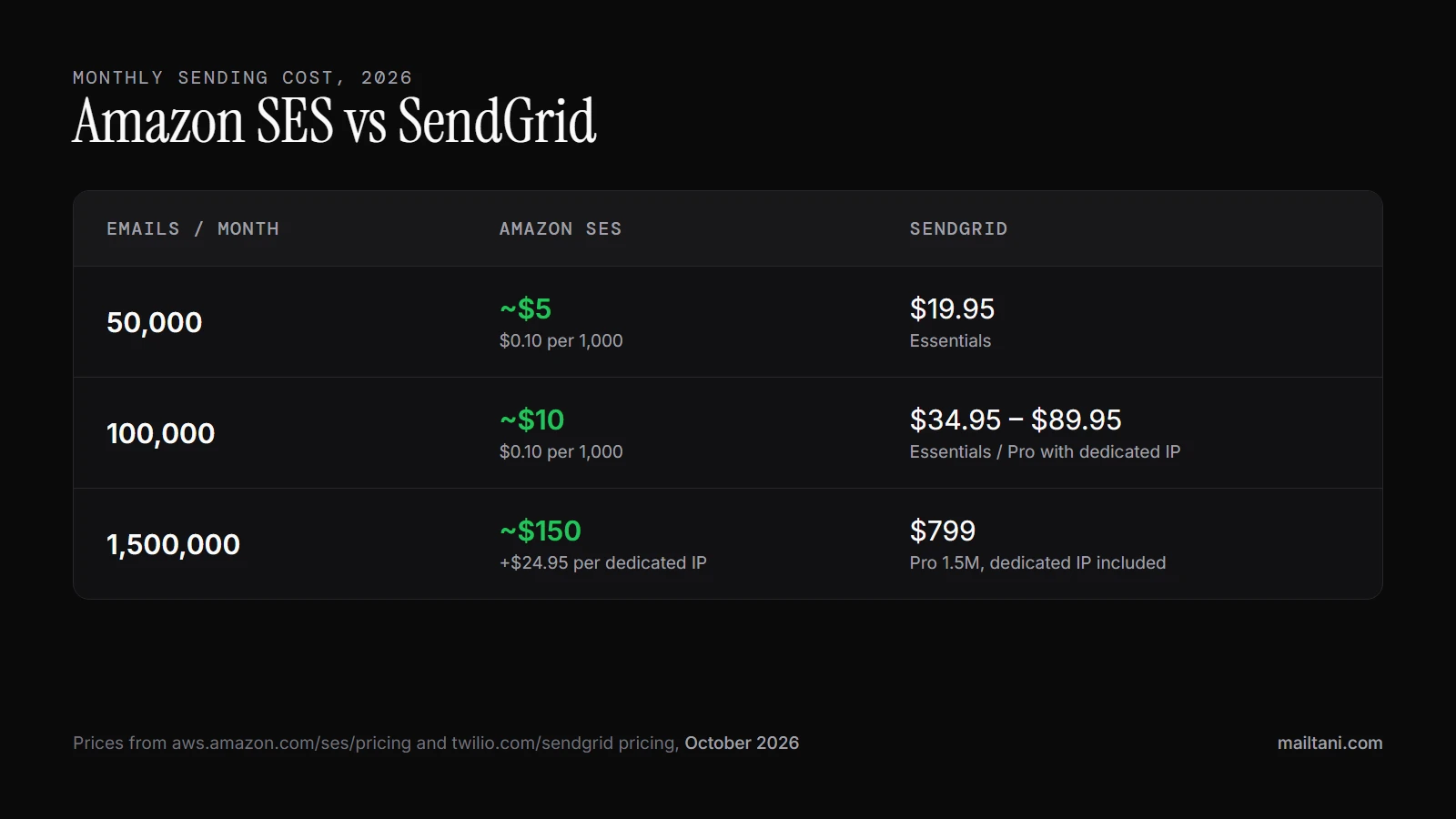
On cost, SES wins at every volume. At 50,000 emails a month SES is about $5 against $19.95 on SendGrid Essentials. At 100,000 it is about $10 against $34.95 (Essentials) or $89.95 (Pro, if you need a dedicated IP). At 1.5 million it is about $150, plus $24.95 per dedicated IP, against $799 on SendGrid Pro.
On setup, SendGrid wins. SES needs an AWS account, a verified domain with DKIM and SPF, a production access request to leave the sandbox (AWS replies within 24 hours, longer if it needs more information), and SNS topics for bounces and complaints. SendGrid takes minutes from signup to first email. Our SPF record generator covers the SES custom MAIL FROM setup.
Deliverability is comparable once both are set up properly. Both run large shared IP pools and offer dedicated IPs with automatic warm-up. What decides inbox placement is your authentication, list quality and complaint rate, not the vendor. Our email deliverability best practices cover the details.
Neither is a marketing tool. SES has no campaign editor at all, and SendGrid sells Marketing Campaigns as a separate product. Teams that need newsletters and onboarding sequences usually add a second tool on top. See our Amazon SES email marketing guide for how that works on SES.
Weighing more than these two? See our full list of email providers for 10 sending services side by side, from the cheapest (SES) to managed APIs like Resend and Postmark.
Amazon SES vs SendGrid Pricing (2026)
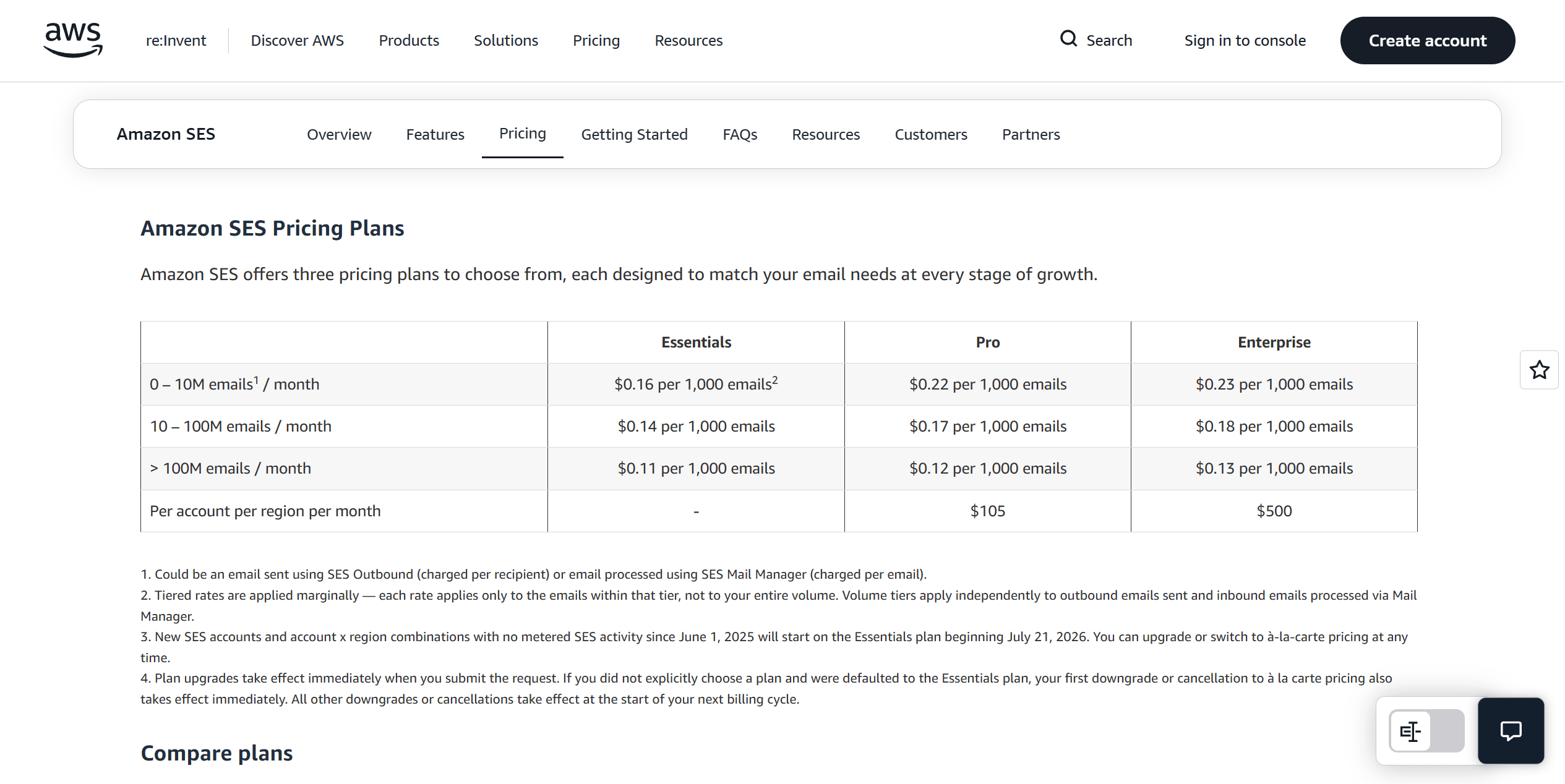
Amazon SES charges per email. On à-la-carte pricing, outbound email costs $0.10 per 1,000, with no monthly fee and no minimum. New AWS accounts get up to $200 in free-tier credits for 6 months. Optional extras: dedicated IPs at $24.95/month each, the Virtual Deliverability Manager dashboard at $0.07 per 1,000 emails, and attachments at $0.12 per GB.
Watch the new SES pricing plans. Since July 21, 2026, new SES accounts start on the Essentials plan at $0.16 per 1,000 emails. AWS also offers Pro ($0.22 per 1,000 plus $105 a month) and Enterprise ($0.23 plus $500), which bundle extras such as managed dedicated IPs and Virtual Deliverability Manager. You can switch to à-la-carte at any time, and if you were placed on Essentials by default the switch takes effect immediately. If you just need sending, à-la-carte is the cheapest option.
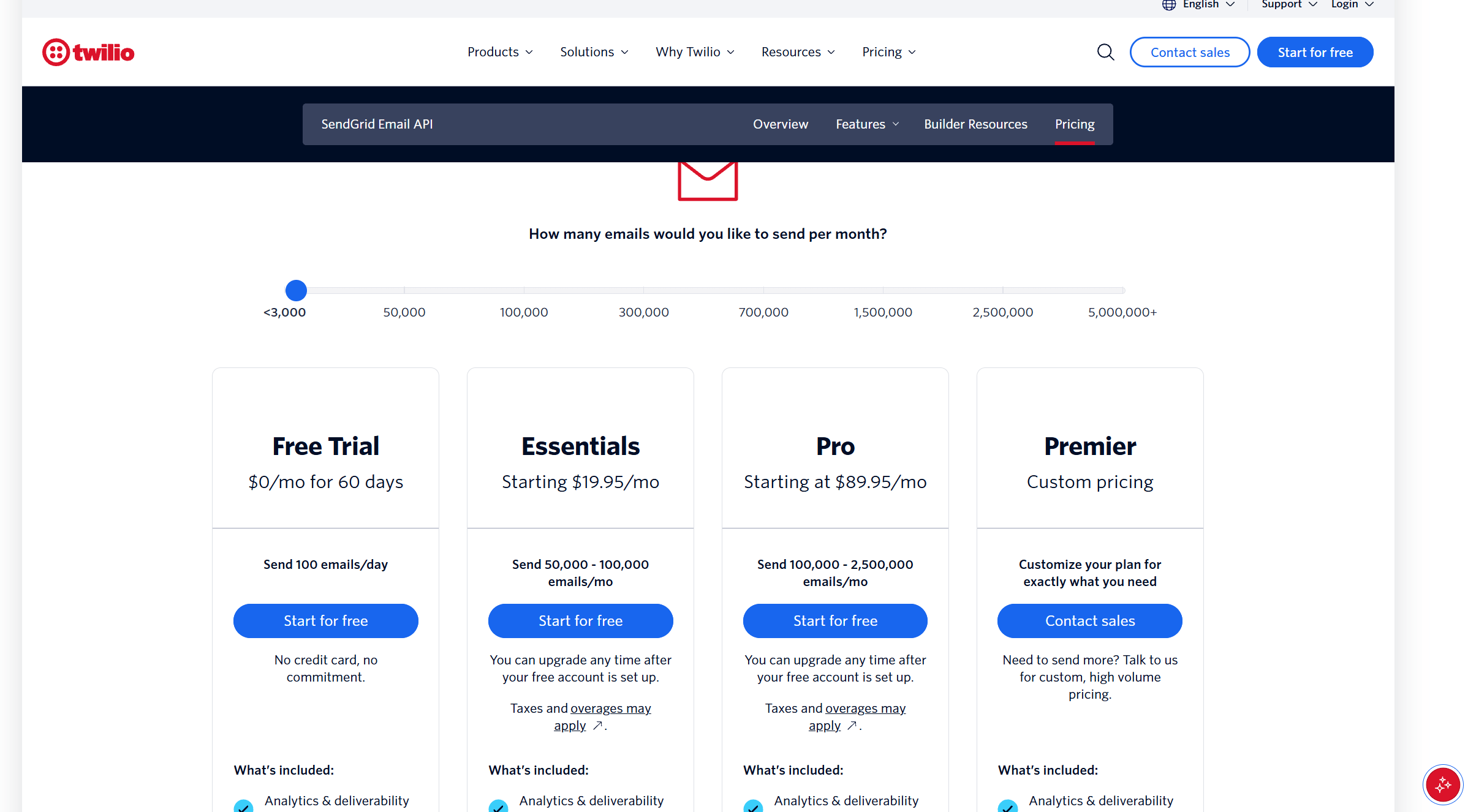
SendGrid charges a monthly plan. Essentials is $19.95 for 50,000 emails and $34.95 for 100,000, with no dedicated IP. Pro starts at $89.95 for 100,000 and runs to 2.5 million ($799 at 1.5 million), with one dedicated IP included. The free plan ended in March 2025; new accounts get a 60-day trial at 100 emails a day.
What a scaling SaaS pays. At 100,000 emails a month: SES about $10, SendGrid $34.95 to $89.95. At 1.5 million: SES about $150 plus $24.95 per dedicated IP, SendGrid $799. Over a year at 1.5 million that is roughly $2,100 on SES with one dedicated IP against $9,588 on SendGrid.
Amazon SES vs SendGrid Deliverability
Neither has a built-in deliverability edge. Both send from large shared IP pools by default and both offer dedicated IPs that warm up automatically (SES ramps a new IP over about 45 days). Inbox placement depends on SPF, DKIM and DMARC, list quality and complaint rates far more than on the vendor.
Monitoring is where they differ. SendGrid includes a dashboard, event webhooks and activity logs. SES gives you raw events through SNS or EventBridge, plus the optional Virtual Deliverability Manager ($0.07 per 1,000 emails) with dashboards, per-mailbox-provider stats and recommendations.
Europe and Asia-Pacific. SES lets you pick the AWS region you send from, including Frankfurt, Ireland, London, Paris, Milan, Stockholm and Zurich in Europe, and Sydney, Singapore, Tokyo and others in Asia-Pacific. There is no SES region in Hong Kong. SendGrid offers EU data residency on Pro and Premier through EU subusers and EU dedicated IPs. For EU recipients, both can keep data in the EU; SES does it on any plan.
Setting Up Amazon SES vs SendGrid
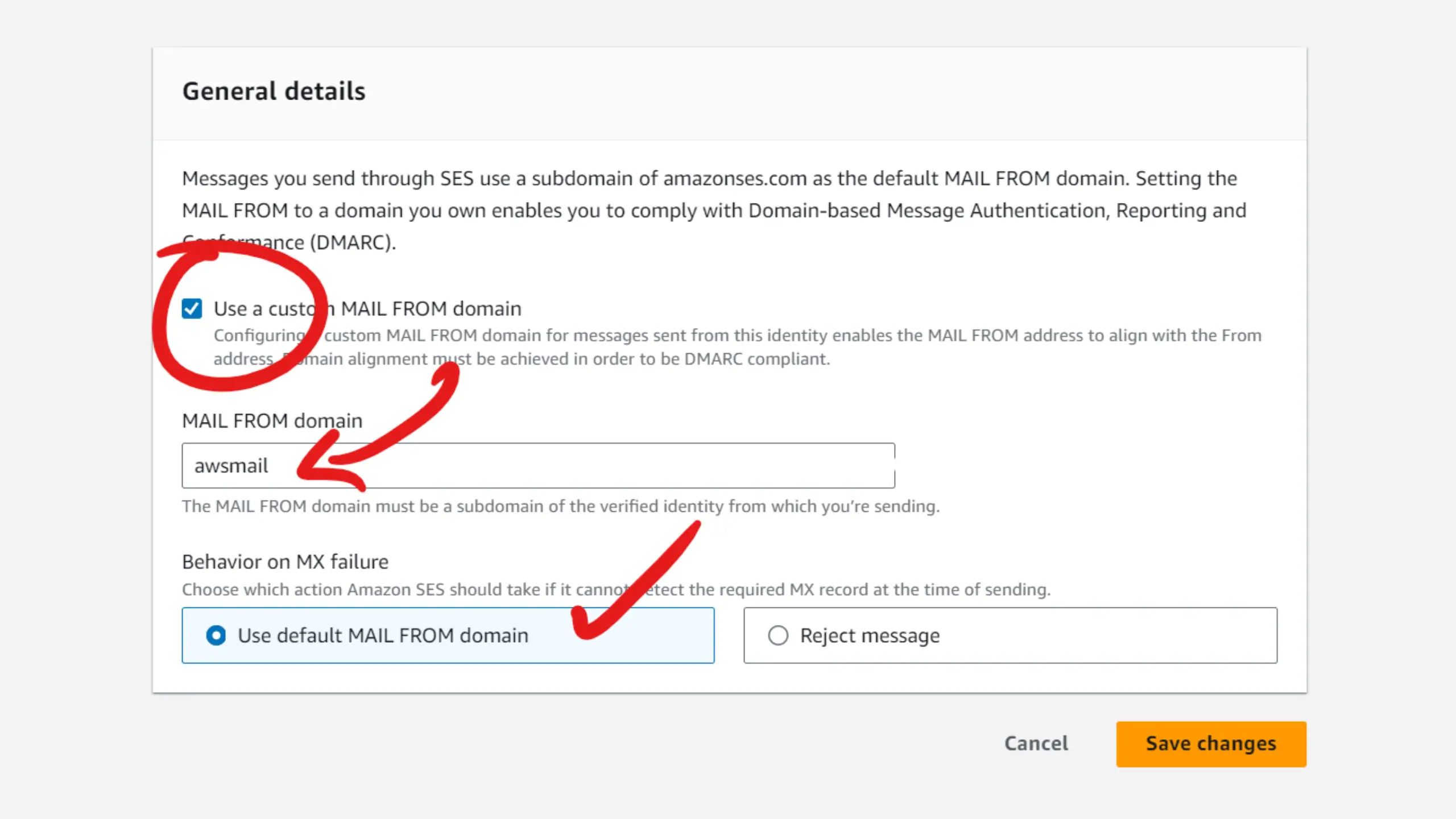
SES setup, step by step: create an AWS account, verify your sending domain (DKIM records), set a custom MAIL FROM domain so SPF aligns, request production access to leave the sandbox, then create SNS topics or a configuration set so bounces and complaints reach your app. AWS answers production access requests within 24 hours, sometimes asking for details about your sending.
SendGrid setup: sign up, authenticate your domain with the DNS records it gives you, create an API key and send. There is no sandbox review, but the 60-day trial is capped at 100 emails a day until you pick a plan.
Using Amazon SES Without Building Everything Yourself
The usual reason teams pick SendGrid over SES is the tooling, not the sending. mailtani connects to your SES account and adds what SES leaves out: broadcasts, sequences, flows, contact lists and a REST API for transactional email. When you connect SES, it creates the SNS topic and configuration set and handles bounces and complaints for you.
What it costs: €89 once, plus your SES usage at $0.10 per 1,000 emails. What it doesn't do: there is no SMTP relay for other apps and no deliverability dashboard like SES VDM or SendGrid's. See mailtani as a SendGrid alternative for the full comparison.
How AWS SES, SendGrid, and mailtani Compare, Feature by Feature
| Feature | AWS SES | SendGrid | mailtani |
|---|---|---|---|
| Lowest cost per email | Uses your SES | ||
| No monthly base fee | ✓ one-time price | ||
| Free option | $200 credits (6 months) | 60-day trial | 100 free emails, no card |
| Dedicated IPs | ✓ $24.95/month | ✓ included on Pro | ✓ via your SES account |
| Automatic dedicated IP warm-up | ✓ via SES | ||
| Deliverability dashboard | ✓ VDM add-on | ||
| Bounce and complaint handling | ✓ set up yourself (SNS) | ✓ set up for you on SES | |
| Event webhooks | ✓ via SNS / EventBridge | ||
| Choose sending region | ✓ US or EU | ✓ your SES region | |
| Setup in minutes | |||
| Sandbox review before sending | ✓ SES still applies | ||
| Subusers / multi-tenant | ✓ tenants | ✓ Pro+ | |
| REST API for sending | |||
| SMTP relay | |||
| Campaign editor and broadcasts | ✓ Marketing Campaigns | ||
| Sequences and automation flows | ✓ Marketing Campaigns |
The Third Option: Why Founders Pick mailtani
- SES pricing without building the tooling: connect your Amazon SES account and get campaigns, sequences and flows on top, at $0.10 per 1,000 emails
- SES bounce and complaint handling set up for you: mailtani creates the SNS topic and configuration set and suppresses bounced or complaining contacts automatically
- One price: €89 once instead of SendGrid Pro at $89.95 every month
- Your account, your reputation: the SES account, domain and dedicated IPs stay yours if you ever leave
What Each Tool Is Built For
AWS SES
AWS SES is built for teams that want the lowest cost and full control, and can handle setup.
SES suits engineering teams that already use AWS or don't mind configuring it. You verify domains, request production access out of the sandbox, wire bounce and complaint notifications through SNS, and choose whether to pay for dedicated IPs or the Virtual Deliverability Manager dashboard. In return, sending costs $0.10 per 1,000 emails at any volume, and you can send from the AWS region closest to your users or your data rules.
SendGrid
SendGrid is built for teams that want sending to be managed and fast to set up.
SendGrid suits teams that want to send their first email in minutes, with a dashboard, event webhooks and activity logs included. Pro adds a dedicated IP, subusers, SSO and EU data residency. The trade-off is price: SendGrid costs 3 to 5 times more than SES at most volumes, and there is no permanent free plan since March 2025.
AWS SES vs SendGrid: Who Should Choose Which?
Choose AWS SES if...
- You want the lowest sending cost at any volume
- Your team is comfortable with AWS (domains, IAM, SNS)
- You need to send from a specific region, such as the EU, on any plan
- You want dedicated IPs without moving to a $89.95+ plan
- You plan to run campaigns on SES through a tool like mailtani
Choose SendGrid if...
- You want to send your first email in minutes
- You want a deliverability dashboard and activity logs included
- You need subusers, SSO or EU data residency on a managed platform
- Nobody on the team wants to manage AWS
- You prefer one vendor for transactional email and basic marketing
AWS SES vs SendGrid: Pros & Cons
AWS SES
Pros
- Cheapest at every volume: $0.10 per 1,000 emails, no base fee
- Dedicated IPs for $24.95/month with automatic warm-up
- Pick your region: several in Europe and Asia-Pacific, on any plan
- Scales without plan changes: the price per email stays the same
- Fits AWS stacks: SNS, EventBridge, Lambda, CloudWatch
Cons
- Sandbox first: production access needs an AWS review
- More setup: domain verification, MAIL FROM, SNS for bounces and complaints
- Dashboard costs extra: Virtual Deliverability Manager is $0.07 per 1,000
- No marketing tools: no editor, lists or sequences
- No free plan for long: $200 in credits for 6 months, new accounts only
SendGrid
Pros
- Minutes to first email with a guided setup
- Dashboard, webhooks and activity logs included
- Dedicated IP included on Pro, plus subusers and SSO
- EU data residency on Pro and Premier
- Marketing Campaigns available as a separate product
Cons
- 3 to 5 times the price of SES at most volumes; $799 vs about $150 at 1.5M
- No permanent free plan since March 2025
- Essentials is bare: no dedicated IP, 3 days of activity history
- Big jump to Pro: $34.95 to $89.95 at 100,000 for a dedicated IP
- Marketing is billed separately from the Email API
Neither AWS SES nor SendGrid right for you?
SES is the cheapest way to send; SendGrid is the easiest. mailtani gives you SES pricing with the tooling on top: campaigns, sequences, flows and a transactional API, with SES bounce and complaint handling set up for you. €89 once, plus $0.10 per 1,000 emails paid to AWS.
100 free emails, no card needed
- 10,000+emails sent
- €89one-time, no subscription
- 35+founders joined
Before You Decide: Common Questions Answered
More Comparisons
What mailtani Brings to the Table
Who Uses These Tools
Start free
Bring your own SMTP key. Unlimited contacts, sequences, warmup, and inbox rotation for €89 once.
- 10,000+emails sent
- €89one-time, no subscription
- 35+founders joined