
10 Email Deliverability Best Practices for 2026
Master email deliverability best practices for 2026. Our top 10 tips cover authentication, IP warmup, list hygiene, and more to land in the inbox.

On this page
Over 15% of legitimate marketing emails still miss the inbox. The global average deliverability rate across tested ESPs sits at 83.1%, which means 16.9% of emails never make it where they're supposed to go, with 10.5% landing in spam and 6.4% going undelivered entirely, according to EmailToolTester's deliverability benchmark summary. That isn't a copy problem alone. It's usually an infrastructure problem, a reputation problem, or a list quality problem.
When teams talk about email deliverability best practices, they often reduce it to “write better subject lines” or “clean your list.” Those matter, but they're not enough. Gmail, Outlook, Yahoo, and other mailbox providers look at authentication, complaint rates, bounce behavior, sending consistency, domain history, and whether recipients engage with what you send. If any of those pieces are weak, good campaigns still end up buried.
The part many brands miss is ownership. If you rely entirely on a large ESP's shared environment, you inherit its strengths and its risks. If another sender on that pool behaves badly, your inbox placement can suffer even when your own campaigns are clean. That's why technical control matters more in 2026 than it did a few years ago. Mailtani's email deliverability feature is built around giving teams direct control over the variables that affect placement.
The fixes are practical. Authenticate properly. Warm up domains and IPs with discipline. Segment hard. Watch complaints daily. Make unsubscribing easy. Keep your sending setup portable so one provider decision doesn't wreck your program.
1. Dedicated IP vs Shared IP Strategy
Shared IPs are convenient. They're also where a lot of deliverability trouble starts.
Across major ESPs, shared IP pools can create inbox placement gaps of up to 20 points because your reputation gets mixed with other senders on that pool, according to Landbase's roundup of deliverability benchmarks. If one sender starts blasting poor-quality mail, everyone nearby can feel it. That's the trade-off many organizations accept without realizing it.
When shared IPs hurt
E-commerce brands usually feel this first. A store can have a clean opt-in list and solid creative, then see promotions drift toward spam during a sale because volume spikes on a shared environment raise suspicion. The same thing happens to SaaS teams when product updates and lifecycle campaigns run through the same crowded pool.
Practical rule: If email drives revenue every week, don't leave sender reputation entirely in someone else's hands.
Dedicated IPs don't fix bad sending. They expose it. That's exactly why they work for mature teams. You control pacing, quality, and reputation instead of inheriting another sender's mistakes.
Who should lean toward dedicated infrastructure
A DTC brand sending regular campaigns, flows, and receipts usually benefits from splitting traffic by purpose. Marketing can use one path, transactional another. SaaS companies sending password resets and onboarding emails should isolate those sends from promotional mail so support-critical messages don't get dragged down.
For cold outreach, the logic is similar. Don't pour all volume through one address or one fresh route. Spread risk across warmed sending identities and keep each stream predictable.
A few habits matter more than the provider brand:
- Keep volume stable: Mailbox providers trust patterns more than spikes.
- Separate use cases: Transactional, lifecycle, and promotional traffic shouldn't always share the same reputation.
- Own the controls: Dedicated infrastructure gives you room to tune warmup, complaint handling, and suppression logic.
A key best practice is simple. Use shared infrastructure when you're small and careful. Move toward dedicated control once email becomes operationally important.
2. DKIM, SPF, and DMARC Authentication Setup
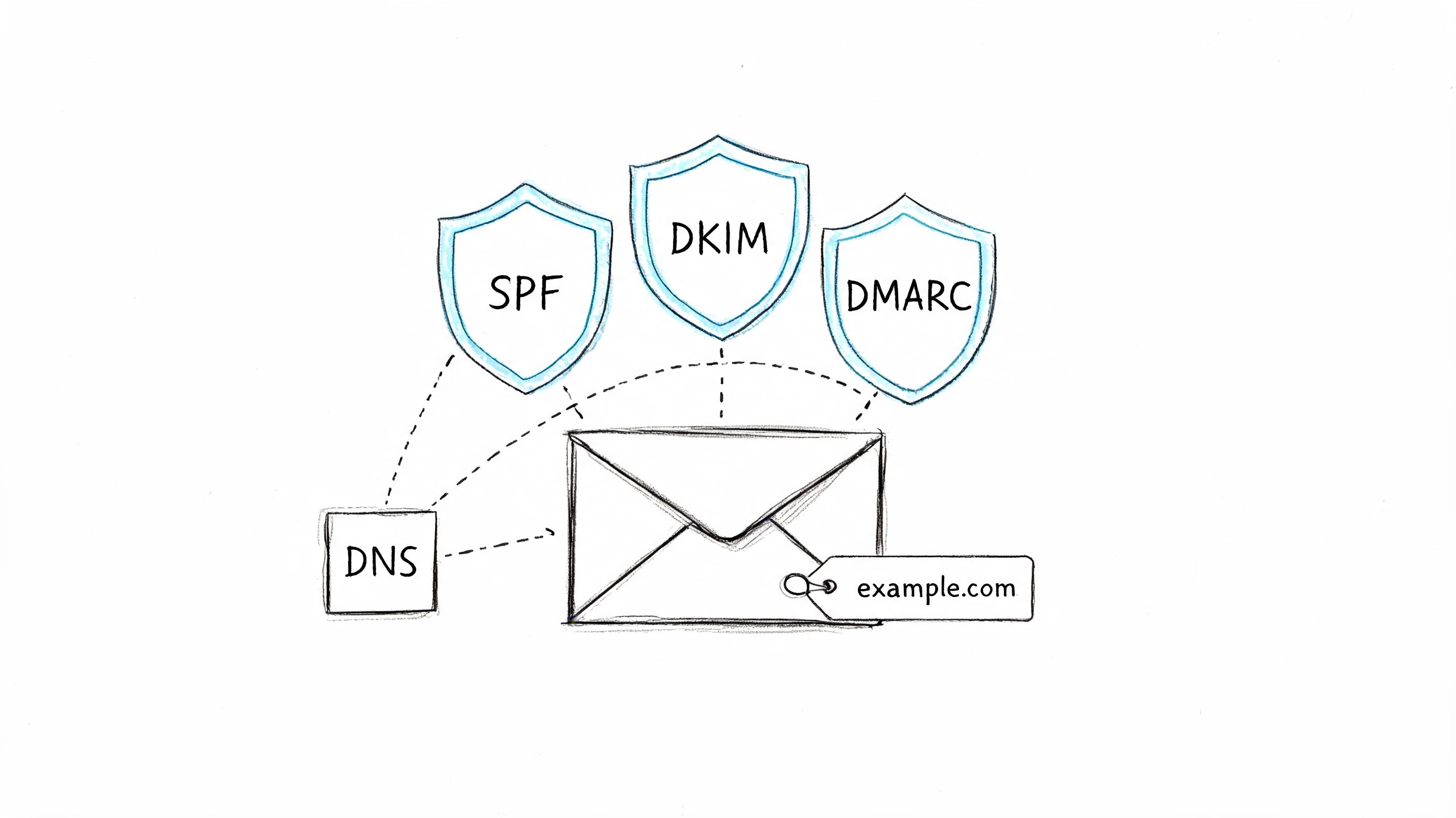
Authentication is the floor. If SPF, DKIM, and DMARC aren't configured correctly, nothing else in your deliverability stack is stable.
Mailbox providers treat these records as basic proof that your domain authorizes the mail being sent. The verified benchmark data is blunt on this point. SPF, DKIM, and DMARC are essential for placement, especially with mailbox providers that enforce modern sender standards aggressively.
Get alignment right, not just records
A lot of teams publish records and assume they're done. They're not. SPF has to include the systems that send your mail. DKIM has to sign consistently. DMARC has to align with the visible From domain.
That matters when you use Amazon SES, Resend, Mailtrap, or any mixed setup with multiple tools. If your app sends receipts through one provider and your marketing platform sends newsletters through another, both paths need to align. A developer can't assume transactional mail is safe just because the API accepted it. A marketer can't assume a verified domain in one tool covers every other sender.
If you need help generating signing records cleanly, use a DKIM record generator built for sending domains instead of hand-editing DNS under pressure. You can build the SPF record with the same approach using the SPF record generator, and create a policy with the DMARC record generator.
Roll out DMARC in stages
DMARC is where teams often get reckless. Going straight to a strict policy before checking reports can block legitimate mail.
Use a staged rollout:
- Start with monitoring: Publish a policy that lets you inspect failures before enforcement.
- Move to quarantine carefully: Once sending sources are aligned, quarantine catches obvious failures without fully rejecting everything.
- Advance to reject when confident: Only do this when you know every legitimate stream passes.
Developers should also split domains by use case. Put marketing on a subdomain. Put transactional on another. That isolates reputation and makes troubleshooting far easier when one stream has trouble.
A short explainer helps if your team needs to align on the basics before touching DNS again.
Authentication doesn't improve weak campaigns. It does stop mailbox providers from treating you like an impostor.
3. Email List Hygiene and Validation
List hygiene is where many deliverability problems become preventable instead of expensive.
The benchmark guidance says bounce rates should stay under 5%, with under 2% as the ideal range for strong programs. That matters because invalid addresses don't just fail. They tell mailbox providers you're not controlling your inputs.
Remove risk before you send
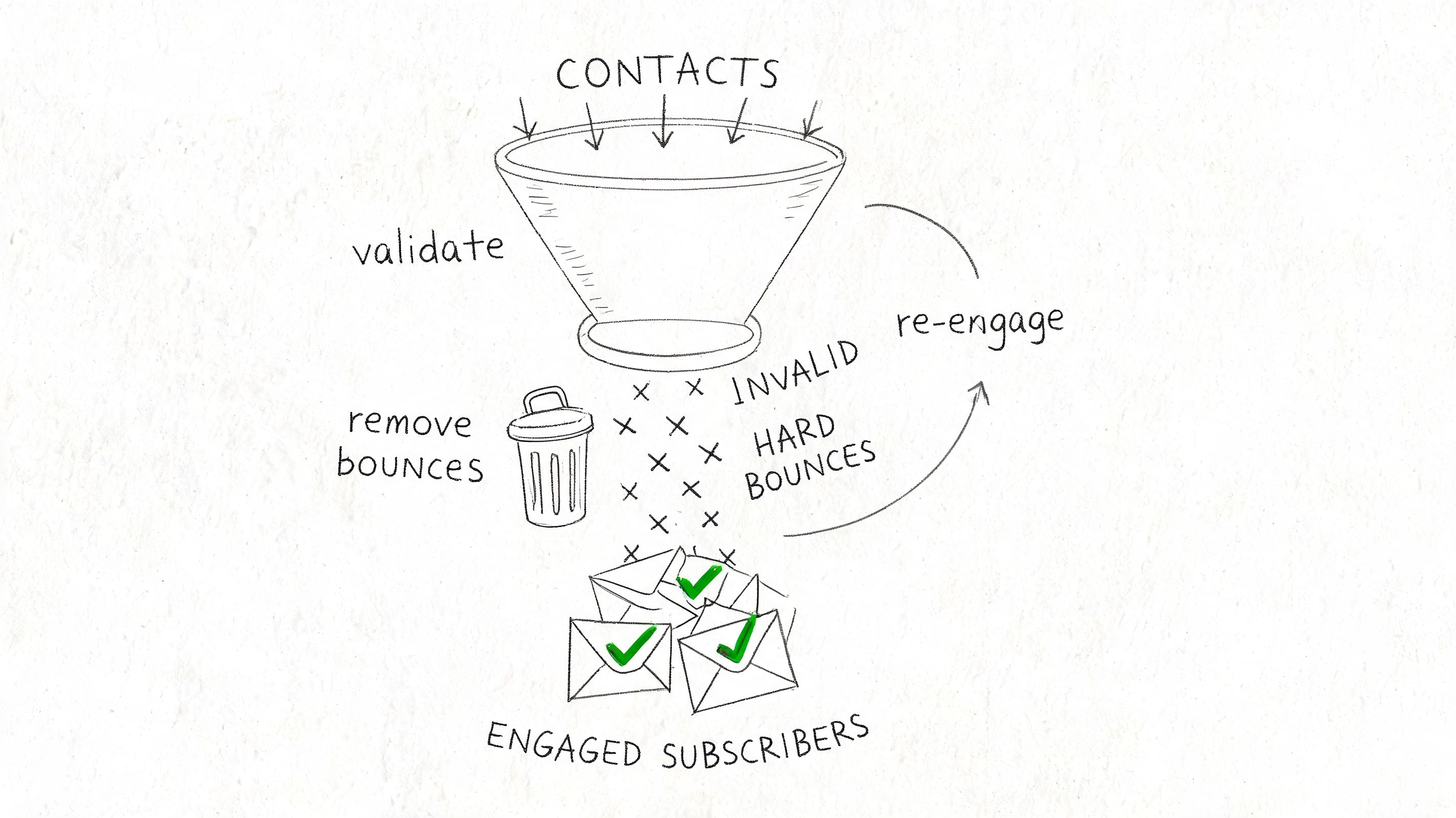
Every list picks up damage over time. Typos at signup. Old corporate emails. Role accounts. Imported contacts from a sales spreadsheet. The fix isn't glamorous. Validate before entry, suppress after hard bounces, and stop treating every contact as equally safe.
A practical e-commerce example: if a store imports leads from a giveaway and sends immediately, it often sees weak engagement and high bounces. A better approach is validating first, suppressing obvious junk, and sending only to confirmed subscribers. The same applies to SaaS waitlists and webinar registrations.
This image captures the process well.
If you want a fast cleanup path before a campaign or migration, run the data through a free email list cleaner for validation and suppression prep.
Suppress inactivity before it becomes reputation damage
Inactive users are quieter than bad addresses, but they still hurt you. If people haven't opened, clicked, or replied in a long time, continued sending drags down engagement signals. Mailbox providers read that as irrelevance.
Send re-engagement campaigns before removal, but don't keep dead weight forever.
For SaaS, create a separate track for dormant trial users instead of dropping them into every newsletter. For e-commerce, suppress buyers who stopped engaging with promos and reintroduce them through post-purchase or back-in-stock flows if behavior changes. For outbound teams, never upload raw lead files without validation and domain-level sense checks.
Clean lists don't just reduce bounces. They protect future sends from getting judged by the worst addresses in your database.
4. IP Warmup and Reputation Building
A fresh IP or domain has no trust history. Mailbox providers don't reward that. They inspect it.
Twilio's deliverability guidance describes warmup as a gradual volume ramp that can start around 50 to 100 emails per day per IP and scale by roughly 20% to 50% daily while monitoring bounce performance, with hygiene staying below the ideal bounce threshold during the process, in Twilio SendGrid's deliverability best practices article. The important part isn't the exact ladder. It's the discipline.
Warmup is controlled trust-building
Warmup fails when teams treat it like a timer instead of a feedback loop. They send too much too soon, mix engaged and unengaged audiences, then assume the IP is “bad” when spam placement shows up.
Start with recipients most likely to engage. That usually means recent customers, active users, or highly responsive segments. If you're a SaaS company launching a new transactional stream through Resend or SES, send password resets, onboarding confirmations, and other expected messages before broadening volume. If you're an e-commerce brand moving to dedicated infrastructure, feed your most active purchasers first.
What disciplined warmup looks like
A good warmup pattern usually follows a few rules:
- Use your best audience first: Engagement creates the earliest trust signals.
- Increase gradually: Sudden jumps look unnatural, even when the list is clean.
- Hold steady if quality slips: If complaints or bounces rise, stop scaling and diagnose.
- Keep timing predictable: Consistent windows help avoid looking erratic.
If you're planning a domain transition, follow a domain warmup process built around deliverability monitoring instead of improvising inside a live revenue campaign.
New infrastructure should earn volume. Don't assign it volume because your calendar says it's time.
Warmup is one of the clearest examples of what works versus what doesn't. Slow and engaged works. Fast and broad doesn't.
5. Segmentation and Behavioral Targeting
Better targeting isn't just a conversion tactic. It's a deliverability tactic.
Mailbox providers watch engagement closely. The verified benchmark data notes that high open, click, and reply behavior signals value, while poor engagement drags reputation down. That's why broad “everyone gets everything” sends eventually cost you inbox placement.
Relevance protects reputation
An online store selling both apparel and electronics shouldn't blast the same promotion to both groups. A SaaS company shouldn't send feature adoption prompts to churned trial users the same way it emails active paying customers. When the message doesn't fit the recipient, fewer people engage, more ignore you, and complaint risk goes up.
Segmentation fixes that by tightening relevance. It also gives you safer warmup audiences, cleaner testing groups, and better visibility into what's causing deliverability swings.
Segments that work in practice
The strongest starting point is behavior. Build core groups around recency and intent, then add business logic.
- Engaged subscribers: Recent openers, clickers, purchasers, or active users should receive your most important sends first.
- At-risk subscribers: People who have gone quiet need lower frequency and sharper relevance.
- Never-engaged or stale contacts: Treat these as a risk pool, not a growth pool.
- Transactional-only audiences: Keep them separate so operational mail keeps its own reputation profile.
Cold outreach teams should segment by role, company fit, and prior interaction. A founder email to a technical buyer shouldn't look like the message sent to a commerce manager. Relevance affects replies, and replies are one of the strongest qualitative trust signals you can generate.
I've seen teams assume segmentation is optional because they're “too small.” That's backwards. Small programs can segment faster, learn faster, and avoid reputation damage before scale makes cleanup painful.
6. Sending Frequency and Schedule Optimization
Frequency problems rarely look like frequency problems at first. They show up as lower opens, higher unsubscribes, and gradually weaker placement.
The issue isn't sending often. The issue is sending more often than your audience wants, or changing cadence in ways that look unstable.
Consistency beats bursts
Mailbox providers like predictable senders. Recipients do too. If you send one newsletter a week for months and suddenly switch to daily promotional blasts, the negative signals show up quickly. That's especially common in e-commerce around launches and holiday pushes.
A publisher with an engaged daily digest can maintain strong trust because subscribers expect it. A DTC brand that only becomes “daily” when sales are soft often trains people to ignore, unsubscribe, or complain. The same principle applies to SaaS lifecycle email. Product announcements, onboarding nudges, and webinars should follow expected rhythms tied to user behavior, not marketing panic.
Set frequency by audience type
There isn't one perfect cadence. There is only a sensible cadence for each segment.
Try rules like these:
- Active buyers or users: They can usually tolerate more frequent messages if content stays relevant.
- Inactive segments: Reduce pressure. More volume to a cold segment usually makes performance worse.
- New subscribers: Start with a clear welcome series so expectation forms early.
- Cold outreach lists: Space sequences naturally and leave room for replies instead of firing repeated nudges too close together.
Offer preference choices when possible. Some subscribers want product news but not every promotion. Others want receipts and account alerts only. If you force all-or-nothing, many people choose spam complaints over managing your settings.
Good scheduling looks boring from the outside. That's usually a sign it's built correctly.
7. Monitoring Bounce Rates and Spam Complaints
If you only watch opens and clicks, you'll miss the signals that get a sender blocked.
The verified data gives two thresholds worth treating as hard rules. Keep spam complaint rates under 0.1%, and understand that complaint rates above 0.3% can trigger serious placement problems. Those numbers are where mailbox providers start deciding your mail is unwanted.
Watch the two metrics that get you blocked fastest
Bounces tell you whether your list is healthy. Complaints tell you whether your audience thinks your mail belongs in the inbox. Together, they shape reputation far more directly than creative teams usually admit.
For example, if a SaaS company imports event leads into a nurture sequence and complaints jump, the problem may not be the copy. It may be weak consent. If an e-commerce brand sees a bounce spike after a CSV upload, the issue may be malformed data or stale records, not the ESP.
Build response rules before you need them
Don't wait for a monthly review. Build operational rules into your platform and workflows.
- Remove hard bounces immediately: There's no value in retrying addresses that are clearly invalid. Run suspicious domains through the email blacklist checker to confirm they aren't already flagged.
- Track complaints by campaign and segment: One audience may be causing most of the damage.
- Pause suspect sends fast: If a segment starts causing trouble, stop and inspect before the next blast.
- Review by mailbox provider: Gmail, Outlook, and Yahoo may react differently to the same campaign.
The fastest way to lose inbox placement is to keep sending while your complaint data is already telling you to stop.
Cold email teams should monitor by sending address and target domain. Marketing teams should monitor by campaign type. Developers should monitor transactional failures separately from promotional performance so support-critical sends don't get hidden in aggregate dashboards.
Metrics don't matter because they're interesting. They matter because they tell you when to stop making the problem worse.
8. Content Quality and Spam Trigger Avoidance
Bad content won't always get you blocked immediately. It will make every other deliverability problem harder to recover from.
The benchmark notes that spammy language and poor engagement can tank reputation, and newer deliverability guidance also emphasizes one-click unsubscribe and engagement-based filtering as core expectations for modern senders. In plain terms, mailbox providers don't just inspect who sent the mail. They inspect whether the mail looks wanted.
Content can lower trust fast
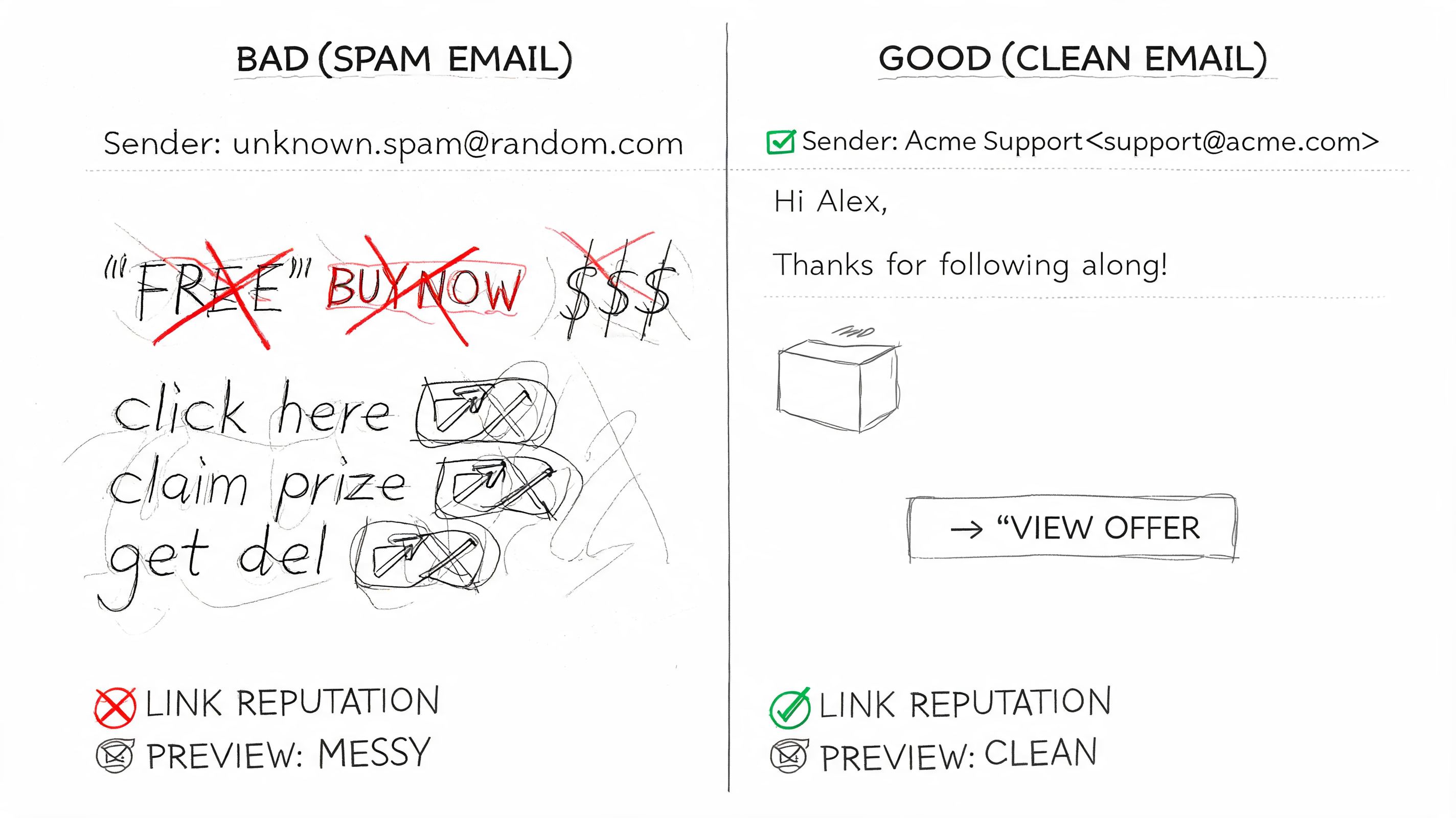
Promotional excess is the usual culprit. All caps. Too many exclamation points. Link-heavy templates. Vague subject lines. Thin copy wrapped around a giant image. These patterns still show up because teams optimize for clicks before they optimize for trust.
An e-commerce campaign with a clear offer, recognizable sender name, visible unsubscribe, and clean text structure usually performs better long term than an aggressive “BUY NOW” blast. A newsletter with a few purposeful links will often age better than one stuffed with tracking clutter. Cold outreach suffers most when every message looks templated, generic, and obviously automated.
Write like a sender who expects scrutiny
A few content habits hold up well across almost every use case:
- Use clear sender identity: People should know who emailed them before they open.
- Keep link count disciplined: Every extra link creates more filter and trust surface area.
- Balance HTML with readable plain text: Fancy templates don't rescue weak structure.
- Match subject and body accurately: Misleading opens create negative engagement later.
For outbound and sales sequences, personalization matters more than cleverness. The verified data includes a projection from a Braze-linked source that reply-focused personalization can improve deliverability, while low-reply broadcast patterns hurt it. That fits what practitioners see in the field. Human-looking messages with a reason to respond age better than synthetic blasts.
Good content doesn't overpower bad infrastructure. It does keep you from sabotaging good infrastructure.
9. Unsubscribe and Preference Management
If people can't leave easily, some of them will report you as spam. That's the simplest unsubscribe lesson.
Modern sender requirements have made this stricter. Verified data notes post-2025 updates that require one-click unsubscribe and keeping complaint rates below the red-line threshold. Even if you're not sending at massive scale, following that standard is smart.
Make leaving easier than complaining
One-click unsubscribe should not feel like surrender. It's a reputation defense.
When someone is done hearing from you, your job is to let them exit cleanly. Don't hide the link in a tiny footer. Don't force a login. Don't ask them to explain themselves before you honor the request. Those patterns protect list size on paper while hurting inbox placement in practice.
For marketers, the trade-off is emotional, not technical. It feels bad to make opting out frictionless. It performs better over time because fewer annoyed recipients escalate to spam complaints.
Preference centers save good subscribers
A good preference center keeps some people who don't want a full unsubscribe. That matters for brands with multiple send types.
A retail brand can offer weekly instead of daily promos. A SaaS company can let users keep billing alerts and product notices while dropping marketing mail. A newsletter can let readers choose topics instead of everything or nothing.
Useful preference options include:
- Frequency control: Daily, weekly, or only major updates.
- Topic control: Product news, educational content, offers, or account alerts.
- Channel control: Promotional versus operational communication.
- Immediate processing: Changes should take effect fast enough that users feel respected.
A visible unsubscribe path tells mailbox providers you're acting like a legitimate sender. It also tells recipients you trust them to choose. That lowers friction, lowers complaints, and usually leaves you with a healthier list.
10. Provider Migration and Data Portability
Deliverability gets better when you can move.
That sounds backward until you've been stuck on a platform with poor support, shared IP issues, opaque suppression logic, or pricing that forces bad sending decisions. Teams with no exit path tolerate weak infrastructure longer than they should.
Deliverability improves when you can leave
Provider lock-in creates technical laziness. If templates, automations, suppression lists, and sending domain setup are trapped inside one platform, migration becomes painful. So teams avoid it, even when the provider is no longer a fit.
That's especially risky for e-commerce brands and SaaS products where email is operational. If your ESP changes policy, throttles you, or limits your setup, you need the option to move without rebuilding from scratch. Developers already understand this with application infrastructure. Email deserves the same treatment.
A practical example: a startup may begin on one provider because setup is easy, then later need Amazon SES for cost control or Resend for a workflow fit. That transition is manageable if the domain records, templates, event logic, and suppression data are portable.
What to keep portable at all times
Treat these assets as yours, not your platform's:
- Subscriber and suppression data: Export regularly and keep clean copies.
- Templates in HTML: Don't rely only on proprietary builders.
- Authentication records and documentation: SPF, DKIM, and DMARC should be mapped clearly.
- Automation logic: Document triggers, delays, and conditions outside the vendor UI.
- Reply and event history: Keep what you need for support, compliance, and troubleshooting.
Owning your sending infrastructure doesn't mean self-hosting everything. It means your business can change providers without losing control of reputation, data, or operating logic. That flexibility is one of the most underrated email deliverability best practices because it prevents the worst kind of failure: being trapped inside a setup you no longer trust.
10-Point Email Deliverability Comparison
| Item | Implementation complexity | Resource requirements | Expected outcomes | Ideal use cases | Key advantages |
|---|---|---|---|---|---|
| Dedicated IP vs Shared IP Strategy | Medium, requires IP provisioning and warmup | Higher, dedicated IP costs and steady send volume | Stronger long-term deliverability and isolated reputation | High-volume senders (e.g., 50k+/mo), transactional-heavy systems | Full control of sender reputation; isolation from other senders' abuse |
| DKIM, SPF, and DMARC Authentication Setup | Medium, DNS changes and key management | Low, DNS access and monitoring tools | Authentication verified, reduced spoofing, improved inbox placement | All senders; mandatory for Gmail/Yahoo compliance | Prevents spoofing and improves trust with mailbox providers |
| Email List Hygiene and Validation | Low–Medium, integrate validation and cleanup processes | Moderate, validation service fees and ongoing maintenance | Lower bounce rates, better engagement, reduced sending costs | Any sender using old, purchased, or large lists | Protects IP reputation and increases campaign ROI |
| IP Warmup and Reputation Building | Medium, staged volume ramp and monitoring | Low–Moderate, time and engaged contact segments | Established positive IP reputation; fewer spam placements | New IPs, migrations, or scaling send volumes | Safe scaling of sends; reduces chance of immediate blacklisting |
| Segmentation and Behavioral Targeting | Medium, requires data strategy and workflows | Moderate, analytics, CRM integration, and maintenance | Higher open/click rates and improved sender reputation | E‑commerce, SaaS, personalized campaigns | Increased relevance → higher engagement and lower complaints |
| Sending Frequency and Schedule Optimization | Low–Medium, testing and automation setup | Low, analytics and A/B testing tools | Optimized engagement with fewer unsubscribes/complaints | Newsletters, promo calendars, lifecycle campaigns | Balances engagement and fatigue to protect reputation |
| Monitoring Bounce Rates and Spam Complaints | Low, analytics and alerting setup | Low, dashboards and defined response processes | Fast detection and mitigation of reputation issues | All senders, essential for high-volume operations | Early warning system to prevent blacklisting |
| Content Quality and Spam Trigger Avoidance | Low, content review and pre-send checks | Low, testing tools and editorial time | Fewer spam-folder placements and better engagement | Promotional and cold outreach campaigns, newsletters | Reduces filter triggers; improves deliverability and user trust |
| Unsubscribe and Preference Management | Low–Medium, preference center and headers | Low, UI work and automation rules | Lower complaint rates and legal compliance | Large subscriber bases and regulated markets | Reduces complaints, retains users via preference choices |
| Provider Migration and Data Portability | Medium, export/import, DNS and migration planning | Moderate, migration testing and possible IP rewarm | Reduced vendor lock-in and operational resilience | Organizations needing cost control or failover options | Flexibility to switch providers without losing data or history |
Own Your Deliverability, Own Your Growth
Email deliverability is not a design tweak or a campaign-level optimization. It's an operating discipline. Teams that treat it like a side metric usually discover the problem late, after launch performance drops, transactional mail gets delayed, or a profitable segment stops seeing promotions.
The technical basics matter because mailbox providers reward proof, not intent. Authentication tells them your domain is legitimate. Warmup shows your infrastructure can handle volume without acting erratically. List hygiene proves you control who you email. Complaint and bounce monitoring proves you respond when something goes wrong. Segmentation and frequency management prove recipients want what you send.
The strategic layer matters just as much. If you send everything through one reputation bucket, one mistake can contaminate every stream. If you stay on shared infrastructure forever, you accept risks you don't control. If your templates, data, and automations are locked inside one provider, you lose advantage and flexibility right when you need them most. That's why owning more of your sending setup often improves deliverability before it improves cost.
There are real trade-offs. Dedicated infrastructure requires warmup discipline. Stricter suppression can shrink your list. Easier unsubscribe flows can lower vanity retention metrics. Segmentation takes more setup than blasting everyone. Portable infrastructure asks your team to document things properly. These are good trade-offs. They reduce false confidence and replace it with a healthier program.
The payoff is reliability. Transactional emails keep arriving when customers need them. Product announcements go to active users instead of dead addresses. Promotional sends reach people who still care. Support teams deal with fewer “I never got the email” tickets. Growth teams can test faster because they aren't constantly repairing reputation damage from old mistakes.
This is the fundamental shift behind modern email deliverability best practices. You stop renting reputation and start managing it. You stop hoping the platform protects you and start building a sending environment you understand.
For teams that want that level of control, using a platform that supports your own provider setup can help. Mailtani is one option built around that model, with support for provider connections like Amazon SES, Resend, and Mailtrap while keeping data portable. That approach fits the broader deliverability principle behind this entire guide: control what you can control, document what matters, and never let convenience dictate your sender reputation.
The inbox is still one of the most impactful channels most businesses have. But only if your mail gets there. Build the foundation properly, keep your standards high, and treat deliverability like infrastructure. That's what it is.
If you want more control over deliverability, pricing, and provider flexibility, Mailtani is worth a look. It lets you use your own sending provider, keep your data portable, and build campaigns on infrastructure you control instead of renting a shared reputation.


