
9 Email Segmentation Best practices for 2026
Master email segmentation best practices with 9 expert tips. Learn to segment by behavior, RFM, lifecycle, and more to boost engagement and ROI.

On this page
Sending the same email to your whole list wastes money faster than many organizations realize. Segmentation isn't just a relevance play. It's a cost-control system. Omnisend reports that 90% of email marketers say subscriber segmentation improves email performance, which matters even more when you pay per send or manage your own infrastructure.
That's why segmentation belongs in your operations, not just your campaign planning. Every low-intent send burns budget, drags down engagement, and makes deliverability harder to protect later. Good segmentation fixes all three. It tells you who should get the email, who should get a different version, and who shouldn't get anything at all.
The best email segmentation best practices aren't complicated. They're disciplined. Start with a few dynamic groups, feed them with clean first-party data, and use your sending stack to move people in and out automatically. If you're using a cost-conscious setup like Mailtani with Amazon SES or Resend, that discipline matters even more because the savings show up immediately in both spend and reputation.
This guide stays practical. You'll get concrete segment logic, implementation ideas, and real trade-offs for DTC, SaaS, and lean teams that can't afford bloated tooling or lazy batch sends.
1. Behavioral Segmentation Based on Email Engagement
If you only build one segment this week, build this one. Engagement data tells you who still wants to hear from you, who needs a different cadence, and who should stop receiving campaigns until they requalify.
By 2025, best practice segmentation has moved well beyond simple demographic splits and leans on behavioral signals instead, including engagement bands such as highly engaged, moderately engaged, and inactive subscribers, according to Omnisend's email marketing statistics roundup. That's the right starting point because engagement is observable, easy to refresh, and directly tied to sender reputation.
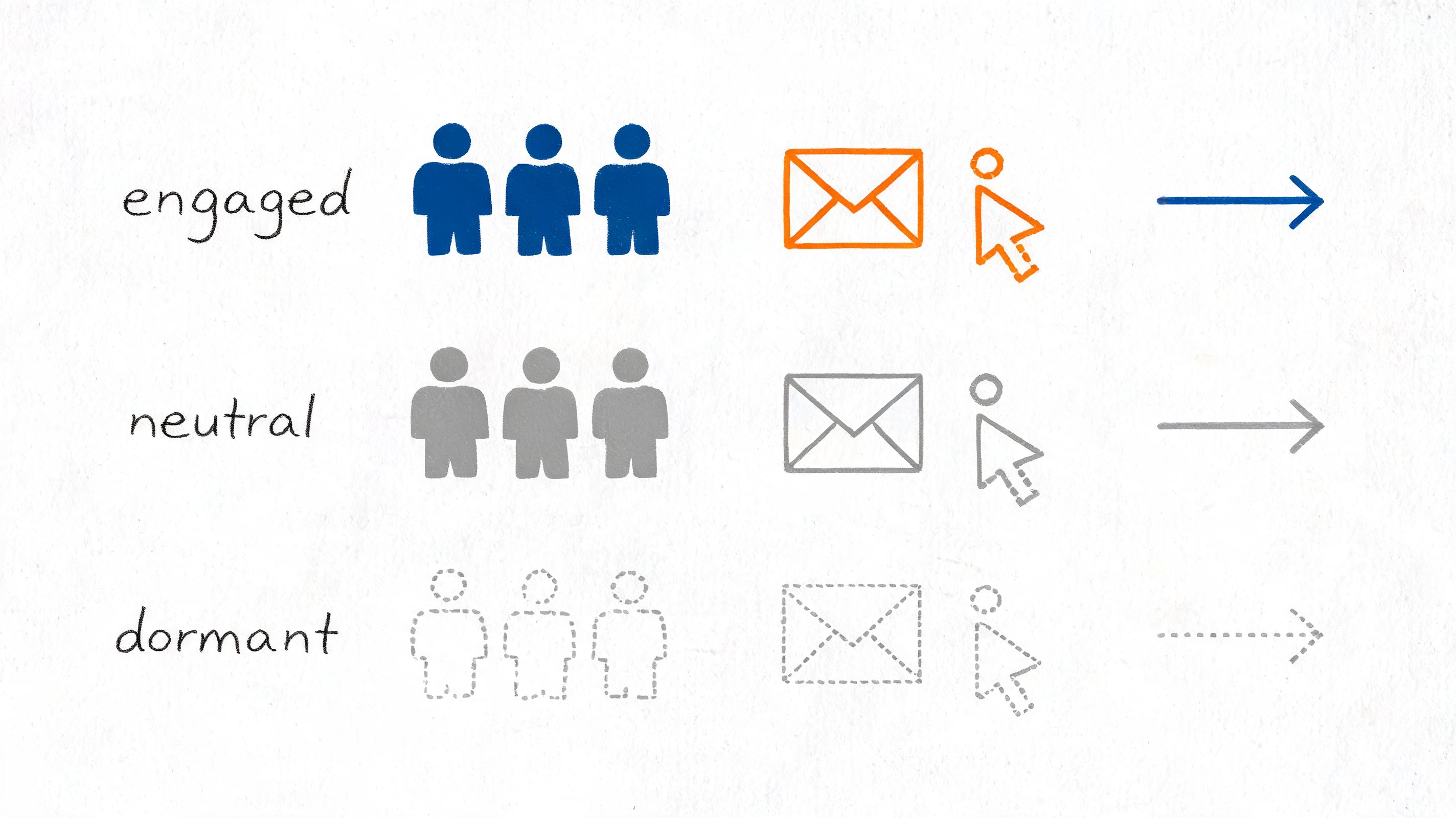
Start with three engagement bands
Keep it simple at first:
- Engaged subscribers: Recent openers, clickers, replyers, and site visitors from email
- Neutral subscribers: People who still interact occasionally but not consistently
- Dormant subscribers: Contacts with no meaningful activity for a long stretch
For DTC, this can mean sending product drops and scarcity-based promotions only to engaged clickers, while neutral subscribers get softer educational content or social proof. For SaaS, users who opened onboarding emails but never clicked setup links should get activation help, not another generic newsletter.
Practical rule: If a segment doesn't change either the message, the offer, or the send frequency, it isn't a real segment.
In Mailtani, define this with dynamic filters rather than static lists. Pull campaign events, tag contacts by recency of interaction, and suppress dormant users from broad sends until they enter a re-engagement flow. If you need a benchmark for what “good” even looks like before setting thresholds, use your own history first, then compare against broader email open rate benchmarks.
A simple query pattern looks like this:
- Engaged 30d: opened OR clicked any campaign in last 30 days
- Engaged 90d: opened OR clicked any campaign in last 90 days
- Dormant: no opens, no clicks, no site activity attributed to email in your chosen window
What doesn't work is blasting dormant users every week “just in case.” That's how teams pay to train inbox providers that their mail is ignorable.
2. Purchase History and RFM Recency Frequency Monetary Segmentation
Purchase history is the fastest route to useful segmentation because it changes revenue decisions, not just audience labels.
An engaged subscriber who has never bought should not get the same campaign as a customer who ordered twice in the last 45 days. RFM gives you a simple framework for that split. Recency shows who is still close to a buying moment. Frequency shows who has formed a buying pattern. Monetary shows who is worth protecting with better offers, better timing, or fewer discounts.
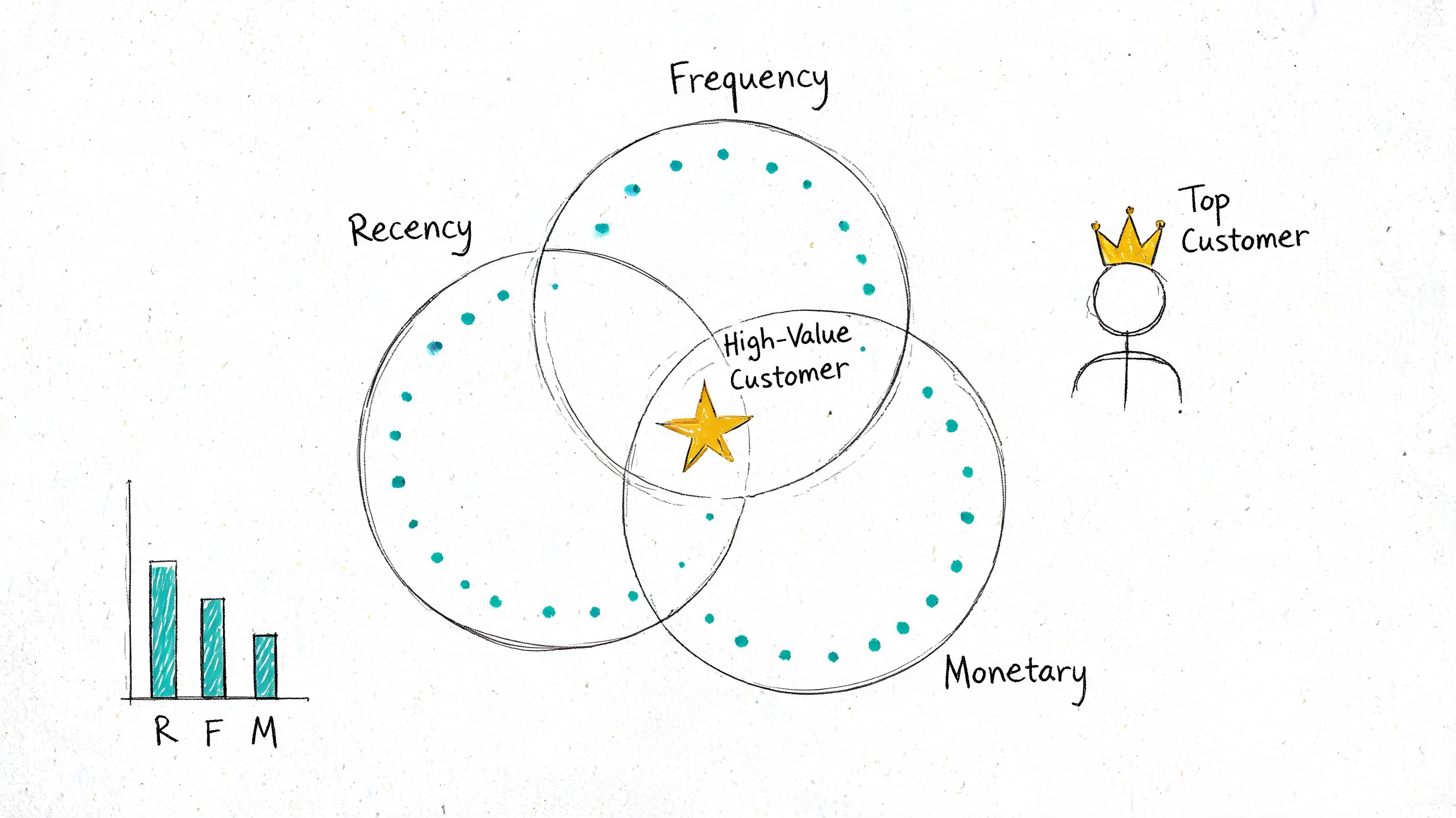
Useful RFM logic in practice
Keep the scoring model simple enough to maintain. I usually start with 1 to 5 scores for each field, then combine them into either a composite score like 555 or separate fields that Mailtani can filter on directly. Separate fields are easier to debug. Composite scores are easier to use in campaign naming and reporting.
A working setup often looks like this:
- High recency, high frequency, high monetary: VIP access, loyalty rewards, limited stock alerts, premium support messaging
- Low recency, high historical value: win-back flows, replenishment prompts, product-specific incentives based on previous categories
- High recency, low monetary: second-purchase nudges, bundles, add-ons, threshold-to-free-shipping campaigns
- Low frequency, low monetary: tighter send limits, stronger offer testing, category education before another discount
The practical mistake is treating RFM as a reporting exercise instead of a sending rule. If the score does not change cadence, offer type, or product selection, it is just decoration in the CRM.
For DTC brands, RFM usually maps cleanly to lifecycle automations. Recent repeat buyers can get new arrivals and accessory cross-sells. Lapsed high-value buyers should get a category-aware win-back sequence, not a generic sitewide coupon. If you are trying to how to improve customer rate, start by splitting one-time buyers from former repeat buyers and writing different recovery paths for each.
For SaaS, the same model works with revenue events instead of catalog orders. Recency becomes last paid invoice or expansion event. Frequency can mean number of billing cycles, renewals, or repeat purchases of seats and credits. Monetary is plan value or total revenue to date. That helps separate new self-serve customers from established accounts that merit upgrade prompts, renewal protection, or customer success outreach.
The implementation is not complicated, but it does require discipline. Calculate RFM on a schedule in Shopify, WooCommerce, Stripe, or your warehouse. Push the results into Mailtani through the API as customer attributes such as last_purchase_at, order_count, total_revenue, recency_score, frequency_score, monetary_score, and rfm_segment.
Once those fields exist, build segments with rules your team can read at a glance:
recency_score >= 4 AND frequency_score >= 4last_purchase_at < 90 days ago AND order_count = 1monetary_score >= 4 AND recency_score <= 2order_count >= 3 AND total_revenue > brand_aov * 2
That last point matters. Good segmentation is not only about marketing logic. It is also about operational cost. Dynamic fields synced into one customer record are cheaper to maintain than exporting CSVs, rebuilding static lists, and fixing stale segments every week.
3. Demographic and Firmographic Segmentation
Demographic and firmographic data earns its keep when it changes the email, not when it acts as the only reason to send one.
That distinction matters in practice. Age, gender, location, role, company size, and industry are useful context fields. They rarely signal timing on their own. I use them to shape offer, proof, tone, and CTA after behavior or lifecycle stage has already narrowed the audience.
For B2C brands, demographics usually work best as message modifiers. A skincare brand might change the angle by age band or climate zone. A retailer might swap creative, shipping cutoffs, or store messaging by region. Language and fulfillment constraints often matter more than broad location fields, so segment around what changes the customer experience.
For B2B and SaaS, firmographics usually carry more weight. Role tells you what a buyer cares about. Company size tells you how complicated the buying process will be. Industry often determines compliance, procurement friction, and which proof points belong in the email. A founder at a 10-person startup needs a different message than an IT manager at a 2,000-person healthcare company, even if both triggered the same product event.
The practical mistake is collecting too many profile fields up front.
Long signup forms hurt conversion and still leave you with messy data. A better setup is progressive profiling. Ask for one or two fields at signup, then collect more through onboarding, sales forms, account settings, or enrichment. In Mailtani, that usually means keeping a small set of high-value attributes on the contact record and updating them as better data arrives.
For example, these are usually enough to start:
countrylanguageage_bandorcustomer_typejob_titledepartmentcompany_sizeindustryplan_typeoraccount_tier
Then write rules tied to actual messaging decisions, not vanity categories:
country IN ('US','CA') AND language = 'en'industry = 'healthcare' AND company_size >= 200job_title ILIKE '%founder%' OR department = 'executive'plan_type = 'free' AND company_size <= 50
Those rules are simple on purpose. If a field does not change subject line, body copy, offer, proof, or compliance language, it probably does not need its own segment.
A few guardrails keep this useful instead of expensive to maintain:
- Validate company fields on a schedule. Titles drift, enrichment data gets stale, and imported CRM values are often inconsistent.
- Standardize inputs before syncing them.
VP Marketing,Vice President of Marketing, andVPMshould not become three different audiences. - Use geography only where it changes fulfillment, regulation, language, seasonality, or inventory.
- Keep a fallback path for unknown values. Blank profile fields are normal, especially early in the relationship.
Raw profile data does not tell you when to send. It tells you how to frame the message once someone has shown enough intent to justify a send.
That is why the strongest segments here are blended segments. "Pricing page visitor at a 500-plus employee fintech company" is actionable. "Fintech VP" by itself usually is not. The first gives your team a reason to send and a reason to tailor the copy. The second gives you only a loose persona.
If you are working with a limited stack, keep this lightweight. Store the core fields once, sync updates through your app, CRM, or billing system, and let Mailtani handle the segment logic on top of the customer record. That setup is cheaper and easier to audit than building separate lists every time sales wants a new vertical or region-specific campaign.
4. Interest and Preference-Based Segmentation
Some of the best segments come directly from the subscriber. They're clean, permission-based, and easy to act on.
Preference centers are especially valuable because they let people self-select product categories, content types, and cadence. Litmus reports that 62% of marketers using preference centers for self-selected interests see higher satisfaction and lower churn. That lines up with what most practitioners see in the field. When subscribers can narrow what they receive instead of fully unsubscribing, you keep more of the relationship.
Build a preference system people will actually use
Keep the options narrow. Too many choices create friction and bad data. Three to five core options is usually enough for most brands.
For a DTC brand, that might be:
- Product category: skincare, supplements, accessories
- Email type: launches, education, offers
- Cadence: weekly digest or major announcements only
For a SaaS product, it might be feature education, product updates, webinar invites, and customer stories. For a newsletter, it could be daily, weekly, or topic-specific digests.
Use stated preferences and inferred interests together. If someone says they want content about advanced workflows but repeatedly clicks beginner tutorials, trust the recent behavior more. Preferences should guide your first send. Behavior should refine the next ones.
A lightweight implementation pattern in Mailtani looks like this:
- Add preference fields to forms and footer manage-preferences links
- Store interests as tags or arrays
- Update them through clicks, form submissions, and account settings
- Use dynamic content blocks when one campaign serves multiple preference groups
What doesn't work is asking for preferences once and never revisiting them. Interests change. Product focus changes. Your preference center should be a living part of the program, not a compliance artifact buried in the footer.
5. Lifecycle Stage Segmentation
Lifecycle stage segmentation fixes one of the most expensive mistakes in email. Teams keep sending based on list membership while the subscriber has already moved to a different stage.
That mistake shows up fast in performance. New subscribers get pushed into discount-heavy campaigns before they understand the product. Customers keep seeing first-order offers. Trial users receive broad newsletters instead of the activation emails that would help them reach value.
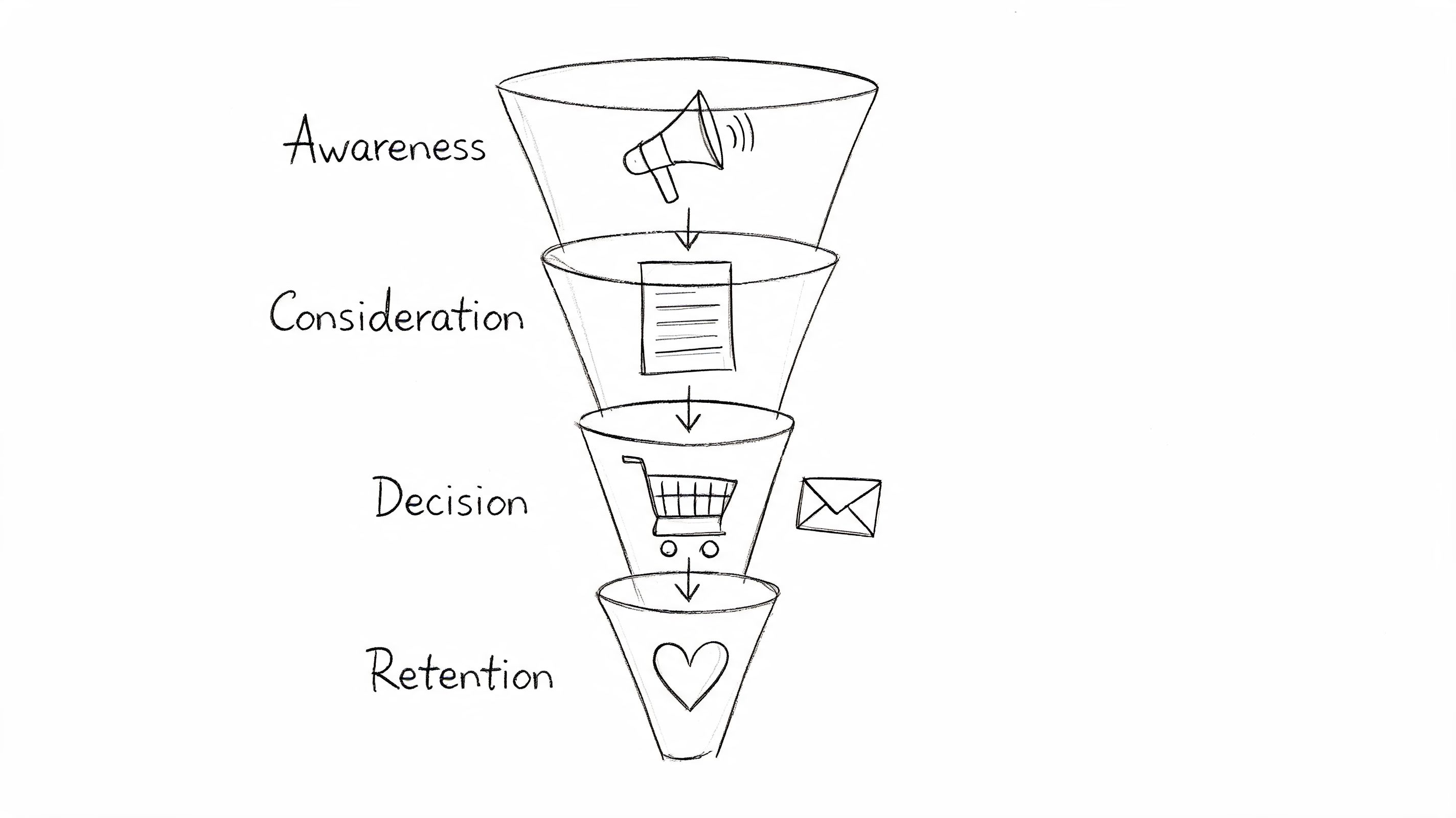
Define stages with event logic
Lifecycle stages work best when they change on events, status changes, and recent behavior. Time windows still matter, but they should support the logic instead of carrying it.
A practical model usually includes:
- Lead: submitted a form, downloaded a resource, or joined a waitlist
- New subscriber: confirmed email, but has not purchased or activated
- Evaluator: viewed pricing, product pages, or comparison content
- Customer: completed a purchase or activated an account
- At risk: engagement dropped, renewal intent weakened, or a support issue is open
- Lapsed: no purchase or no product activity inside your reactivation window
The useful question is not “which list is this person on?” It is “what has this person done recently, and what should they receive next?”
In Mailtani, that means wiring lifecycle changes to the systems that already hold the truth. Shopify or Stripe should move someone into customer status after purchase. Your app database should promote a trial user to activated after they hit the product milestone you care about. Support events can suppress upsells for a few days so the team is not marketing into an unresolved problem. If you need a clean way to separate those support, billing, and promotional paths, this guide to transactional vs marketing email infrastructure is a good reference.
Use stage exits as aggressively as stage entry
Many programs fail at this point. Marketers set entry triggers, then forget to define exit rules.
A basic example:
- Signup starts welcome
- First purchase exits welcome and enters post-purchase
- Refund or cancellation removes cross-sell offers
- Inactivity for a defined period moves the contact into reactivation
- High-intent actions, like pricing views or demo requests, pause generic nurture and trigger sales-assist or product-proof content
That exit logic matters more than adding another branch to the flow. I have seen teams spend weeks refining nurture copy while still sending consideration emails to people who bought the day before. The fix was not creative. It was one condition in the query.
For DTC, lifecycle segmentation usually centers on first purchase, second purchase, replenishment window, and lapse risk. For SaaS, it usually centers on signup, activation, trial-to-paid, early retention, expansion, and churn risk. The stages are different, but the operating rule is the same. Tie messaging to customer state, not campaign calendar.
This approach cuts wasted sends and makes each automation easier to justify. You still send at a healthy volume. You stop sending the wrong sequence after the customer has clearly moved on.
6. Transactional vs. Marketing Email Segmentation
This split isn't optional. Transactional and marketing emails have different jobs, different urgency, and different failure costs.
An order confirmation, password reset, invoice, or account alert should never compete with a promotional campaign for infrastructure, throttling, or reputation management. When teams mix them casually, they usually notice the problem only after a promotion spikes volume and a critical transactional message lands late or misses the inbox.
Separate infrastructure before you need to
Use different streams, subdomains, or provider keys for transactional and marketing mail. If you run Mailtani with multiple providers, this is straightforward. Send transactional through one provider path and marketing through another, based on the use case and your routing rules.
Mailtani's guide to transactional email vs marketing email is a useful framework for defining the line clearly inside your system. Once the line is documented, enforce it in your event logic and templates.
A clean setup usually includes:
- Transactional stream: password resets, order receipts, shipping notices, invoices, login alerts
- Marketing stream: newsletters, campaigns, upsells, launches, re-engagement
- Separate suppression logic: marketing unsubscribes should not break essential account mail
- Separate monitoring: watch bounce patterns and complaint signals independently
For SaaS, billing notices and security alerts belong in the transactional lane. For e-commerce, shipment and delivery emails belong there too. Promotional cross-sells inside a transactional email are where teams often get sloppy. Keep the core function clear and compliant.
What doesn't work is saying “we'll separate later when volume grows.” By then, you've already trained your infrastructure badly.
7. Channel and Device-Based Segmentation
Channel and device data changes money decisions, not just design decisions. If a segment opens on mobile and converts on desktop, the right move is not just a cleaner template. It is a different CTA, a different send time, and sometimes a different channel sequence entirely.
Start with behavior you can act on. Segment by dominant reading environment, then decide what each segment should receive.
Segment for reading context, not just screen size
A simple setup works well:
- Mobile-dominant readers: short subject lines, faster visual scanning, early CTA placement, lighter image usage
- Desktop-dominant readers: longer comparison blocks, denser product detail, secondary links, tables or side-by-side modules where supported
- Mixed-device readers: simpler layouts that hold up across clients, with one primary action above the fold
Device type alone is not enough. Email client matters too. Gmail mobile, Apple Mail, and Outlook all render HTML differently, and those differences affect clicks. Buttons that feel easy to tap in one client can look cramped in another.
I usually tag users with two fields: primary device family and last-seen client. That gives enough signal to improve templates without creating a segment maze your team cannot maintain.
Use device data to shape the path after the click
Channel segmentation earns its keep in these scenarios. A mobile open does not always mean a mobile conversion. DTC shoppers often browse products on their phones, then finish checkout later on desktop. SaaS buyers might read a launch email on mobile but only start a trial from a laptop, where they can compare plans or set up a workspace.
That means the email and landing page need to work together. If your mobile-heavy segment clicks into a slow product page or a form with too many fields, the segment logic was right and the experience still failed. If you need better visibility into that handoff, set up website visitor tracking for email-driven sessions so device and channel patterns are tied back to actual on-site behavior.
A practical segmentation workflow
Use a lightweight ruleset first:
- Channel source: email-first, SMS-assisted, paid-retargeting-assisted
- Primary device: mobile, desktop, mixed
- Client priority: Gmail, Apple Mail, Outlook, other
- Goal type: browse, purchase, account action, demo request
Then map creative and routing rules to each group.
For DTC, a mobile-heavy promo segment usually needs a tight hero section, thumb-friendly buttons, and landing pages built for quick product discovery. If the same segment abandons checkout often, follow with SMS or targeted email reminders built to recover abandoned carts instead of resending the original campaign.
For SaaS, desktop-heavy segments usually tolerate more detail because the task itself needs concentration. Admin, billing, setup, and integration emails often perform better with fuller context, especially if the click leads into an app, docs page, or pricing comparison.
Keep the implementation cheap and maintainable
You do not need a complicated CDP project to do this well. Store the last known device, last known client, and recent conversion channel in your user profile or event store. Then query from there.
For example:
- if
primary_device = mobileandlast_conversion_channel = email, send the mobile-optimized promo version - if
primary_device = mobileandlast_conversion_channel = paid_retarg, keep email lighter and let retargeting carry more of the close - if
primary_device = desktopandsegment = saas_admin, send the fuller product or account workflow email
Mailtani analytics makes this easier because you can compare clicks and downstream behavior by segment before rebuilding every template. That matters. Channel and device segmentation should reduce waste, not create six extra versions of every campaign.
8. Intent-Based Segmentation Website Behavior and Content Consumption
Intent segmentation is the point where email starts acting on buying signals instead of broad audience labels. A subscriber who reads comparison content, revisits a product page, or hits pricing twice in two days is giving you timing, interest, and likely objections. If you wait too long or send the same follow-up to all of them, that signal loses value fast.
The useful shift is from “this person fits a persona” to “this person did something specific.” That is the difference between generic nurturing and behavior-driven email logic you can operationalize in Mailtani or any event-based setup.
A quick visual walkthrough helps if you're setting this up from scratch:
Build segments from events, windows, and exclusions
Start with event combinations, not pageviews in isolation. One pricing-page visit can be accidental. Two visits plus a demo-page click and no booking is a segment worth treating differently.
For DTC, the highest-value intent segments usually look like this:
- viewed product, no add to cart within 24 hours
- added to cart, no checkout start within 4 hours
- started checkout, no purchase within 2 hours
- viewed the same category or product family multiple times in 7 days
- viewed shipping, returns, or sizing content before dropping
For SaaS, use behavior that maps to evaluation and rollout:
- visited pricing, no demo booked
- viewed integration docs after feature-page visit
- returned to the same use-case page more than once
- downloaded content, then visited product or comparison pages
- invited teammates or viewed admin or security pages without upgrading
The query logic matters more than the segment name. In practice, I like rules such as pricing_views >= 2 AND demo_booked = false AND last_seen <= 3 days or product_view_count >= 2 AND add_to_cart = false AND category = "running-shoes". Those are cheap to run, easy to audit, and good enough for a lot of teams without a large CDP budget.
Tie website intent to message depth
Intent signals should change the email, not just the audience.
A high-intent DTC browser should get product-specific proof, inventory context, and a short path back to the cart or PDP. A low-intent browser who skimmed a category page may need a lighter browse-abandon flow with bestsellers or social proof instead. If checkout was started, skip the generic promo and focus on removing friction. Teams that recover abandoned carts well usually match the message to the exact step where the shopper dropped.
For SaaS, a pricing visitor often needs a different follow-up from someone reading educational content. Send the pricing visitor to ROI, implementation, or plan-fit content. Send the docs visitor to integrations, setup help, or a technical CTA. Send the comparison-page visitor to proof that answers switching risk. Different signals suggest different objections.
Keep the implementation practical
You do not need a complicated scoring model on day one. Capture page views, product or content categories, key conversion events, and a recent timestamp. Then push those traits into your email platform as tags, custom events, or attributes.
If you need a starting point, track website visitors and sync behavioral events into Mailtani, then trigger automations from rolling windows such as “viewed pricing in last 3 days and not booked demo” or “viewed product twice in 5 days and no purchase.” That gets you to useful intent-based campaigns without a long implementation cycle.
One warning. Do not create ten near-identical automations for tiny behavior differences. Group actions by decision stage, then customize the copy inside the email. That keeps the system maintainable and still gives you message-to-intent fit.
9. Lookalike and Audience Expansion Segmentation
Segmentation shouldn't stop at the current list. It should also help you decide which new leads deserve attention first.
Lookalike and expansion segments work best when you build them from first-party signals, not vague personas. Don't model from everyone who converted. Model from the people you want more of. That usually means repeat buyers, high-value customers, activated users, or accounts with strong product adoption.
Build expansion audiences from value not volume
A good expansion model starts with a source segment that is both valuable and coherent. For DTC, that might be repeat buyers in a specific category. For SaaS, it could be activated accounts in one industry that reached a key usage milestone.
Then score incoming leads against shared traits such as:
- acquisition source
- product or feature interest
- role or company type
- pricing-page behavior
- first-session depth
- early email engagement
This is also where restraint matters. InsiderOne notes a gap in practical guidance for smaller senders using self-hosted infrastructure and suggests starting with 3 to 5 dynamic segments rather than building too many from day one. That advice is especially relevant for indie hackers and low-volume teams on Amazon SES. Small lists don't need elaborate audience trees. They need clean signals and stable sending.
In Mailtani, you can score leads upstream, push the score as a field, and route them into distinct onboarding or promotional paths. A founder downloading your API guide and visiting your pricing page shouldn't get the same intro series as a casual newsletter subscriber.
What doesn't work is buying cold lists and calling them “lookalikes.” A real lookalike workflow uses your own best-customer data to prioritize similar people after they enter your owned system.
9-Point Email Segmentation Comparison
| Segmentation Type | Implementation complexity | Resource requirements | Expected outcomes | Ideal use cases | Key advantages |
|---|---|---|---|---|---|
| Behavioral Segmentation (Email Engagement) | Low, uses built-in email analytics and simple rules | Historical engagement data; basic analytics and automation | Higher open/click rates; fewer wasted sends and lower costs | Re-engagement, cart abandonment, VIP targeting | Improves conversions and reduces sending costs; clear content insights |
| Purchase History & RFM | Low, scoring from transaction data; periodic recalculation | Reliable transaction logs, e‑commerce/CRM integration, scoring logic | Predictive revenue impact; prioritizes high‑value customers | E‑commerce retention, VIP programs, win‑back campaigns | Directly tied to revenue; maximizes marketing ROI |
| Demographic & Firmographic | Low, apply static profile attributes to lists | Signup/profile fields; optional third‑party enrichment | Better message relevance and localization; compliance support | B2B vertical targeting, localization, product‑market testing | Simple, foundational targeting; supports legal compliance |
| Interest & Preference‑Based | Medium, requires preference center and tagging | Preference center UX, ongoing preference management and tagging | Higher engagement, lower unsubscribes, more relevant streams | Newsletters, content personalization, category opt‑ins | Respects subscriber choice; enables scalable personalization |
| Lifecycle Stage Segmentation | Medium, define stages and automate progression | Journey mapping, event triggers, automation flows | Right cadence per stage; increased conversions and retention | Onboarding, free trials, churn prevention, retention | Aligns frequency with intent; reduces irrelevant messaging |
| Transactional vs Marketing | Medium, separate queues and compliance workflows | Parallel sending paths, IP/subdomain management, compliance rules | Protects transactional delivery; isolates marketing risk | Order confirmations, password resets, billing vs promos | Safeguards critical emails and sender reputation |
| Channel & Device‑Based | Medium, device/client detection and conditional templates | Open tracking, template variants, client testing tools | Improved rendering, optimized send times, better mobile UX | Mobile‑heavy audiences, template rollouts, send‑time tests | Enhances device‑specific UX and reduces rendering issues |
| Intent‑Based (Website Behavior) | High, analytics integration and real‑time triggers needed | Tracking pixels, event pipeline, developer resources, privacy controls | Captures high‑intent users; timely triggers increase conversions | Abandoned cart recovery, pricing page visitors, demo offers | Predicts intent for high‑conversion, real‑time campaigns |
| Lookalike & Audience Expansion | Medium, modeling and data matching required | Sufficient conversion history, modeling/ML tools or platforms | Scales acquisition with targeted cold audiences; better CAC | New customer acquisition, cold outreach, channel tests | Efficient scaling of acquisition; focuses spend on likely converters |
From Theory to Practice Your Segmentation Action Plan
Effective segmentation isn't about building a maze of tiny lists. It's about reducing waste. The strongest programs send fewer irrelevant emails, protect deliverability more carefully, and use first-party data to decide who should hear what next. That's the primary payoff. Better engagement and lower cost move together.
If you're starting from scratch, don't implement all nine practices at once. Pick one segment that clearly changes sending behavior. For many marketing departments, that's engaged versus dormant subscribers. For stores, purchase history and RFM are close behind. For SaaS, lifecycle and website intent usually create the fastest improvement because they align directly with activation and expansion motions.
Then make the segment dynamic. Static CSV exports break fast. People buy, browse, ignore, reply, churn, and come back. Your segmentation logic should move with them. That means connecting your store, app, CRM, or analytics stack to your email platform and updating fields automatically through tags, events, or API syncs.
There is also a discipline component that often goes overlooked. Segmentation only pays off when you change something downstream. Change the offer. Change the cadence. Change the content block. Change the channel priority. If every segment still receives the same campaign with a different label, you have added complexity without adding relevance.
For cost-conscious teams, this matters even more. Mailtani's model is attractive because you pay provider rates rather than bloated per-subscriber markups. That also means every unnecessary send is visible. You feel the waste sooner, which is good. It pushes better operating habits. Separate transactional and marketing traffic. Suppress the inactive. Route high-intent visitors into tighter flows. Let purchase and product data decide who gets premium treatment.
I'd also keep one principle front and center. Don't chase segment count. Chase decision quality. A small set of well-maintained, high-signal segments will outperform a giant taxonomy that nobody trusts enough to use.
If you want a practical rollout order, use this:
- First build: engaged, neutral, and dormant
- Second build: lifecycle stages tied to actual events
- Third build: purchase or product-usage segments
- Fourth build: website intent triggers
- Fifth build: preferences and audience expansion
That sequence keeps implementation realistic and results measurable. Once you've done that, segmentation stops feeling like a marketing tactic and starts acting like infrastructure.
For brands that want to boost Shopify revenue with segmentation, that shift is usually the difference between occasional wins and a system that keeps compounding.
If you want the upside of advanced segmentation without paying inflated ESP markups, Mailtani is built for it. You can connect your own Amazon SES, Resend, or Mailtrap account, sync real behavioral data through the API, separate transactional from marketing traffic, and run dynamic segments on infrastructure you control. That means better visibility into costs, cleaner deliverability management, and a setup that fits DTC brands, SaaS teams, developers, and indie hackers who'd rather own their email stack than rent it.


