
7 Survey Reminder Email Templates to Boost Responses
Copy-paste survey reminder email templates and survey follow-up samples for SaaS and e-commerce, plus when to send each reminder and how many to send.
TL;DR / Quick answer: Send the first survey reminder 2–3 days after the invite and a final one around day 7, only to people who haven't responded (Instantly's recommended cadence). Two reminders is the right number for most lists; a third should carry a real deadline or incentive. Keep it under 80 words with one button above the fold.
Jump to a template: one-click · contextual · 3-email follow-up sequence · last chance · mobile one-tap · segmented · you-asked-we-built
Survey reminder emails can increase response rates by as much as 36%. That’s the upside. The failure point is simpler: organizations often send a vague nudge, to everyone, at the wrong time, from infrastructure they barely control.
A survey reminder email template only works when the copy matches the situation. A post-purchase Shopify survey needs a different reminder than a SaaS onboarding check-in or a developer tool feedback request after a new integration goes live. Busy customers don’t ignore surveys because they hate giving feedback. They ignore them because the ask feels easy to postpone, the value isn’t obvious, or the email lands like just another campaign.
The fix is straightforward. Keep the ask short, send reminders only to non-responders, time them based on actual behavior, and make sure deliverability doesn’t sabotage the campaign before the customer even sees it. In practice, that means using segmented flows, testing subject lines and CTA placement, authenticating your domain, and sending from infrastructure you control.
Below are seven survey reminder email template options that work in real e-commerce and SaaS environments. Each one includes the copy pattern, when to use it, and the setup details that usually separate a decent reminder from one that gets completed.
1. The Simple One-Click Reminder
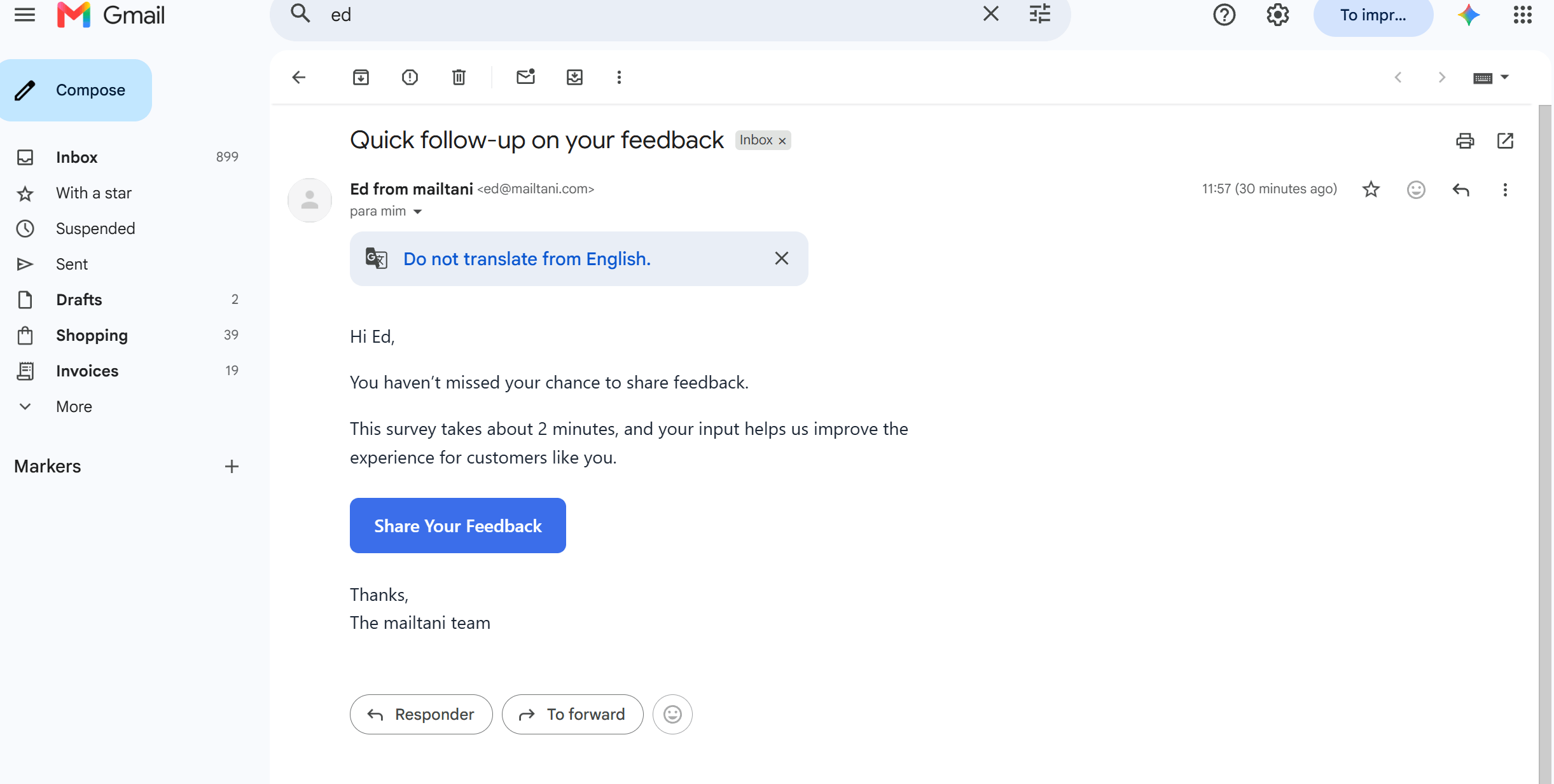
Some reminders fail because they ask the reader to think too much. The simple one-click reminder strips that away. One job. One button. Minimal copy.
This is the survey reminder email template I’d use for a Shopify post-purchase survey, a Stripe-style onboarding check-in, or a GitHub integration feedback request where the customer already knows the context. You don’t need to re-sell the whole relationship. You need to make completion feel immediate.
Template
Hi {{firstName}},

You haven’t missed your chance to share feedback.

This survey takes about 2 minutes, and your input helps us improve the experience for customers like you.

[Share Your Feedback]

Thanks,
{{companyName}}
Send this to non-responders automatically. In mailtani, a sequence can wait 3 days, skip anyone who completed the survey, and send the reminder from your own SES or Resend account. See how email sequences work.
Make the click the whole job
Put the button above the fold. Don’t bury it under a long explanation, a hero image, and three paragraphs of brand voice. If the survey is short, say so plainly. “2-minute survey” performs better than fluffy copy because it answers the only question that matters: how much effort is this?
For e-commerce, this works well after delivery confirmation. For SaaS, use it after activation milestones such as first project created, billing connected, or first report generated. For dev tools, send it after a successful API call or integration setup, not before the user has experienced the product.
A few setup details matter:
- Track the reminder source: Add UTM parameters to the survey URL so you can separate completions from the initial invite versus the reminder.
- Test the subject line, not the whole email first: With a short format like this, small subject line changes can do more than body copy rewrites. Run your options through a subject line tester first.
- Sync replies back into one place: If someone replies instead of clicking, IMAP syncing helps your team capture that intent rather than treating them like a non-responder forever.
Practical rule: If the survey is short and the audience already has context, shorter reminder copy usually wins.
This format is especially useful on cost-conscious stacks. If you’re running reminders through Mailtani with your own provider setup, you can test send timing and subject variants without feeling like every extra experiment is inflating a subscriber-based monthly bill.
2. The Value-First Contextual Reminder
Reminder performance usually drops when the email gives the recipient no reason to care. Context fixes that. A survey reminder tied to a real action, purchase, or support moment feels relevant, and relevant emails get opened, clicked, and answered more often than generic follow-ups.
Use this format when the recipient has enough history for you to reference something specific. That could be a first order, a plan upgrade, a support ticket, a setup milestone, or feature usage that clearly signals intent.
Template
Hi {{firstName}},

You recently {{eventContext}} with {{companyName}}, and we’d love your feedback.

We’re reviewing responses to improve {{specificOutcome}}, so your input will directly shape what we change next.

[Take the survey]

If it’s easier, just reply to this email with your thoughts.

Thanks,
{{senderName}}
Tie the ask to a real product moment
This reminder works because it answers the recipient’s first question before they ask it: why am I getting this?
For e-commerce, that context might be the exact category purchased. A DTC apparel brand can ask about sizing after a customer’s first denim order. A skincare brand can ask whether the product matched the customer’s skin concerns after delivery plus enough time to try it.
For SaaS, the trigger should map to a meaningful milestone, not just account creation. Good examples include finishing onboarding, inviting teammates, connecting a data source, publishing a first report, or resolving a support issue. For developer tools, use product events with clear intent, such as shipping a first API request or deploying an integration.
Good contextual reminders usually include three parts:
- A specific trigger. Mention the order, upgrade, support conversation, or feature the person used.
- A clear reason for the survey. Tell them what decision their feedback will influence, such as onboarding changes, sizing guidance, or a feature improvement.
- A low-friction backup path. Let them reply by email if opening a form feels like extra work.
A reminder should answer two questions fast: why this survey, and why me?
Timing matters here because context fades quickly. Send too soon and the customer may not have enough experience to give useful feedback. Send too late and the detail you referenced no longer feels familiar. In practice, this format works best once the user has completed the event you care about and had enough time to form an opinion.
The technical setup matters as much as the copy. Segment by behavior, not broad audience labels. Someone who bought denim should not get the same reminder as someone who bought footwear. A trial user who connected Slack should not see the same message as an admin who invited five teammates and upgraded. One automation can still handle this if your ESP supports dynamic blocks and event-based conditions. Mailtani is useful here because you can run one low-cost workflow, swap copy by cohort, and avoid cloning separate campaigns for every product line or lifecycle stage.
Test the context line before rewriting the whole email. In SaaS, “You connected HubSpot last week” may beat “You recently set up your account” because it proves the message is based on a real action. In e-commerce, “How did the sizing work on your first denim order?” will usually outperform a generic request for store feedback because the question is narrower and easier to answer.
There is a trade-off. More context improves relevance, but only if your event data is clean. If your product catalog tags are messy or your app events fire unreliably, the reminder can feel wrong fast. That hurts trust and response rate. Check the trigger logic, fallback copy, and merge fields before sending at scale.
If you’re mailing from a newer domain, warm it up first and protect deliverability before expanding a contextual reminder program. Relevant copy helps engagement, but it does not fix poor domain reputation or broken authentication.
3. The Survey Follow-Up Email Sequence (3 Emails, With Incentive)
A single reminder is often enough for engaged customers. It’s rarely enough for everyone else.
When the survey matters and the audience is mixed, run a small sequence only to non-responders. That’s the important part. Incentives become expensive and annoying when you blast them to people who already completed the survey or were never likely to care.
Template sequence
Email 1
Hi {{firstName}},

We’d still love your input. The survey is short, and your feedback will help us improve the product.

[Take the survey]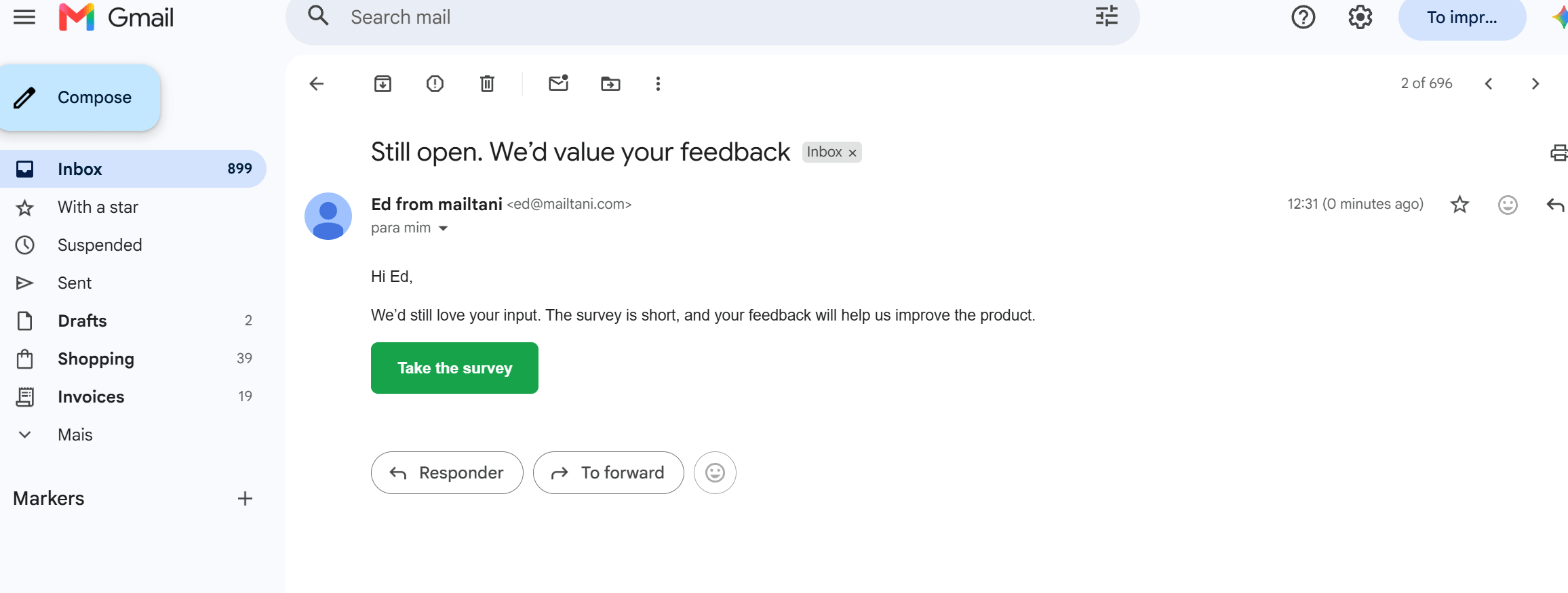
Email 2
Hi {{firstName}},

If you can spare a couple of minutes, we’d appreciate your feedback. As a thank-you, we’ll send {{incentive}} after completion.

[Share your feedback]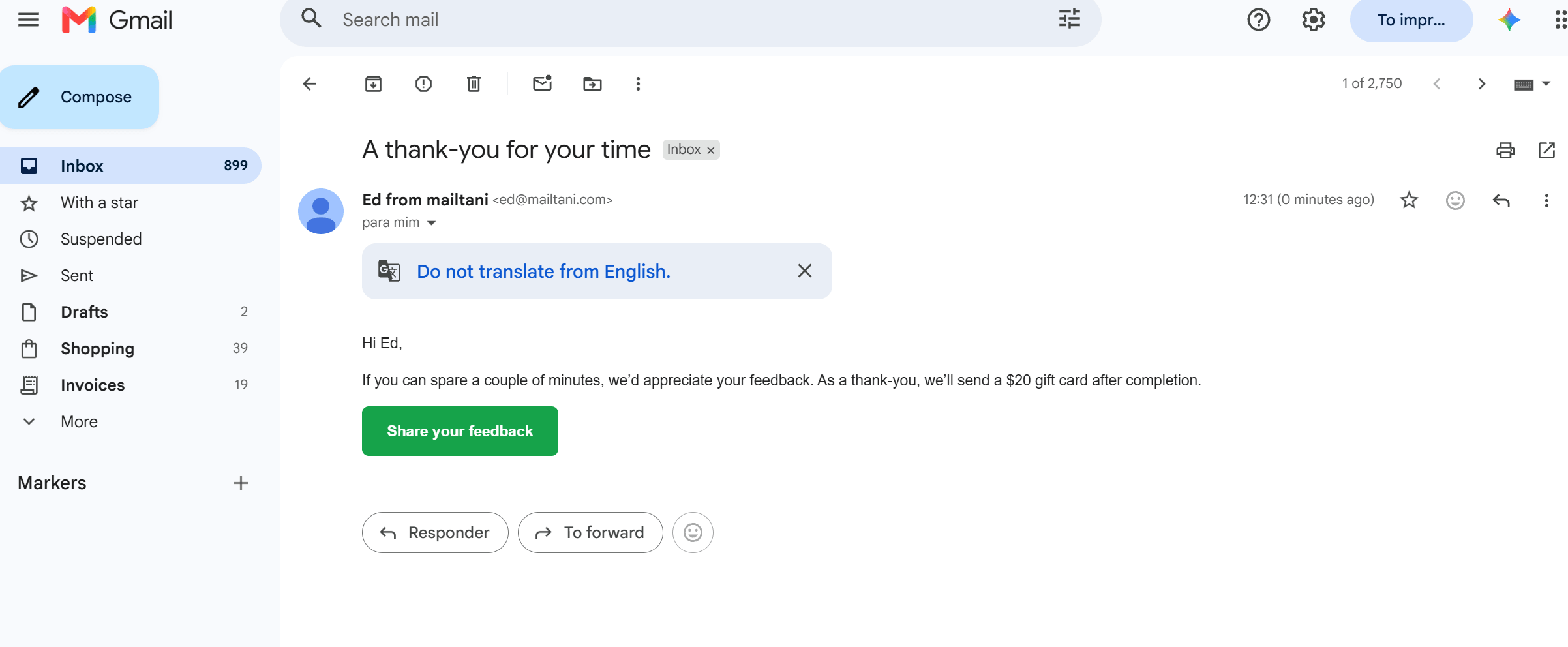
Email 3
Hi {{firstName}},

This is the last reminder before the survey closes.

If you’d like to share feedback and receive {{incentive}}, use the link below.

[Complete the survey]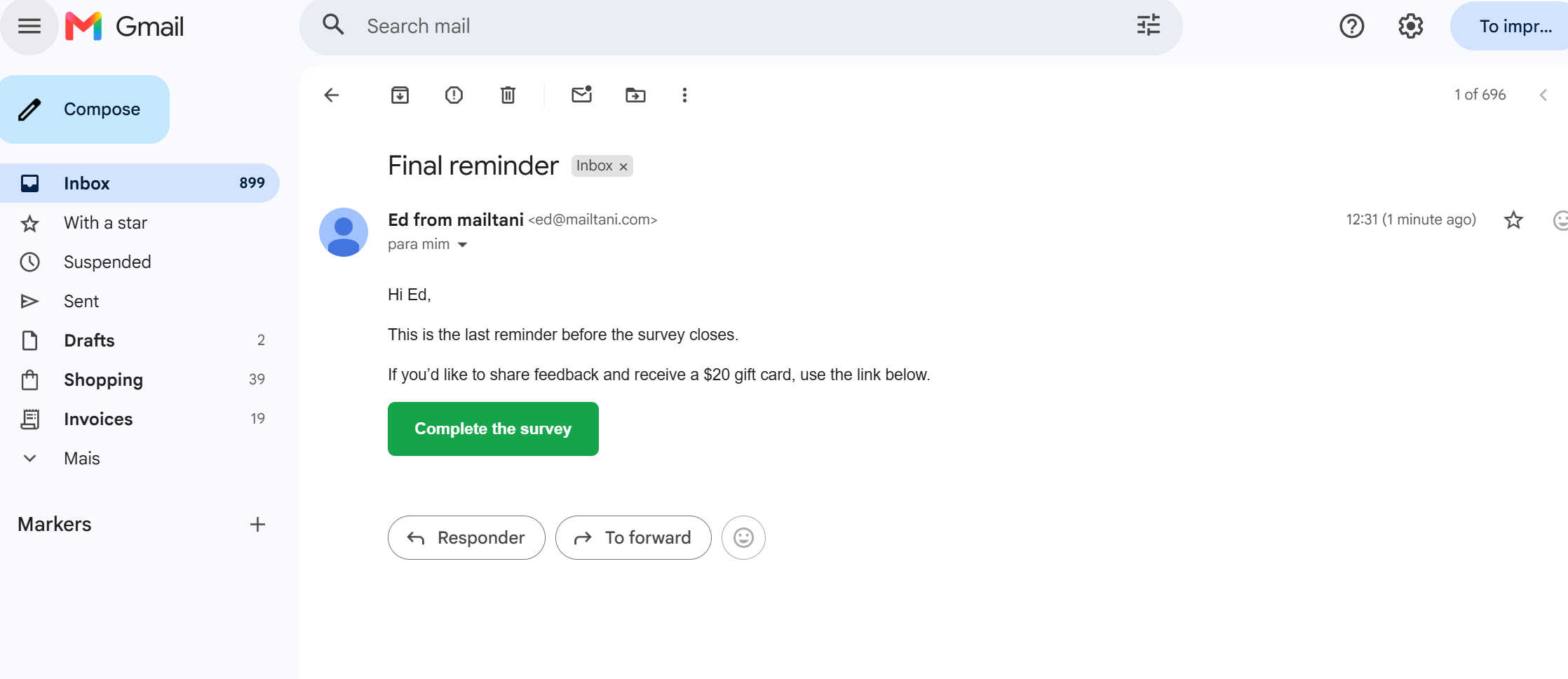
Use incentives carefully and only for non-responders
Instantly.ai reports that a structured 3-step reminder cadence can boost B2B completion rates by 14% to 25% over baseline 12% to 15% averages. That’s useful guidance for SaaS founders, agencies, and growth teams running feedback loops with busy professional audiences.
The trade-off is obvious. Incentives can lift completions, but they can also attract low-intent answers if the reward is the main attraction. In practice:
- Reserve the offer for later emails: Don’t lead with the discount if power users will respond without it.
- Branch the automation: Anyone who completes the survey should exit the sequence immediately.
- Match the incentive to the customer: A beta feature might work better than a discount for SaaS. Free shipping or a next-order perk might fit e-commerce better.
For setup, use conditional branches in your automation flow and sync responses back into your CRM or inbox. Mailtani’s visual automations plus IMAP sync are useful here because they let you remove completers from the sequence and still see direct replies in one view.
A sequence like this also benefits from owned infrastructure. If you’re sending follow-ups across multiple domains or addresses, warm them gradually and keep authentication clean. Reminder series amplify any deliverability weakness because the same recipient sees multiple touches in a short window.
4. The Urgency-Driven Time-Sensitive Reminder
Deadlines increase response rates only when the recipient believes two things: the date is real, and their input still has time to affect the outcome.
That makes this format useful, but narrow. A time-sensitive survey reminder email template works best near an actual cutoff, not as a generic pressure tactic. In SaaS, that might be a roadmap vote before planning closes. In e-commerce, it could be post-purchase feedback collected before a seasonal assortment review or packaging change is finalized.
Template
Hi {{firstName}},

We’re closing this survey soon, and we’d still like your input.

We’re using these responses to guide {{decision}}, so if you want your feedback included, please submit it before {{deadline}}.

[Submit your feedback]

Thanks,
{{companyName}}
Urgency works when the deadline is real
The copy has to answer one practical question fast: what happens after the deadline? “We’re locking next quarter’s onboarding priorities at 5 PM Friday” is credible. “Survey closes soon” is weak because it hides the decision behind the request.
Use urgency late in the sequence. Earlier reminders should do different jobs. One should make the survey easy to complete. Another should explain why the feedback matters. The urgency email is the close. It asks non-responders to act now because the window is closing.
This is also where setup matters as much as copy. Schedule by the recipient’s local time so “last day” arrives during working hours, not at 2 AM. Suppress anyone who already completed the survey. If you use a countdown timer, test it in Gmail, Apple Mail, and Outlook before you send. Bad rendering turns a credible reminder into a broken one.
A few places this format works well:
- SaaS roadmap voting: Feature prioritization, beta access requests, onboarding pain-point reviews before planning meetings
- E-commerce seasonal feedback: Holiday shipping experience, gift packaging feedback, product bundle preferences before the next campaign goes live
- Time-bound research: Webinar follow-up surveys, launch retrospectives, or post-event feedback tied to a review deadline
The trade-off is trust. Strong urgency can lift completions, but fake scarcity trains customers to ignore future reminders. Complaint risk goes up when the message sounds like marketing pressure instead of a genuine request for input.
If the customer cannot see what decision the deadline affects, the urgency will not feel credible.
For teams building this in Mailtani or a similar low-cost platform, keep the logic simple. Trigger the reminder only for non-responders, cap frequency, and tag this send separately so you can compare subject lines such as “Last day to share feedback” versus “Survey closes at 5 PM.” Then check the actual outcome, not just opens. Completion rate, unsubscribe rate, and spam complaints tell you whether the urgency helped or hurt.
Deliverability matters more here because urgency language already adds pressure. Run the copy through a spam word checker before it goes out. Send from an authenticated domain, keep DKIM and DMARC aligned, and avoid stacking multiple deadline emails from different addresses or subdomains. If inbox placement slips, the strongest deadline copy still arrives too late to matter.
5. The Mobile-First Interactive Reminder
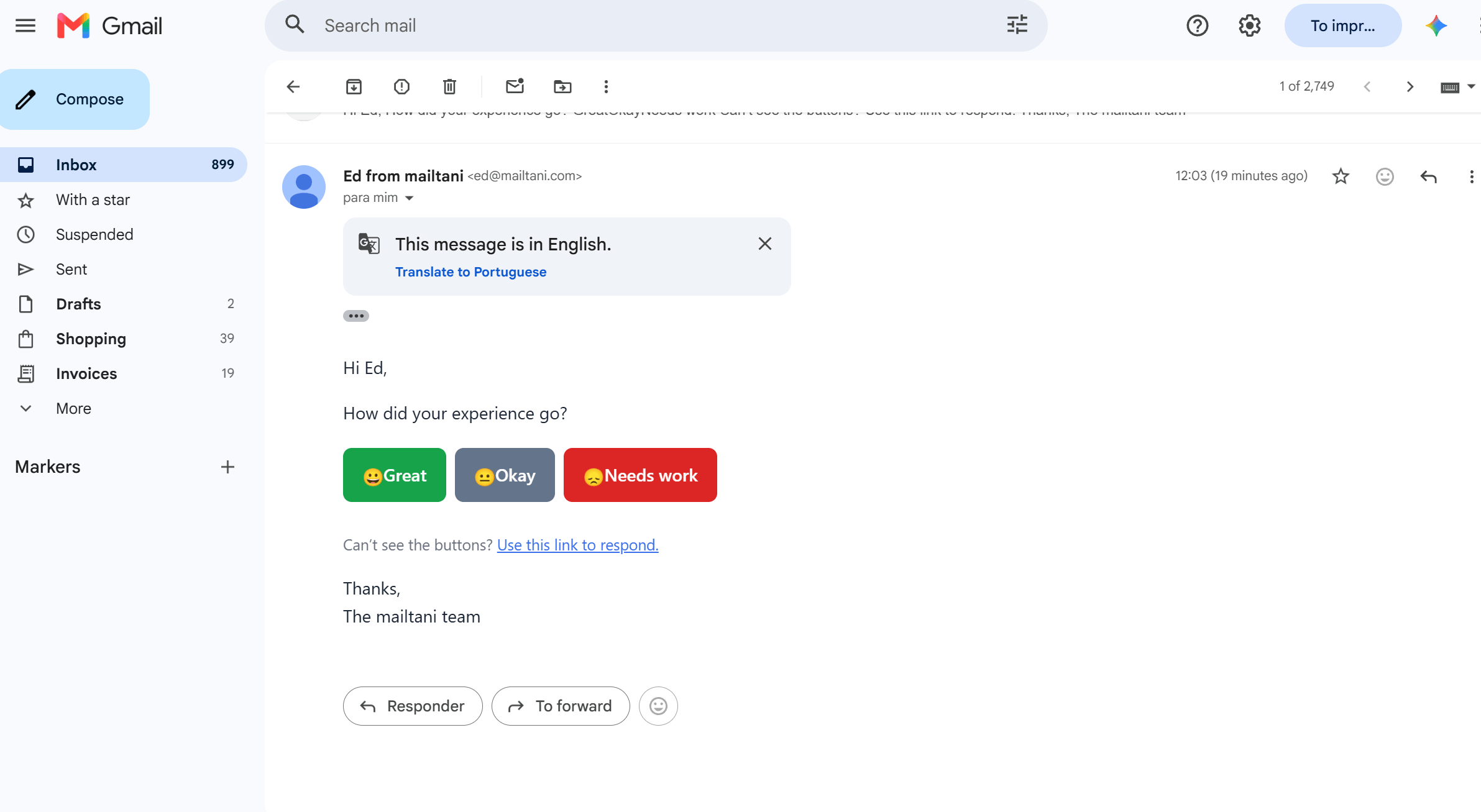
More than half of survey reminder opens often happen on phones. That changes the job of the email.
A mobile-first reminder should get a response before the reader has to pinch, scroll, or load a long form. The simplest version uses a single tap in the email, then sends people to a short follow-up page only when you need more detail. That approach works well for post-delivery checks in e-commerce, onboarding feedback in SaaS, and basic satisfaction signals after a support interaction.
Template
Hi {{firstName}},

How did your experience go?

[Great] [Okay] [Needs work]

Can’t see the buttons? Use this link to respond.

Thanks,
{{companyName}}
Design for the thumb, not the desktop preview
The rule here is simple. Ask one thing well.
For e-commerce brands, that might be “Did your order arrive on time?” or “How was the packaging?” For SaaS teams, “Was setup easy?” usually gets more responses than a broader product survey. Developer tools can ask a narrower question such as whether the integration worked on the first attempt.
The trade-off is depth. You will get more taps, but less nuance unless the click routes to a second step. That is usually a good deal when the goal is to identify happy customers, flag poor experiences fast, or suppress future reminders for people who already gave you a usable signal.
Timing matters as much as copy. Send this reminder after the customer has had time to use the product, but before the experience fades. In practice, that often means a few days after delivery, activation, or the original survey invite. Teams using Mailtani or a similar low-cost platform should set this up as a non-responder branch, then split by device or audience where possible so mobile-heavy cohorts get the interactive version first.
What tends to work:
- Use clear button text: “On time / Late” or “Easy / Confusing” beats vague icons.
- Keep tap targets large: Small buttons hurt response rates on phones.
- Include a fallback link: Some inboxes will not render interactive elements cleanly.
- Write click events back to the user record: Once someone taps, suppress the next reminder or move them into the right follow-up path.
- Test the second step too: A strong first click is wasted if the landing page is slow or asks six more questions.
Button style is worth testing because audience context changes the winner. Consumer e-commerce lists often respond well to bold visual buttons. B2B SaaS readers usually prefer plain text options that look more credible and less promotional. I also test whether the click should open a hosted microsurvey, a prefilled web form, or a simple thank-you page with one optional open-text field. The best option depends on how much detail the team can act on.
Deliverability and tracking deserve attention here because interactive reminders depend on a clean first impression. Use authenticated sending domains (start with a correct SPF record), keep the HTML light, and check rendering in major mobile inboxes before rolling it out. Then judge the setup by completed responses, not just click rate. A high tap rate with weak follow-through usually means the email promise and the landing experience do not match.
6. The Segmented Re-engagement Reminder
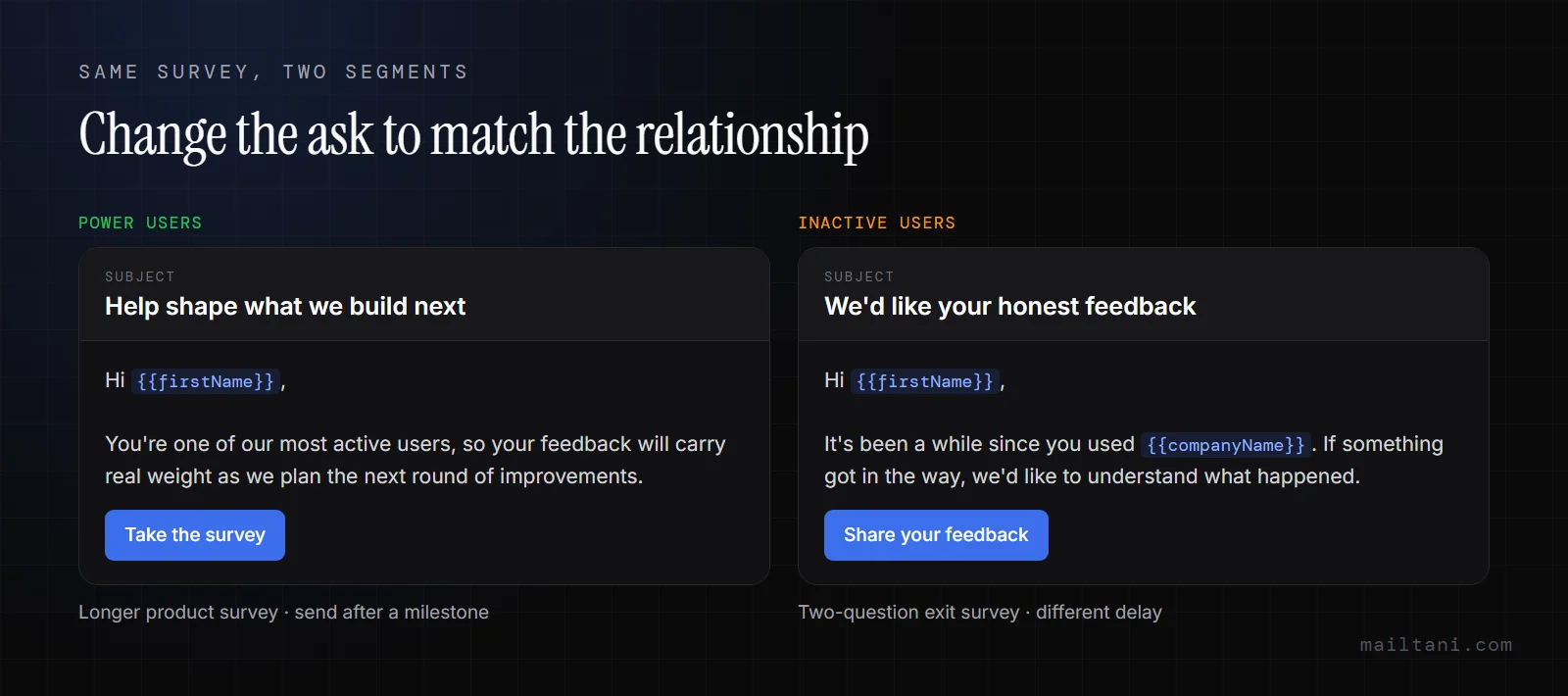
A re-engagement reminder should reflect why the person matters to the survey in the first place. High-intent customers, churned users, first-time buyers, and heavy product users do not need the same prompt, and they should not get the same one.
The goal is simple. Match the ask to the customer’s relationship with the product.
Template for power users
Hi {{firstName}},

You’re one of our most active users, so your feedback will carry real weight as we plan the next round of improvements.

[Take the survey]

Thanks,
{{companyName}}
Template for inactive users
Hi {{firstName}},

It’s been a while since you used {{companyName}}. If something got in the way, we’d like to understand what happened.

[Share your feedback]

Thanks,
{{companyName}}
Build segments around the question you need answered
Start with a few segments that change the message in a meaningful way. New customer. Repeat customer. VIP. Inactive. Power user. That is usually enough to improve response quality without turning one reminder into five separate campaigns your team has to maintain.
The copy should change with the job of the survey.
- E-commerce: Send VIP buyers a reminder that asks for input on premium products, early access, or service quality. Send first-time buyers a simpler post-purchase survey that focuses on checkout, shipping, or product fit.
- SaaS: Send active accounts a roadmap or workflow survey. Send inactive users a short friction survey focused on setup issues, missing features, pricing concerns, or team adoption.
- Developer tools: Send frequent contributors a more detailed product survey. Send lighter users a shorter version with plain language and one clear CTA.
This is also where the technical setup matters. Good segmentation is not just better copy. It affects timing, automation logic, and what happens after the click.
In practice, I keep the segment rules boring and stable. Purchase count from Shopify. Plan tier from Stripe. Last active date from the product database. Lifecycle stage from the CRM. Then I use one automation with conditional blocks instead of cloning campaigns for every cohort. That keeps reporting cleaner and reduces the chance that one segment gets missed or overmailed.
Mailtani fits this approach well because you can keep the audience logic, dynamic content, and suppression rules in one place without paying for an oversized stack. That matters when a SaaS team wants power users to get a longer product survey, but churn-risk users should get a two-question exit survey sent on a different delay.
Test the segment logic, not just the subject line. Compare a 7-day reminder against a 14-day reminder for inactive users. Test whether VIP shoppers respond better to exclusivity language or direct product-improvement language. Check completed responses by segment, not aggregate click rate. A campaign can look healthy overall while one valuable cohort ignores it.
Deliverability usually improves when segmentation gets tighter because the message fits the recipient better. That leads to more opens, more clicks, and fewer people ignoring the next send. It also gives you better feedback data, because you can see whether your problem is onboarding friction, product depth, or simple survey fatigue by cohort instead of guessing from one blended result.
7. The Transparent Feedback-Loop Reminder
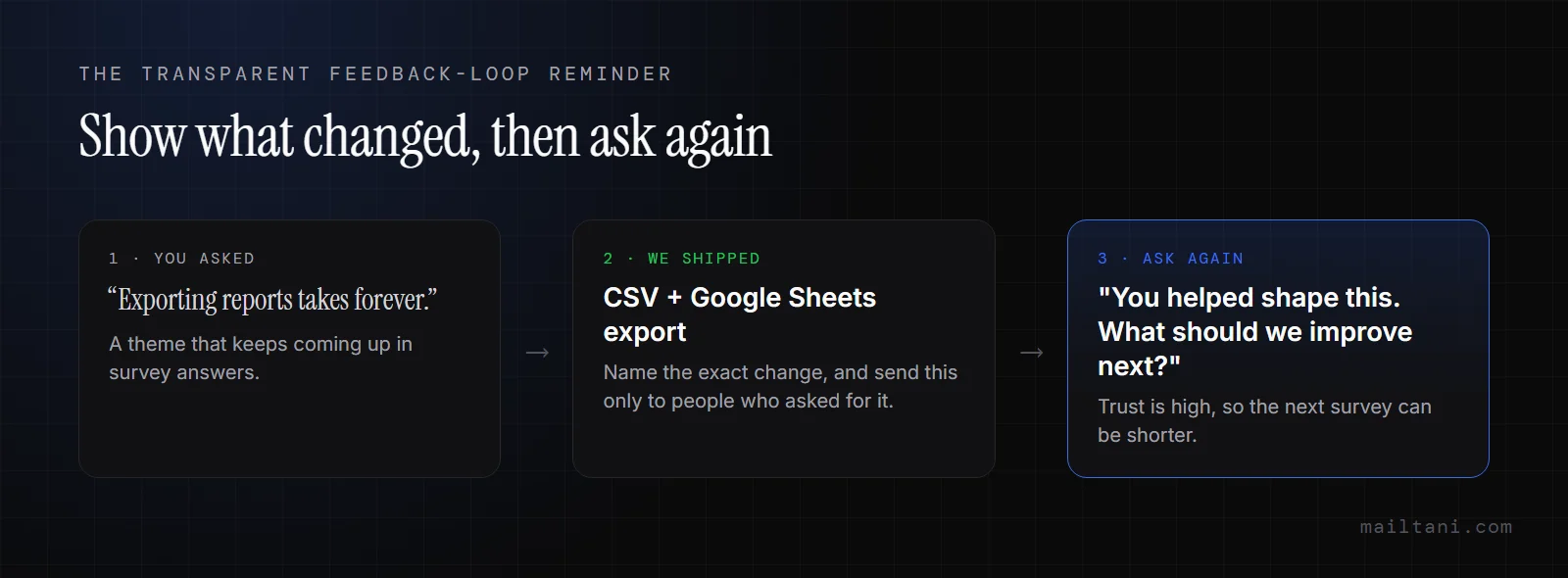
Teams that close the loop get better repeat participation because they answer the question every respondent has in mind: did anyone use the last survey?
That is the job of a transparent feedback-loop reminder. It shows a real change, ties that change to customer input, and asks for the next round of feedback while trust is high. For SaaS, that usually means sending after a feature release, onboarding fix, or policy change. For e-commerce, it fits after a packaging update, sizing revision, returns-process change, or post-purchase support improvement.
Template
Hi {{firstName}},

You asked for better {{improvementArea}}, and we made changes based on customer feedback.

Now we’d love to hear what should come next.

[Take the survey]

Thanks for helping us build a better experience,
{{companyName}}
Show the change clearly
This reminder works best when the proof is specific. “We listened” is weak copy. “You asked for a faster export flow, and we shipped CSV + Google Sheets export last week” gives the recipient a reason to believe the next response will matter too.
I use three credibility checks before sending this type of reminder:
- Name the exact change: Call out the feature, policy, or product update in plain language.
- Match the audience to the change: Send the email only to customers who likely care about that update.
- Make the proof visible: Add a screenshot, product image, or short before-and-after explanation.
The targeting matters as much as the copy. If a SaaS company ships an admin permission fix, the reminder should go to admins, not every user in the workspace. If a DTC brand improves sizing based on return comments, send the reminder to recent buyers in the affected category, not the full list. Broad sends dilute the message and hurt response quality.
Timing is different from the urgency-style reminder earlier in this article. Do not rush this one out just to fill the cadence. Send it after the change is live, support has seen it in use, and the team can describe the improvement in one sentence without hedging. In practice, that usually means waiting until the release is stable and the landing page, changelog, or product imagery is updated.
A few technical setup choices make this strategy work better on lower-cost platforms like Mailtani. Tag the survey theme at send time, such as onboarding, checkout, delivery, or retention. Pass that tag into your survey tool and store completions back on the customer record. Then A/B test the proof element, not just the subject line. One version can lead with “you asked, we changed X.” Another can lead with the visible outcome, such as “returns are simpler now.” Measure completed surveys and comment quality, not clicks alone.
Keep the ask tight. If the email already contains proof, the survey can be shorter than usual because the trust work is already done.
Operationally, this approach depends on a clean feedback log. Store request themes somewhere the email team and product or CX team can query later. A roadmap tool works. A spreadsheet works too if the labels stay consistent. What matters is being able to pull a believable line from prior feedback to shipped change, then trigger the reminder to the right segment without rebuilding the campaign every time.
7 Survey Reminder Email Samples Compared
Jotform, citing Pointerpro, puts an average survey response rate at around 33%. For subject lines to pair with each template, see these follow-up email subject lines. The gap between an average program and a strong one usually comes from setup, not copy alone.
This comparison is useful for one reason. It shows which template fits your audience, your tech stack, and the amount of operational work your team can support. A SaaS team sending from Mailtani does not need the same reminder system as a DTC brand chasing post-purchase feedback across SMS and email. If you do mix the two, note that the free carrier gateways people used for texting an email are shutting down, so SMS reminders need a proper SMS tool.
| Template | Setup Complexity | What You Need | Likely Result | Best Fit | Main Advantage |
|---|---|---|---|---|---|
| The Simple One-Click Reminder | Low | One clear CTA, light HTML or plain text, basic suppression of prior responders | Fast responses from people who only needed a nudge | Post-purchase e-commerce surveys, onboarding check-ins, short SaaS feedback asks | Lowest friction and strong inbox placement |
| The Value-First Contextual Reminder | Medium | Purchase or product-use data, dynamic copy blocks, tighter design control | Better response quality because the ask feels relevant | E-commerce brands with order data, SaaS teams surveying by feature or plan | Adds context without making the email long |
| The Incentivized Multi-Step Reminder Series | High | Automation rules, incentive tracking, exclusion logic, budget control | More completions, with added cost and higher unsubscribe risk if overused | Higher-stakes research, churn analysis, review generation, detailed CX surveys | Recovers responses that a single reminder will miss |
| The Urgency-Driven Time-Sensitive Reminder | Medium | Deadline copy, careful send timing, optional countdown treatment, QA on time zones | Quick spike in action during a short response window | Limited-time feedback requests, launch votes, seasonal buying feedback | Gives people a clear reason to act now |
| The Mobile-First Interactive Reminder | High | Interactive email support or fallback design, event tracking, heavier QA across clients | Better mobile completion for very short surveys | NPS, CSAT, delivery satisfaction, one-question check-ins | Removes extra taps for mobile users |
| The Segmented Re-engagement Reminder | High | Clean tags, CRM sync, audience rules, reporting by segment | Higher response quality and fewer irrelevant sends | Lapsed buyers, inactive trial users, plan-based SaaS cohorts | Sends a different ask to different behavior groups |
| The Transparent Feedback-Loop Reminder | Medium | Tagged feedback themes, proof of shipped changes, synced survey completions | Stronger trust and better comment depth | Product-led SaaS, community-led brands, stores acting on common complaints | Shows customers their input changed something real |
The trade-off is simple. The easiest reminder gets sent faster. The more advanced reminders usually produce better feedback, but only if your data, automation, and suppression logic are clean.
A few practical picks help.
If you run a smaller e-commerce team and need results this week, start with the simple one-click reminder or the value-first version. Both work well on lower-cost platforms because they do not depend on heavy engineering. If you run SaaS lifecycle programs with usable event data, segmented re-engagement and transparent feedback-loop reminders usually give better insight because the prompt matches what the user experienced.
Do not choose by creativity alone. Choose by operational fit. A good survey reminder template is not the one with the cleverest copy. It is the one your team can send on time, personalize correctly, suppress after completion, and test without breaking reporting.
Survey Reminder FAQ
When should I send a survey reminder email?
Send the first reminder 2–3 days after the original invite, while the experience is still fresh. If you send a second, do it 5–7 days after the invite.
How many survey reminders should I send?
Two is enough for most lists. Only add a third if it has a real deadline or an incentive, and send every reminder to non-responders only.
What should a survey follow-up email say?
Say how long the survey takes, why their answer matters, and put one clear button near the top. Keep it under 80 words. For a B2B client or an executive, use a more formal greeting and sign-off (how to write a formal email).
What's a good subject line for a survey reminder?
Short and specific works best: "Quick follow-up on your feedback", "2 minutes to share your thoughts?", or "Last day to share feedback" for the final reminder.
Should I offer an incentive in a survey reminder?
Save it for the second or third reminder. Leading with an incentive attracts low-effort answers from people who would have replied anyway.
How to Send Survey Reminders Automatically
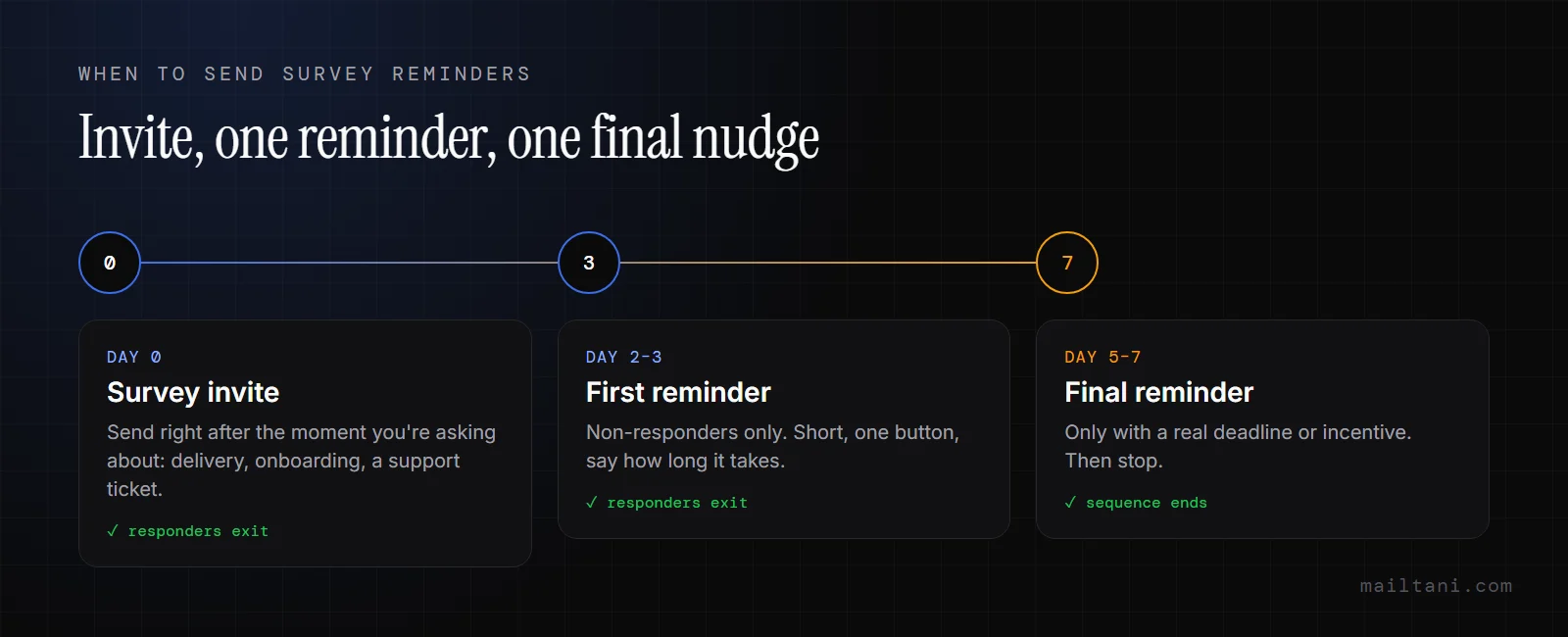
Teams that add reminders usually get more survey responses. The lift does not come from copy alone. It comes from a system that sends the right follow-up to the right non-responder at the right time, then stops the moment that person completes the survey.
Start with timing. In practice, the first reminder usually works best while the experience is still fresh. For e-commerce, that might be shortly after delivery or a few days after the product has had real use. For SaaS, it is often after onboarding, first value, or a support interaction, not at some fixed delay that ignores product behavior. Send too early and the ask feels premature. Wait too long and the customer has to work to remember what happened.
Keep the sequence short and controlled.
A simple setup is enough for many programs: the initial survey email, one reminder to non-responders, then a final follow-up only if the feedback is high value and the audience has not shown fatigue. The operational rule matters more than the exact number. Suppress anyone who already responded. Exclude recent complainers if the survey is not meant for recovery. Watch completions by send time and segment, not just opens or clicks, because a reminder with a lower open rate can still produce better completion quality.
Segmentation turns a generic reminder into a relevant one. A repeat buyer should not get the same prompt as a first-time purchaser who may still be waiting on an exchange. A trial user who never activated needs a different question than a power user on a paid plan. In SaaS, I usually segment by lifecycle event first, then by plan or account health. In e-commerce, purchase recency, product category, order value, and return history are more useful than broad demographic buckets.
Deliverability decides whether any of that work pays off. Survey sends often go wrong because the team treats them like low-risk transactional traffic and skips the setup work. Use authenticated sending. Warm new domains before pushing a reminder series through them. Keep complaint rates low by limiting reminder volume and honoring suppressions fast. If inbox placement slips, rewriting the subject line will not solve the underlying problem.
Cost changes behavior too. If every extra branch in the workflow raises your monthly bill, teams avoid segmentation, skip holdout tests, and settle for one generic reminder. Cost-efficient platforms matter here because survey programs improve through iteration. A setup like Mailtani gives e-commerce and SaaS teams the practical pieces for this workflow: segmentation, visual automations, real-time analytics, IMAP reply sync, REST API access, inbox warmup, and control over sending through your own provider. That makes it easier to test timing, run simple A/B splits, and connect survey completions back to the campaign logic that produced them.
The goal is ownership. Build a reminder workflow your team can repeat, measure, and improve. Write copy that matches the customer moment, route each reminder by behavior, suppress aggressively, and review performance by completion rate, response quality, and inbox placement together. That is how a survey reminder template becomes a feedback loop your team controls.
