
Can You Text an Email? How to on Samsung, iPhone & Android
Yes, you can text an email address from most phones. Here's how on Samsung, iPhone and Android, which carriers still support it in 2026, and what to use instead.

You’re usually asking “can you text an email” because you only have someone's email address, or because one channel just failed you.
TL;DR: Yes, you can text an email. On most phones you type the email address into the recipient field of your messaging app, where the phone number normally goes, and send. The text arrives in their inbox as an email. On iPhone it goes as an iMessage if the address belongs to an Apple ID, otherwise as an MMS. It depends on your carrier: AT&T ended text-to-email in June 2025, and the free email-to-text gateways that ran the other way are shutting down. For business alerts, use an SMS platform or API instead.
Texting an email is handy when you're on your phone and only have someone's email address, or when you want a quick note to land in an inbox instead of a chat. Below is how to do it on Samsung, iPhone and other Android phones, what still works in 2026, and what businesses should use instead.
How to Text an Email From Your Phone
The trick is the same on every phone: put the email address where the phone number goes. Your phone sends the message as an MMS (multimedia message), and your carrier hands it to the recipient's email server.
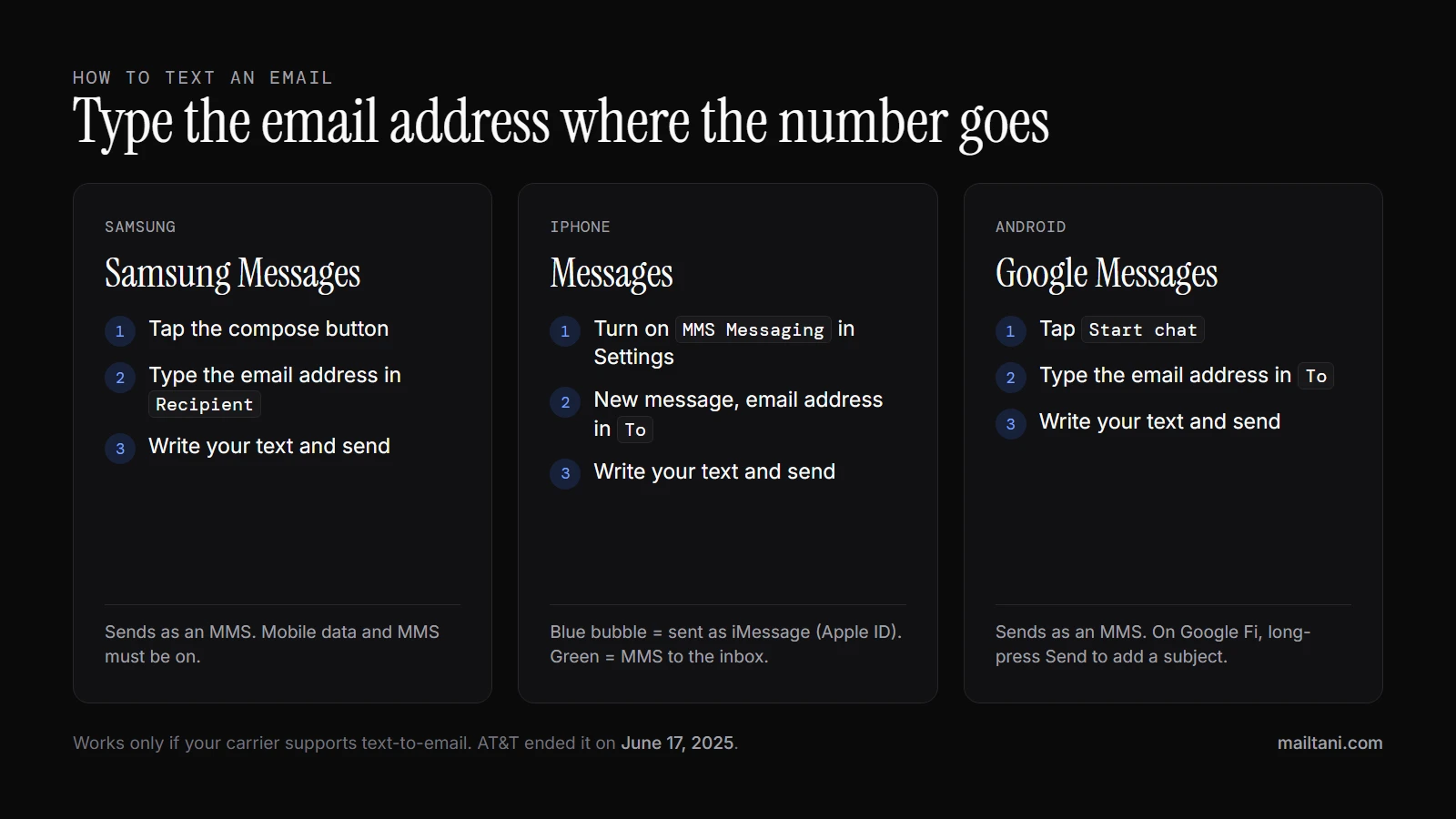
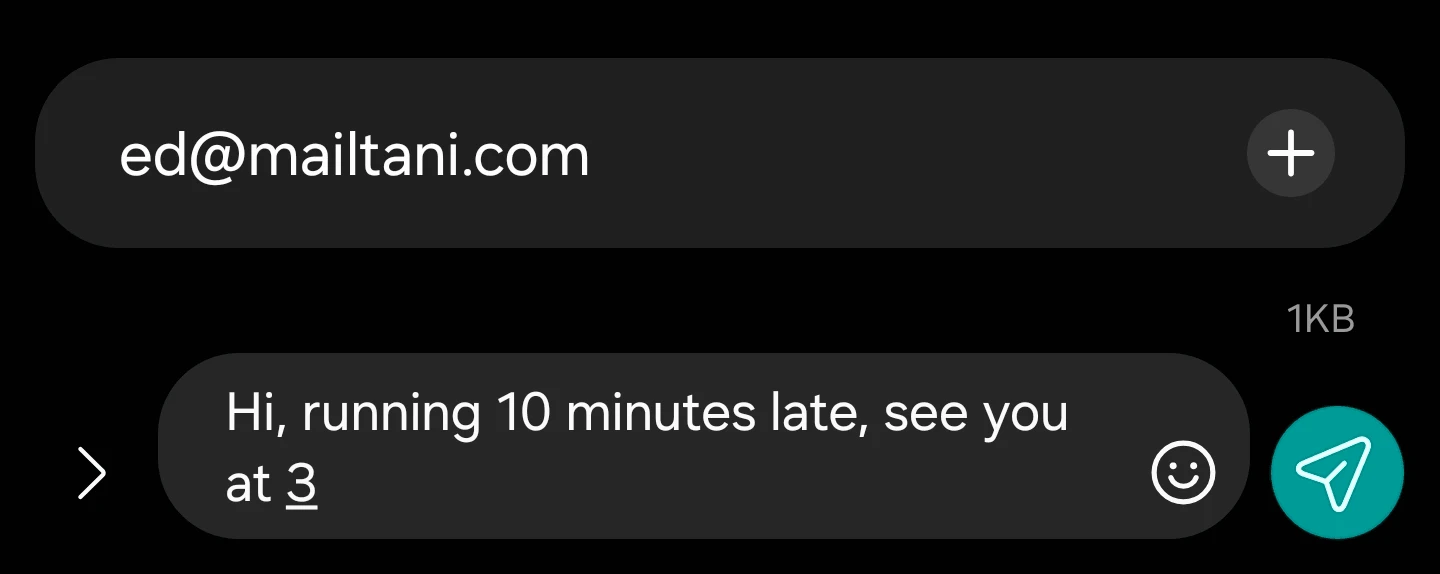
Samsung Galaxy (Samsung Messages)
- Open Messages and tap the compose button.
- In the recipient field, type the full email address instead of a phone number.
- Write your message and tap Send.
Samsung Messages switches the message to MMS automatically when the recipient is an email address, so mobile data needs to be on. Some carriers charge for MMS or don't allow it on every plan.
iPhone (Messages)
- Go to Settings → Apps → Messages (on older iOS, Settings → Messages) and turn on MMS Messaging.
- Open Messages, start a new message, and type the email address in the To field.
- Write your message and tap Send.
Watch the bubble color. Blue means the address belongs to an Apple ID, so it went as an iMessage and won't show up in their email inbox. Green means it went as an MMS and will arrive as an email.
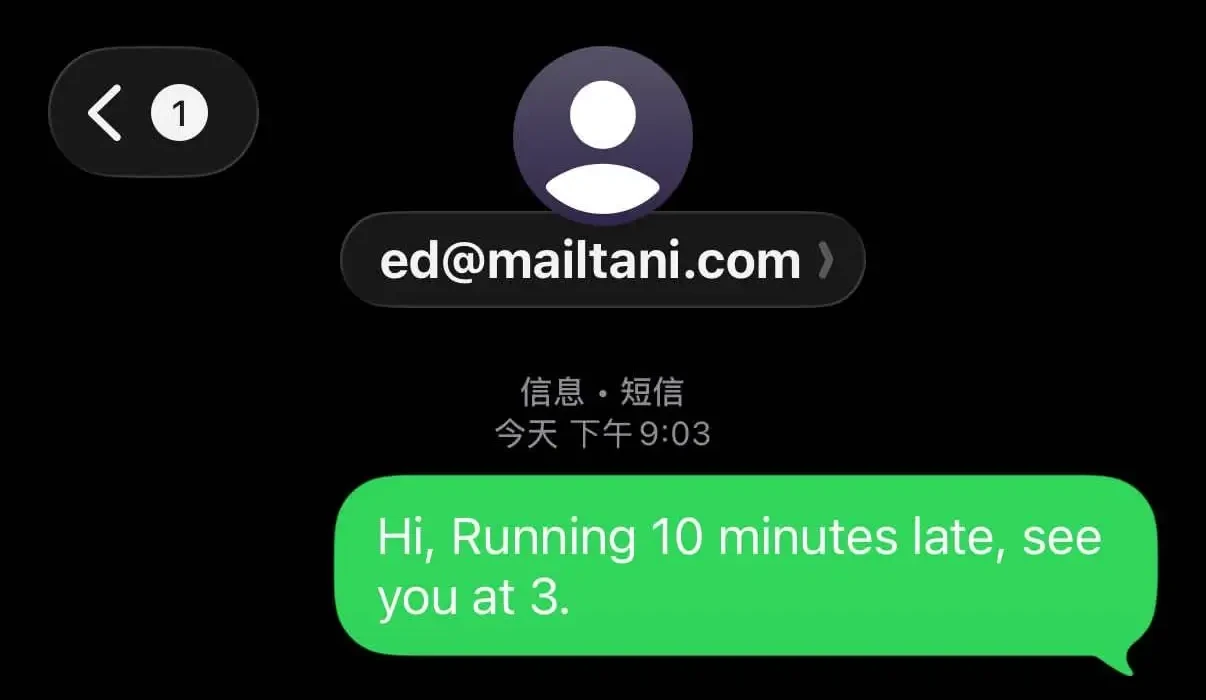
An iPhone (set to Chinese) texting an email address: the green bubble and the "Text Message · SMS" label mean it went as a text, not an iMessage.
Other Android phones (Google Messages)
- Open Messages and tap Start chat.
- Type the email address in the To field.
- Write your message and send.
It goes as an MMS. On Google Fi you can add a subject line by long-pressing the Send button.
What the recipient sees
The text lands in their inbox as a normal email. The sender is your phone number at your carrier's domain, and the message is usually in the body or attached as a short text file. If they reply, the reply comes back to your phone as a text, on carriers that still support it.
If your text to an email won't send
- Your carrier doesn't support it. AT&T ended email-to-text and text-to-email on June 17, 2025, so AT&T and Cricket lines can't text an email address anymore.
- MMS or mobile data is off. Texts to email addresses always go as MMS, even with no picture attached.
- It went as an iMessage. On iPhone, a blue bubble means it reached the person's Apple devices, not their inbox.
- The address has a typo. Unlike a phone number, there's no contact match to catch it.
- The inbox is filtering it. If your texts reach other addresses but not this one, the receiving mailbox may be blocking them. Our guide to email not working covers the inbox side.
Does Email-to-Text Still Work in 2026?
The reverse direction, sending an email that arrives as a text, used to run through free carrier gateways: you emailed number@carrier-domain and the carrier turned it into an SMS. Those gateways are closing.
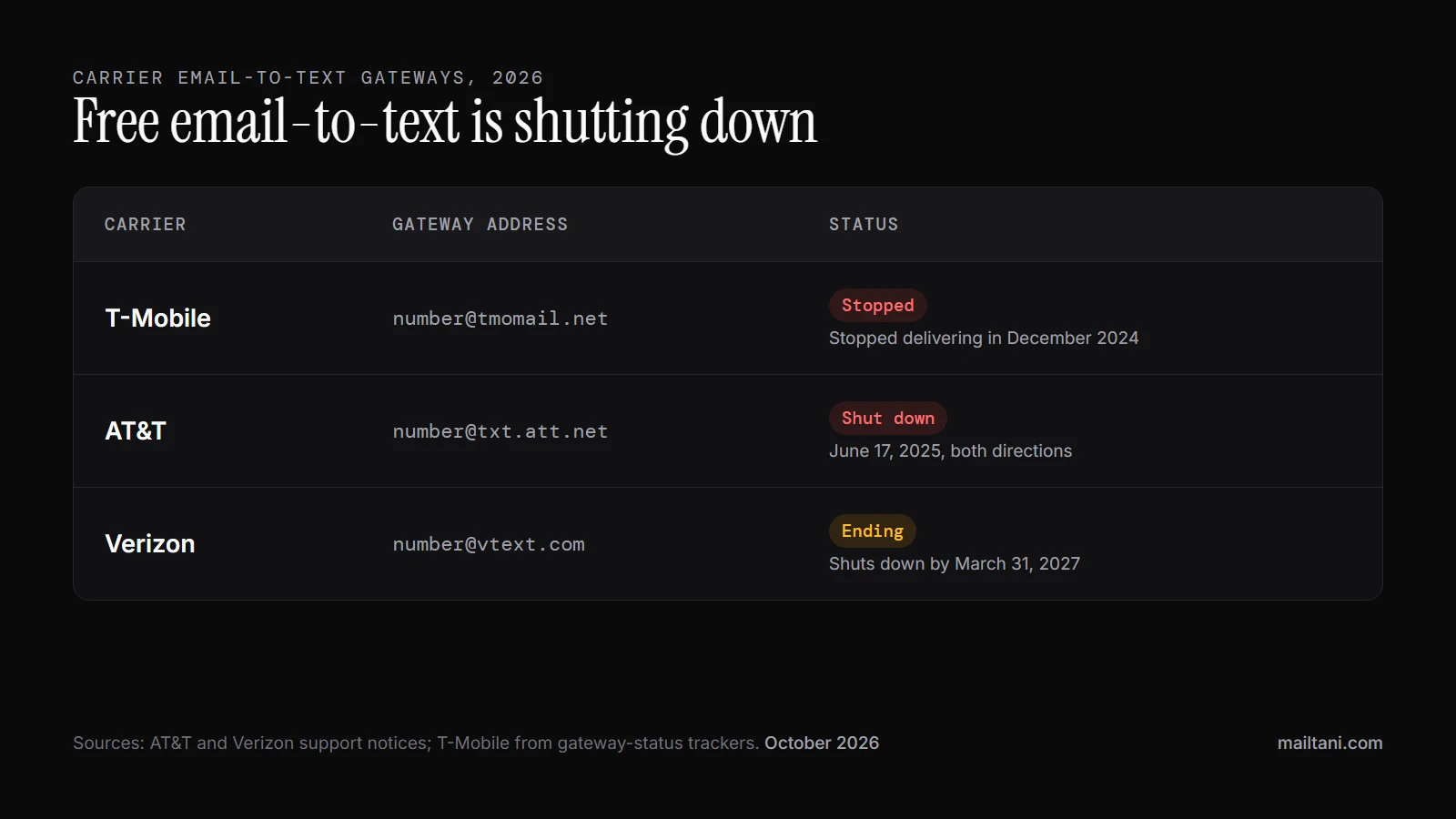
| Carrier | Gateway address | Status in 2026 |
|---|---|---|
| T-Mobile | [email protected] | Stopped delivering in December 2024 |
| AT&T | [email protected] | Shut down on June 17, 2025, in both directions |
| Verizon | [email protected] | Shutting down by March 31, 2027, and heavily spam-filtered until then |
For personal use you can still text an email from your phone where your carrier allows it. For anything a business depends on, such as alerts, reminders or customer notifications, the free gateways are no longer an option. Use an SMS platform or API, covered below.
Why Businesses Text Instead of Email
A flash sale is a good example. Email can carry the creative, the branding, and the longer message. But if the offer expires soon, waiting on inbox behavior is risky. Business texting behaves very differently. Business text messages achieve a 98% open rate and 96% are read within 3 minutes, while email averages a 20% open rate, according to Kenect’s business texting data.
That’s why the question matters. Not because texting an email is clever, but because channel choice changes outcomes when timing matters.
The business use case is usually urgency
Teams reach for email-to-text in a few common situations:
- Time-sensitive alerts like account verification, fraud warnings, delivery issues, or appointment changes, the kind of transactional emails that can't wait for someone to open an inbox
- Operational updates when a staff member won’t be sitting in front of an inbox
- Fallback delivery when email is the system of record but SMS is the attention layer
- Two-step outreach where email holds the detail and text nudges the recipient to check it
Practical rule: Use SMS for urgency and email for depth. Problems start when you expect one message format to do both jobs well.
The decision isn’t whether you can send a text to an email address or route email into SMS. It’s whether you’re doing a one-off shortcut or building a communication path your business can trust.
Cheap tricks and real systems are not the same
The free route usually means a carrier gateway. It feels direct because it is direct. It also gives you very little visibility, little control over formatting, and weak reply handling.
The professional route usually means an API-based workflow. It takes more setup, but you gain logs, validation, cleaner routing, and a system you can evolve. If you’re sending anything customer-facing at scale, those differences stop being technical details and become operating costs.
How Your Phone Carrier Translates Text to Email
The first encounter with email-to-text is often through a carrier gateway. It looks odd, but the idea is simple. The mobile carrier acts like a translator between messaging systems.
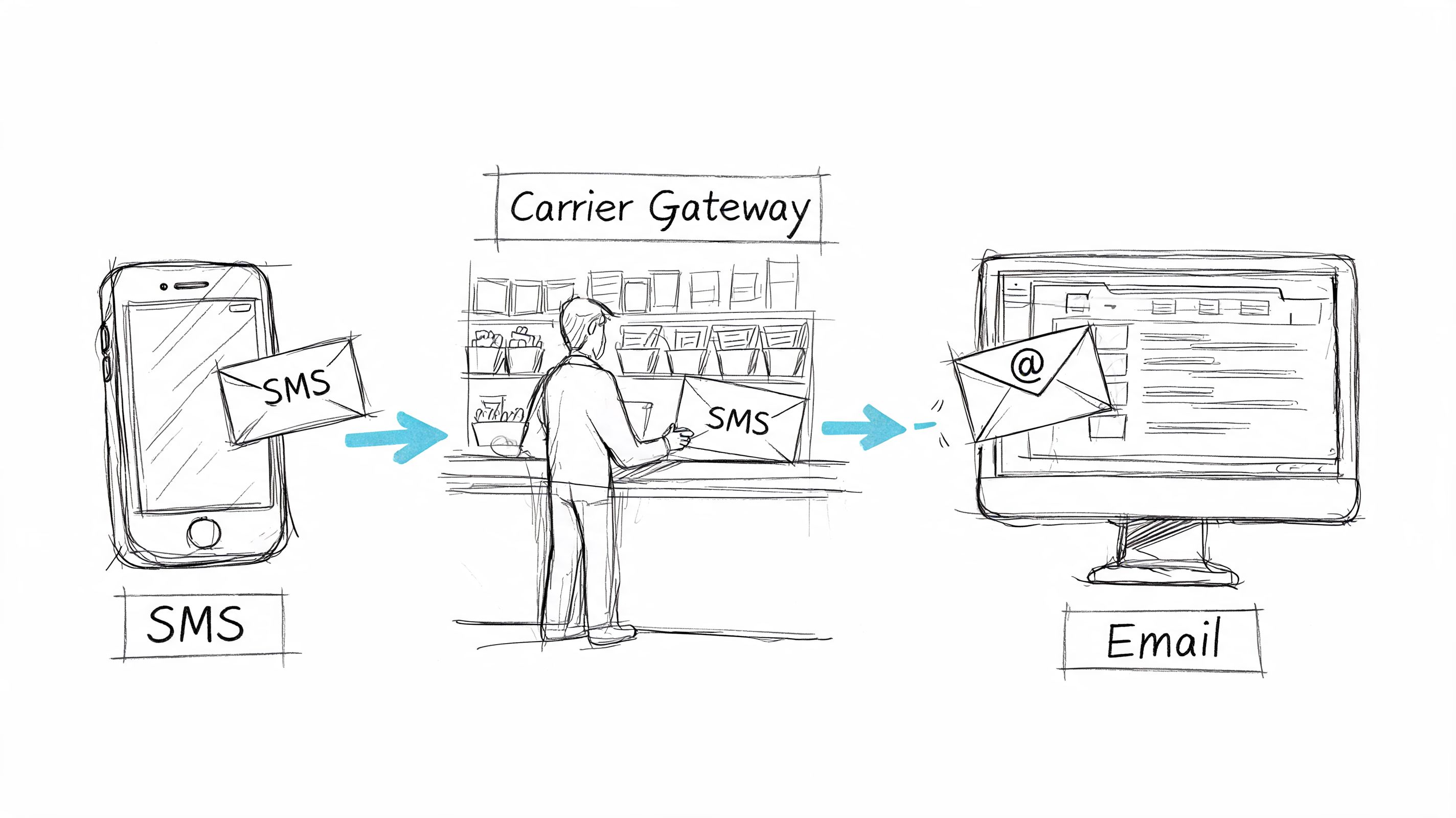
Carrier-specific SMS-to-email gateways let you text an email address by routing the message through a domain managed by the mobile operator, which converts the short SMS payload into email using carrier infrastructure and protocols like SS7, as described in Vida’s explanation of SMS-to-email gateways.
What actually happens
Think of the carrier gateway as a mailroom clerk.
You send a message to a specially formatted destination. The carrier receives it, recognizes that the destination should be transformed, then repackages it for the other system. A text becomes an email, or an email becomes a text, depending on the direction.
In plain terms, the process looks like this:
- The message reaches the carrier gateway
- The gateway parses the sender, recipient, and body
- The carrier reformats the content for the destination channel
- The recipient gets a simplified version of the original message
That’s why these messages often lose polish. SMS and email weren’t built to preserve the same structure.
Why it feels easy and why it isn't
For personal use, carrier gateways used to be convenient. You didn’t need to build anything or hire a developer. That’s mostly over: T-Mobile’s and AT&T’s gateways are gone, and Verizon’s ends by March 2027 (see the 2026 status table above).
The catch is that gateways are old infrastructure. They were never designed to be a polished business messaging layer with reporting, routing logic, and lifecycle tracking. They’re translators, not campaign systems.
A carrier gateway is good at moving a short message from one format to another. It’s not good at behaving like a customer communications platform.
Attachments are another friction point. Some gateways strip them. Others convert them poorly. Long bodies get clipped, reformatted, or delivered in a way that feels broken to the recipient.
Comparing Your Four Main Sending Options
If you’re deciding how to text an email for business use, there are four main paths. They don’t compete on the same level. Some are hacks. Some are proper systems.
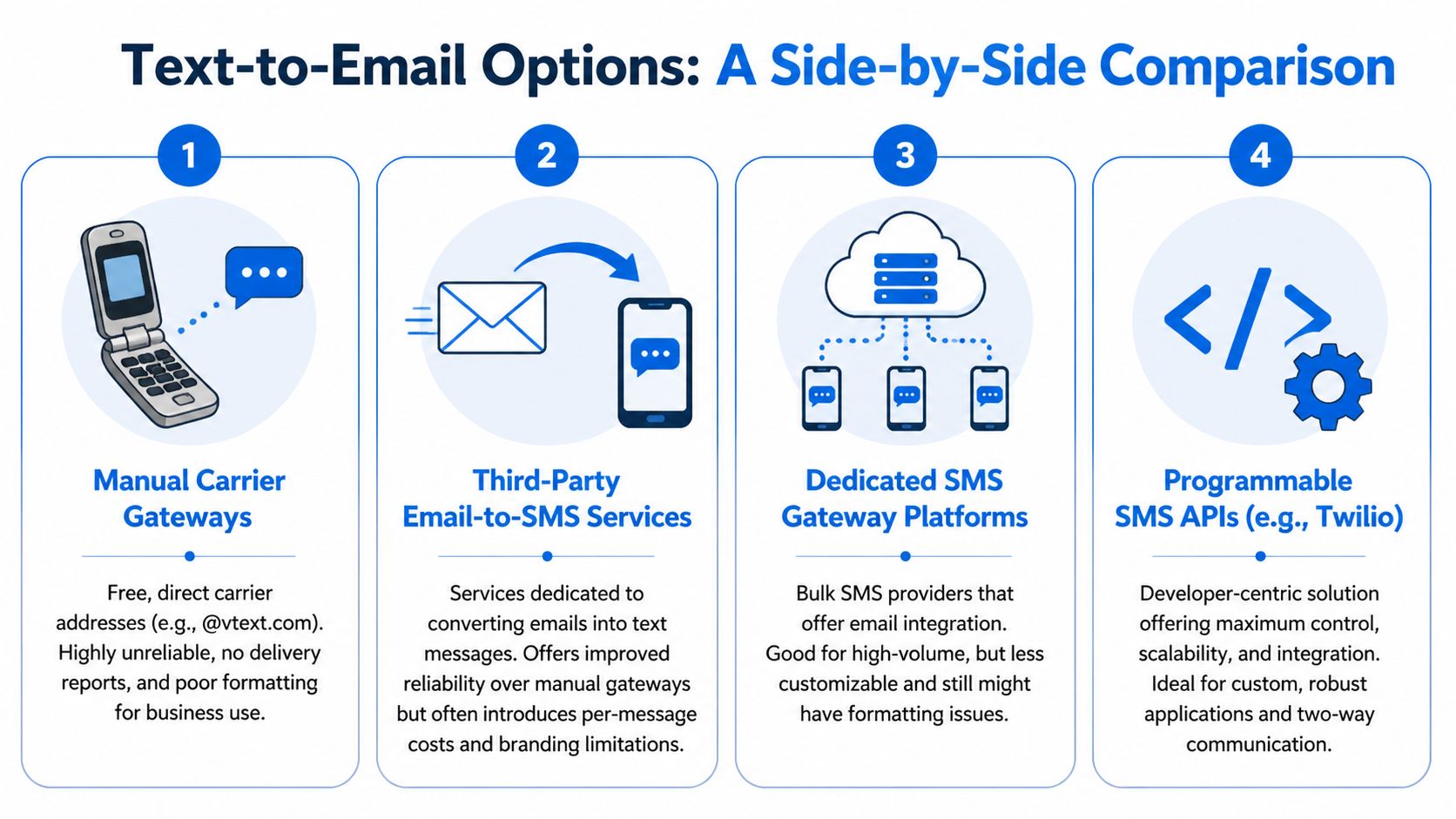
Carrier gateways (mostly shut down)
This was the quick-and-dirty method: send to a carrier-formatted address and hope the message arrives readable. In 2026 it’s barely an option. T-Mobile and AT&T have shut their gateways, and Verizon’s ends by March 31, 2027.
Best use today: nothing you depend on. Verizon-only internal tests at most.
Worst use: customer notifications, marketing, or anything that needs reliable reply handling.
Forwarding services and hosted bridges
Some services sit in the middle and convert emails into texts for you. They’re easier than building an API workflow, and often cleaner than manual gateways.
They’re useful when a team wants convenience, but they often add branding limitations, another vendor in the chain, and another place where failures can happen.
SMS platforms and programmable APIs
The rationale for business use becomes clear. A dedicated SMS provider gives you an explicit sending layer, and a programmable API lets you define how email content becomes a text message.
That means you can validate sender inputs, rewrite content, map replies, and log everything.
For a broader look at bridging email and text for business, it helps to compare where simple forwarding ends and real messaging workflow design begins.
Direct integration patterns
This is the developer-minded approach. Your app or automation receives an email event, decides whether SMS is appropriate, transforms the message, and sends through your chosen providers.
That architecture gives the most control over cost, deliverability, and portability. It also makes provider changes less painful because the business logic belongs to you.
For teams evaluating infrastructure choices, a curated email providers list is useful because your provider setup affects how much control you retain.
Email-to-Text Methods Comparison
| Method | Cost | Scalability | Reliability | Two-Way Replies |
|---|---|---|---|---|
| Carrier gateways | Free, but mostly shut down | Poor | Shutting down | Weak |
| Third-party forwarding services | Ongoing vendor cost | Moderate | Better than manual gateways | Limited to service design |
| Dedicated SMS gateway platforms | Usage-based and more predictable | Strong | Good | Usually supported |
| Programmable SMS APIs with direct integration | Build cost plus provider usage | Strongest | Best control | Best control |
A simple rule helps here. If a human can manage the entire flow manually, a gateway may be enough. If a business process depends on it, use a system that exposes logs, routing, and reply state.
The Hidden Problems with Texting Emails
The free methods look attractive because they hide failure until after you send.
Carrier gateways and improvised forwarding setups can work just well enough to lure teams into using them for customer-facing communication. That’s usually when the weak points show up.
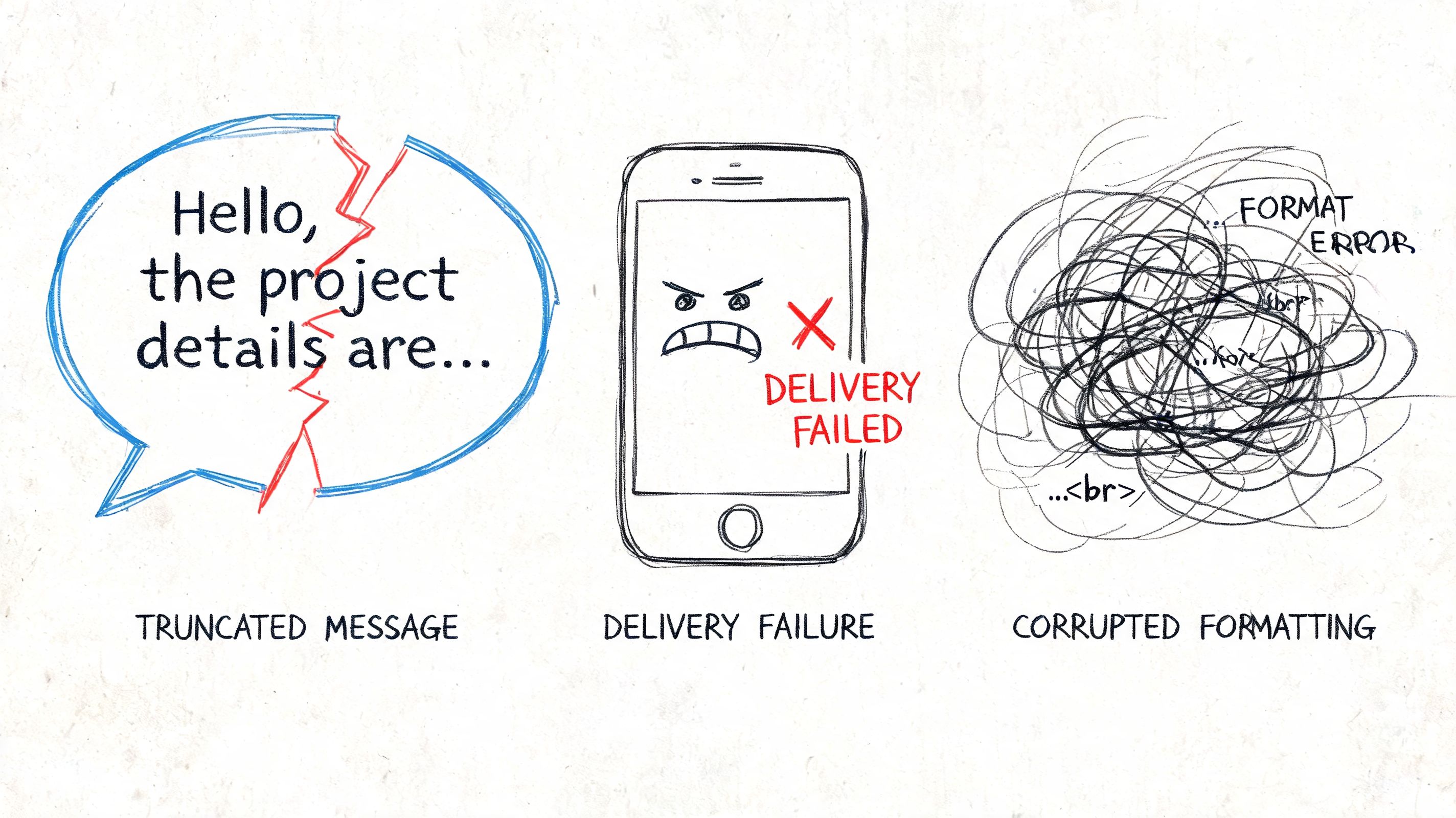
Formatting breaks first
Email content is structured for inboxes. SMS is not. Subject lines, signatures, links, footers, and multipart content become clutter when squeezed into a text workflow.
What works poorly:
- Long bodies that assume scrolling, spacing, and visual hierarchy
- HTML-heavy templates with tracking elements and formatting baggage
- Attachment-dependent messages where the file matters as much as the text (video is the worst case; see how to send video mail)
- Multi-recipient logic because texts are usually much more linear
Teams underestimate the cost of “free.” The message technically sends, but the recipient gets something confusing.
If the recipient has to decode the message format, delivery didn’t solve the problem.
Replies create operational debt
Reply handling is where most email-to-text shortcuts fall apart. The sender assumes replies will route cleanly. In practice, they may land in the wrong inbox, show up without context, or fail to map back to the original thread.
That creates three problems fast:
- Support confusion because agents can’t tell which message triggered the reply
- Broken automation when a system can send but can’t reliably ingest responses
- Scattered records across inboxes, tools, and carrier behavior you don’t control
This is one reason serious teams invest in centralized deliverability and reply visibility instead of treating messaging like a forwarding trick. If you care about inbox placement and message control on the email side, a dedicated email deliverability workflow becomes part of the same operational discipline.
Compliance gets ignored until it hurts
The biggest blind spot isn’t technical. It’s legal and operational.
A major issue with gateway-based emailing and texting is HIPAA and GDPR risk. If a business casually pushes sensitive information through SMS-email workflows, exposed data and scattered replies can create serious compliance problems, especially because carriers may retain messages and the conversation trail becomes fragmented, as discussed in Holland & Hart’s guidance on emailing and texting PHI.
That changes the answer to “can you text an email” for healthcare, finance, and account-security use cases. The question becomes: should this specific message ever pass through that path?
For regulated communication, “it usually works” isn’t a standard. You need consent handling, retention logic, access control, and a clear record of what was sent through which channel.
Building a Scalable Email-to-SMS System
If the workflow matters, build around events and APIs instead of gateways.
The clean model is simple: email remains one system, SMS remains another, and your application decides when to bridge them. That keeps the channels separate while giving you control over formatting, logging, and reply routing.
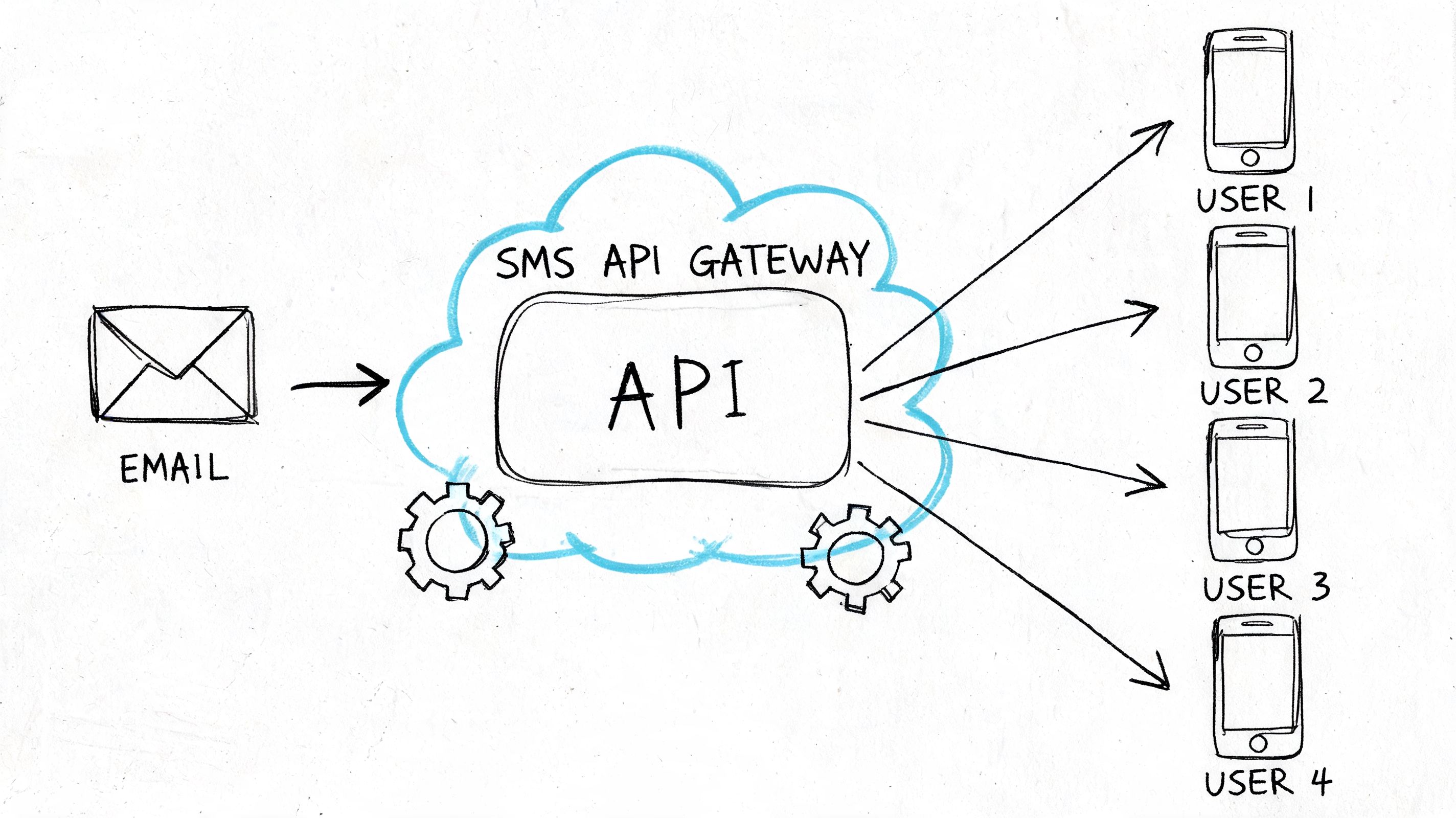
A practical architecture
A scalable setup usually includes these parts:
- An inbound trigger from your email system, app event, or support tool
- A transformation layer that strips the message down to SMS-safe content
- An SMS API provider that handles delivery and status callbacks
- A reply router that sends responses back into the right inbox, CRM, or app record
- A queue so temporary provider issues don’t block the whole workflow
If you’re designing for reliability, queueing matters: a message queue is what keeps bursts, retries, and asynchronous delivery from turning into dropped notifications.
What a minimal workflow looks like
Here’s the conceptual version:
- A customer action creates an email event.
- Your app checks whether the message is urgent enough for SMS.
- A function rewrites the email into plain, short text.
- The SMS API sends the message.
- Delivery status and replies come back through webhooks.
- Your system stores the interaction against the customer record.
That model avoids a lot of the pain that gateway methods create. You decide which emails become texts. You control the output. You know what happened after send.
A bare-bones pseudocode flow looks like this:
on email_event:
  if message_type is urgent and recipient has sms_consent:
    sms_body = summarize(email_subject, email_body)
    send_sms(recipient_phone, sms_body)
    log_delivery(message_id, recipient_phone)
The key isn’t the code. It’s ownership of the logic.
Engineering rule: Don’t convert every email into a text. Convert specific events into purpose-built SMS messages.
For the email side, keep your sending stack modular. A provider-agnostic setup with stable SMTP integration options gives teams flexibility when they need to change providers, isolate workflows, or separate transactional mail from other streams.
That’s the business advantage of the API-driven route. Better control usually means lower long-term waste, cleaner debugging, and fewer surprises when volume grows.
When to Use Each Email-to-Text Method
The right answer depends on what you’re sending, how often you’re sending it, and what happens if the message fails.
The fast decision guide
Use your own phone (text to an email address) for one-off personal messages. Carrier email-to-text gateways are no longer a real option: T-Mobile and AT&T have closed theirs and Verizon’s ends by March 2027.
Choose a forwarding service when you need a simple bridge and your workflow is still light enough that another vendor layer won’t slow the team down too much.
Use a dedicated SMS platform when you have repeatable business notifications and need cleaner sending, basic reporting, and more predictable operations than ad hoc gateways can provide.
Build around a programmable API workflow when the communication path is part of your product, store, support operation, or account lifecycle. That’s the point where logging, routing, consent, and reply mapping stop being optional.
One extra filter before you send
There’s another factor that most “can you text an email” articles ignore. Accessibility.
Existing guides often miss the needs of rural users who depend on SMS as a universal channel and users with disabilities who need clearer, more compatible message formats, which makes accessible plain-text design part of the decision, as noted in Clickatell’s discussion of messaging in underserved communities.
That changes how you write the message itself:
- Keep it plain-text first so meaning survives translation between systems, the same reasoning as plain text vs HTML email
- Put the key action early because formatting may collapse
- Avoid vague references like “see below” or “open the attachment”
- Write for assistive tech and low-bandwidth contexts instead of assuming a polished smartphone experience
If you’re still deciding, use this shortcut. The less business-critical the message is, the more you can tolerate a shortcut. The more critical it is, the more you should own the infrastructure, the logic, and the reply path.
Texting an Email FAQ
Can you text an email address?
Yes. On Samsung Messages, iPhone Messages or Google Messages, type the email address where the phone number goes and send. It's delivered as an MMS to their inbox, as long as your carrier supports text-to-email.
Does texting an email cost anything?
It counts as an MMS on your phone plan. Most unlimited plans include MMS; on pay-as-you-go plans your carrier may charge per message.
Can the person reply to my text by email?
Usually, yes. The email comes from your number at your carrier's domain, and a reply comes back to your phone as a text, on carriers that still support it.
Why didn't my text to an email go through?
The most common reasons are a carrier that has dropped text-to-email (AT&T since June 17, 2025), MMS or mobile data being off, or, on iPhone, a blue bubble that means it went as an iMessage instead of an email.
Can I text an email from my computer?
Yes, if your phone is connected: Google Messages for web and Messages on a Mac send through your phone, so you can enter an email address the same way.
Is email-to-text still free?
Mostly not anymore. T-Mobile's tmomail.net stopped in December 2024, AT&T's txt.att.net shut down on June 17, 2025, and Verizon's vtext.com ends by March 31, 2027. Businesses now use SMS platforms or APIs instead.
If you want the cost control of using your own email infrastructure without the usual ESP markup, Mailtani is worth a look. It lets you connect providers like Amazon SES, Resend, or Mailtrap, keep control of your sending setup, and manage campaigns, replies, and automations without getting locked into per-subscriber pricing.