
Free SPF Record Generator & Builder
Build and create a valid SPF TXT record in seconds. Pick your sending providers, add your own IPs, and watch the DNS lookup count as you go. For providers that check SPF on a subdomain, like Amazon SES and Resend, you get that record too.
Sending to a list? mailtani sends newsletters and sequences through your own Amazon SES, with no per-contact pricing.
How to Use This Tool
Select your providers in the SPF record builder
Tick every service that sends email for your domain: your mailbox provider, your email platform, and any transactional API. Add your own server IPs if you send from one.
Check the lookup count and choose a policy
Keep the root record at 10 DNS lookups or fewer. Start with ~all (softfail) and switch to -all (hardfail) once every legitimate sender is covered.
Publish each TXT record
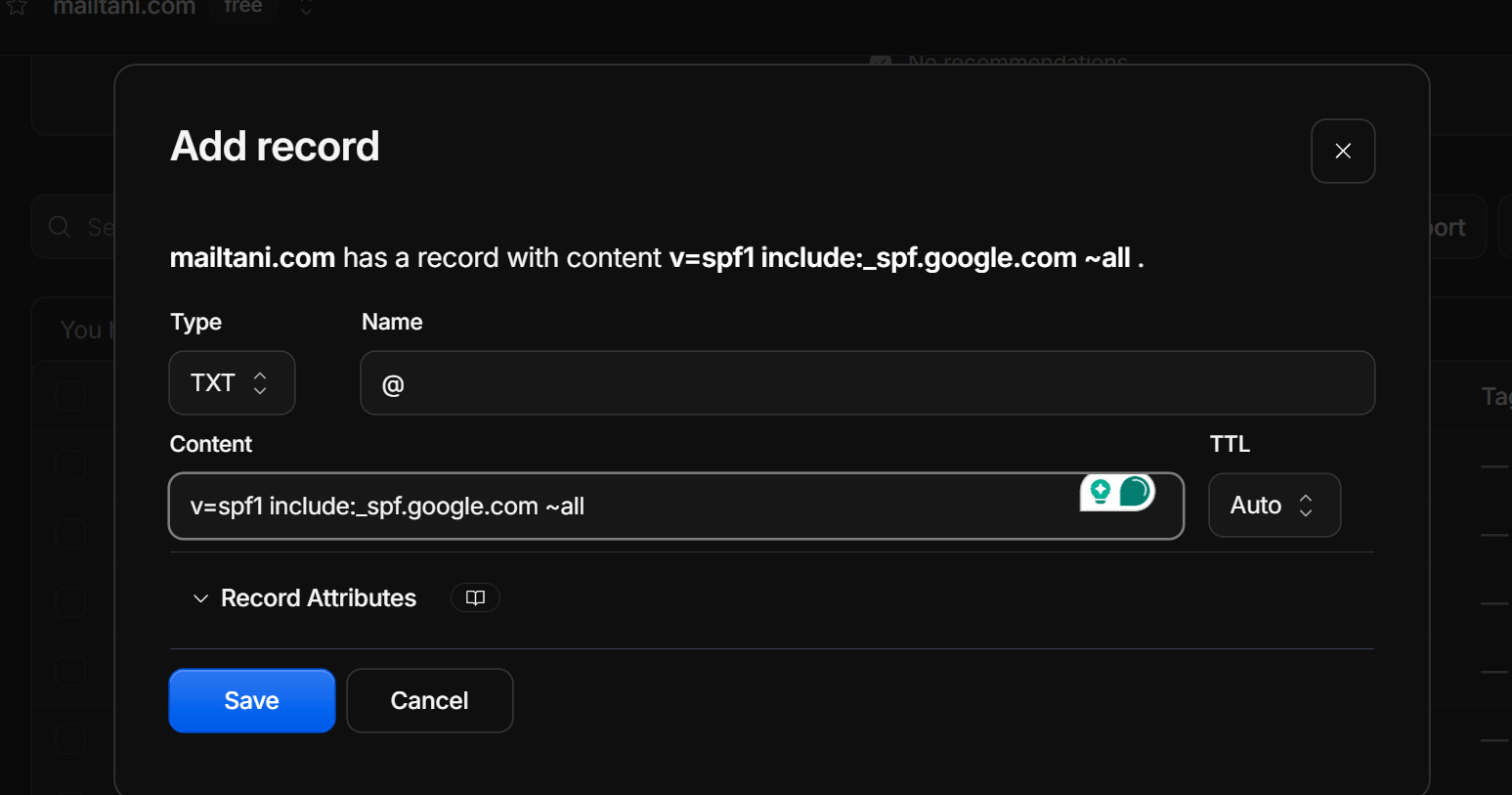
Add the root record as a TXT record at @, replacing any SPF record you already have. Add each subdomain record (for example send or mail) at the host shown.
What SPF Is and How It Actually Works
Sender Policy Framework (SPF) is a DNS-based email authentication protocol. It lets you declare which mail servers are authorised to send email for your domain.
Whatever you call the tool (SPF generator, builder, creator or maker), the result is the same: one TXT record that lists who may send for you.
Here is what happens when a message arrives claiming to be from your domain:
- The receiving server looks up a TXT record on your domain that starts with
v=spf1. - That record lists the IP addresses and hostnames allowed to send for you.
- The server compares the sending IP against that list.
- The result is pass, fail, softfail, neutral or none.
SPF checks the envelope-from (Return-Path) address, not the From address your recipients see.
That distinction matters. A phisher can spoof your visible From address and still pass SPF with their own envelope sender. That is why SPF should always be paired with DKIM and DMARC, which close that loophole.
SPF is standardised in RFC 7208 and is a baseline expectation at Google, Microsoft and Yahoo. Their 2024 bulk sender requirements made it official: domains sending at scale must publish a valid SPF record or accept worse deliverability.
SPF Record Syntax: Reading and Writing It Correctly
Every SPF record has three parts: the version, one or more mechanisms, and a catch-all policy at the end.
v=spf1declares the version. Every record starts with it.ip4:andip6:list IP addresses or CIDR ranges.include:hands part of the check to another domain's SPF record. This is how you authorise a third-party sender like a CRM or ESP.amatches your domain's A record, andmxmatches its MX records.allsets the result for every IP not matched before it.
The all mechanism takes a qualifier:
-all(hard fail): reject mail from any IP not in the list.~all(softfail): accept it but mark it. Use this while you are still finding all your senders.?all(neutral): no policy. It effectively does nothing.
Once your record is complete, moving from ~all to -all hardens your policy.
The most common SPF mistake is going over the 10 DNS lookup limit.
Each include:, a, mx, exists: and redirect= costs a lookup, and services like Google Workspace, Salesforce, Mailchimp, HubSpot and Zendesk add their own nested includes. Go past ten and SPF returns a PermError, which many receivers treat as a fail.
To get back under the limit:
- Remove senders you no longer use.
- Move high-volume senders such as Amazon SES or Mailgun to their own subdomain, so their lookups stop counting against your root record.
- Flatten includes into raw IP ranges only as a last resort. Providers change their IPs without notice, so a flattened record quietly goes stale.
Where Each Provider's SPF Record Goes
SPF is checked against the envelope-from (Return-Path) domain, so where a provider's SPF belongs depends on which domain that provider uses as the Return-Path. Many SPF generators put every provider into your root record. For several popular services that does nothing except use up DNS lookups.
Root domain record. Mailbox providers send with your own domain as the Return-Path:
- Google Workspace:
include:_spf.google.com - Microsoft 365:
include:spf.protection.outlook.com - Zoho Mail:
include:zohomail.com - Brevo:
include:spf.brevo.com - Mailtrap Email Sending:
include:_spf.smtp.mailtrap.live
Subdomain record. API senders usually check SPF on a subdomain:
- Amazon SES: publish
v=spf1 include:amazonses.com ~allon your custom MAIL FROM subdomain, for example mail.yourdomain.com. - Resend: sends through SES from a send subdomain, so the same value goes at send.yourdomain.com.
- Mailgun:
include:mailgun.orggoes on the sending domain you added in Mailgun, usually mg.yourdomain.com.
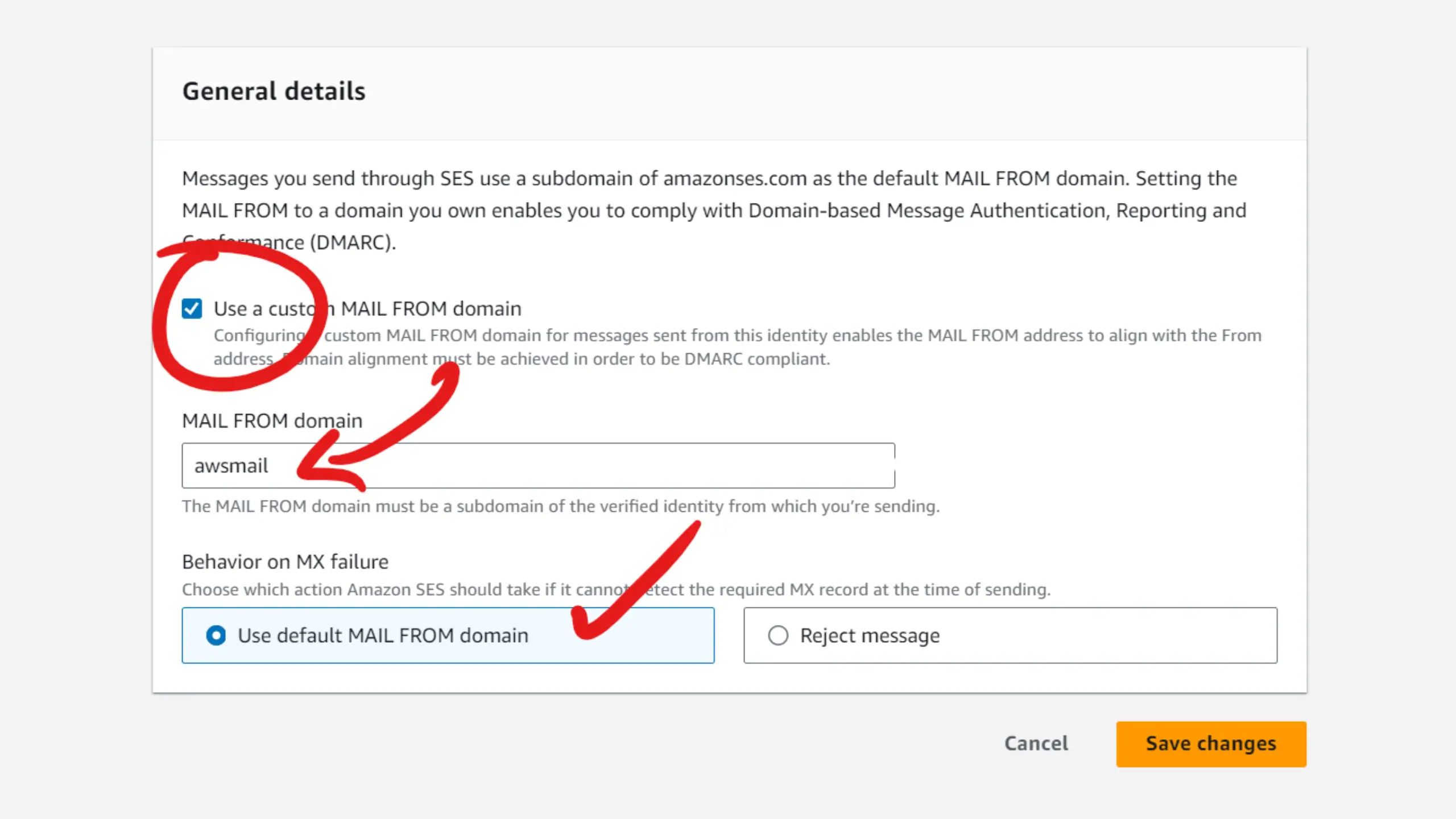
There is no include:spf.resend.com. That domain doesn't exist, and adding it makes SPF return a PermError.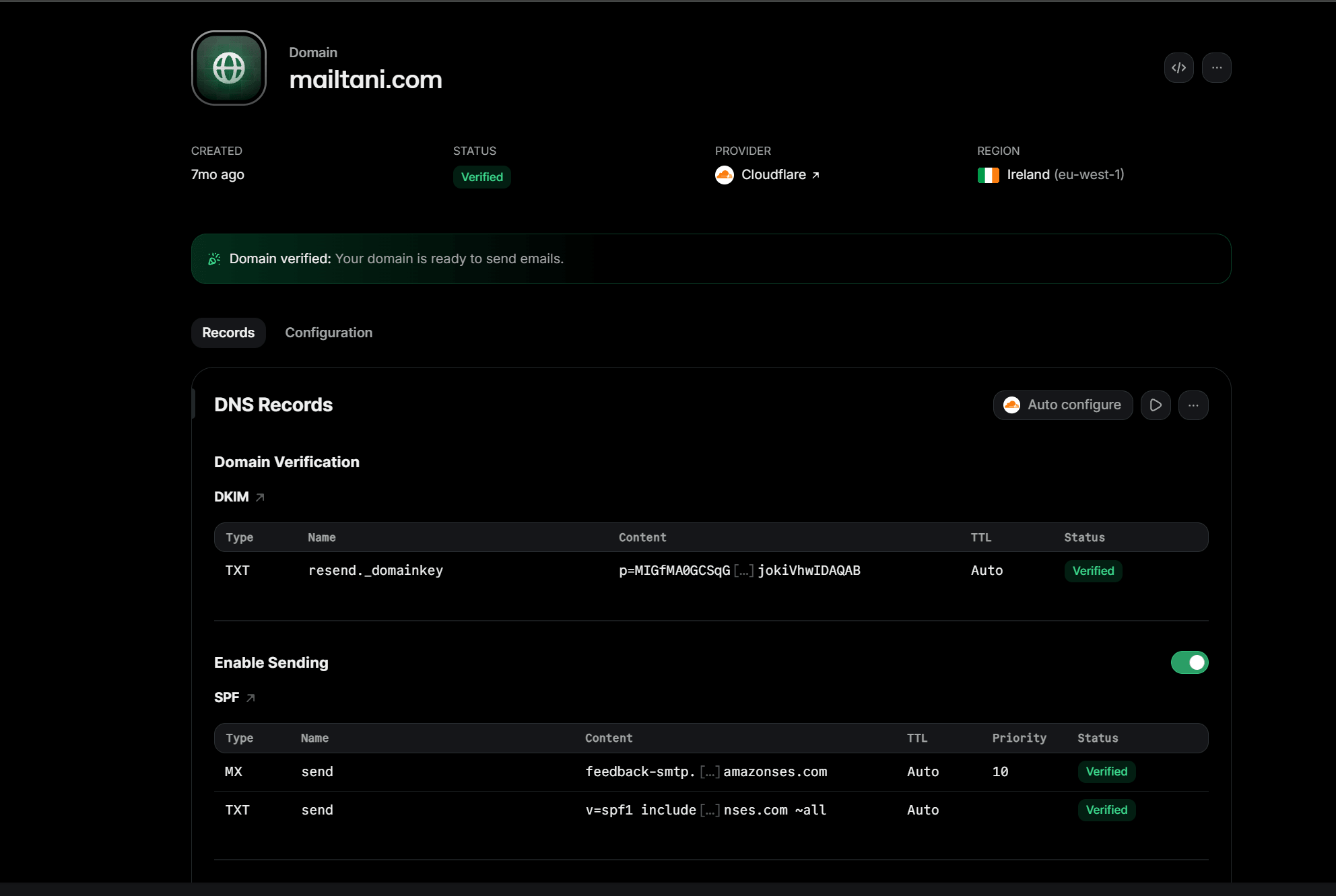
No SPF change needed. These providers send with a Return-Path domain they control, and that domain already carries their SPF:
- Postmark
- SendGrid, with domain authentication
- Mailchimp and Mailchimp Transactional (Mandrill). The old
include:servers.mcsv.netandinclude:spf.mandrillapp.comentries can be removed. - SparkPost, with a custom bounce domain
For these providers, DMARC passes through DKIM or through the CNAME records they ask you to add.
Deploying SPF Safely: Sequencing and Common Pitfalls
Before you publish your first SPF record, list every service that sends email from your domain:
- Transactional email from your app
- Marketing campaigns from your email platform
- CRM follow-ups and helpdesk auto-replies
- Billing and invoice notifications
Miss even one and that traffic fails SPF, which can hurt your sender reputation before you notice.
The safe rollout:
- Publish the record with
~all, then confirm it is live with the SPF lookup tool. - Set up DMARC and read its aggregate reports to find any sender missing from your record (the DMARC report analyzer turns them into a table).
- After two to four weeks with a complete picture, switch to
-all.
Two pitfalls catch a lot of teams:
- Subdomains don't inherit SPF. A record at yourdomain.com doesn't cover mail.yourdomain.com or noreply.yourdomain.com. Each subdomain used in an envelope-from address needs its own SPF record.
- Parked domains need SPF too. Domains that never send mail should publish
v=spf1 -all, so nobody can use them for spoofing.
SPF in the Broader Authentication Stack
SPF is the first of three authentication layers:
- SPF says which servers may send for your domain.
- DKIM adds a cryptographic signature that proves the message wasn't changed, and it survives forwarding.
- DMARC ties SPF and DKIM back to the visible From domain and tells receivers what to do when they fail.
For DMARC to pass, at least one of SPF or DKIM must align: its domain must match the From domain, either exactly (strict) or at the organisational level (relaxed).
Forwarding breaks SPF, because the forwarded mail comes from a different IP. That makes DKIM the more reliable way to pass DMARC in practice.
SPF still matters. It is simpler to set up, it is checked even when DKIM is missing, and a pass adds to the trust signals inbox providers weigh. Get SPF right first, then add a DKIM record and a DMARC policy.
Key Features
12 Provider Presets
Google Workspace, Microsoft 365, Zoho, Brevo, Mailtrap, Amazon SES, Resend, Mailgun, Postmark, SendGrid, Mailchimp and SparkPost, each checked against the provider's current docs and DNS.
DNS Lookup Counter
Counts the lookups your root record costs, nested includes included, and warns as you approach or pass the ten-lookup limit.
Subdomain Records
For SES, Resend and Mailgun, gives you the separate record for the subdomain they check, instead of wasting lookups on your root record.
IP, a and mx Mechanisms
Add your own IPv4 and IPv6 addresses or ranges, your A record and your MX servers. Invalid IPs are flagged and left out.
Policy Selector
Choose -all, ~all or ?all with a plain-language explanation of what each does to mail from unlisted senders.
Copy-Ready Output
Copy each TXT record value straight into your DNS provider, with a warning if it needs splitting past 255 characters.
Frequently Asked Questions
Related Tools
Continue your email deliverability setup with these free tools.
Tools Are Just the Start
Once your domain is set up, mailtani handles sending, warmup, sequences, and rotation.
See How mailtani Compares
Send Email with Confidence
mailtani includes built-in deliverability tools, inbox warmup, and SPF/DKIM/DMARC setup guides in one platform, with a one-time lifetime plan.
- Built-in SPF/DKIM/DMARC setup guides
- Inbox warmup & rotation
- Deliverability monitoring
- One-time price
14-day free trial · €89 lifetime access after
Sign up today and get an extra 10% off the yearly plan when you upgrade during onboarding.