
SMTP TLS Port Guide: 587, 465, or 25?
Which SMTP port should you use? 587 for STARTTLS, 465 for implicit TLS (SMTPS), 25 for server relay, 2525 as a fallback. Plus how to test each with OpenSSL.
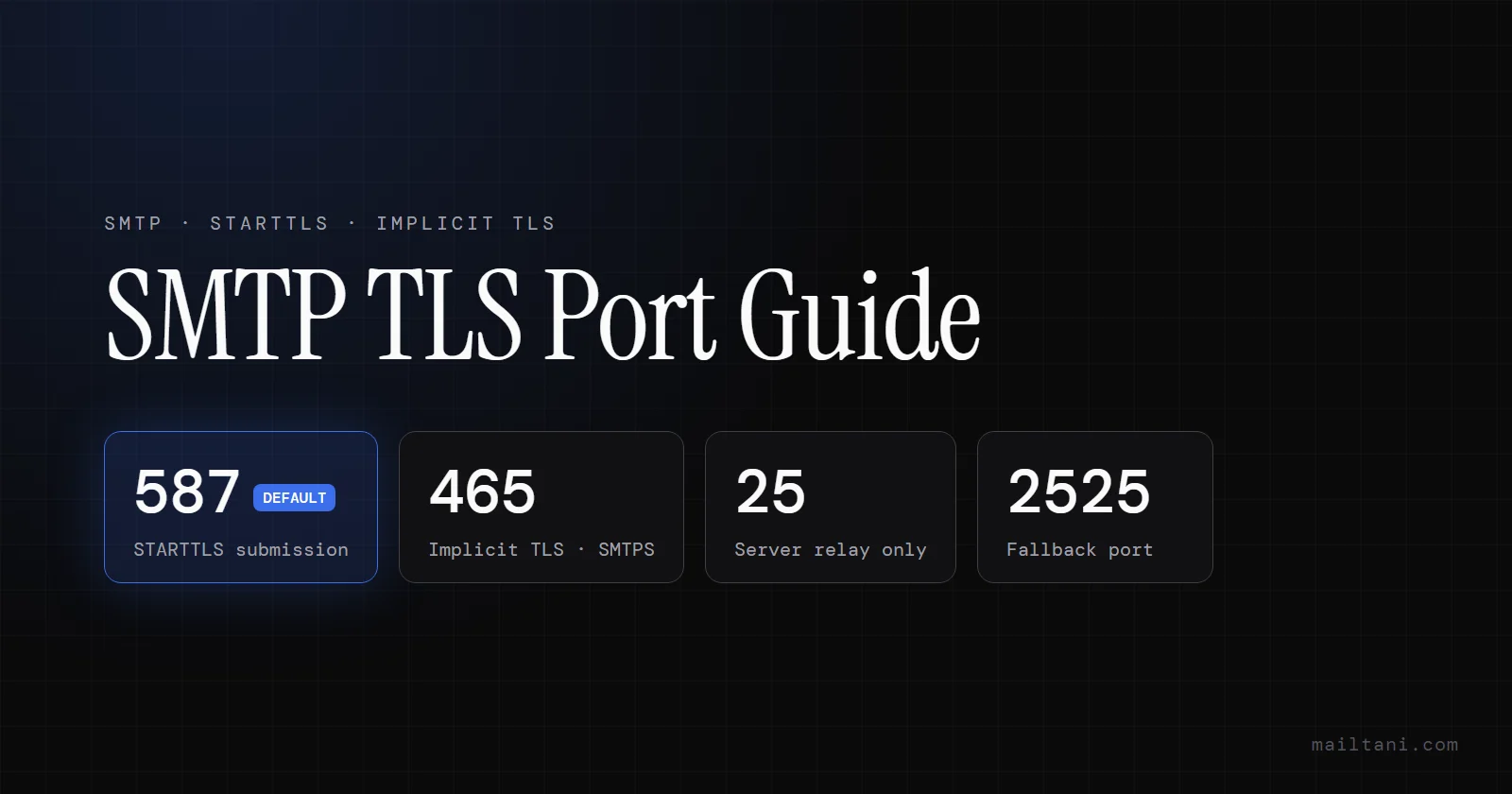
TL;DR / Quick answer: Use port 587 with STARTTLS for sending from an app. Use port 465 for implicit TLS (also called SMTPS or the "SMTP SSL port"). Port 25 is for server-to-server relay and is often blocked. Port 2525 is an unofficial fallback when 587 and 465 are blocked.
| Port | Encryption | Use it for |
|---|---|---|
| 587 | STARTTLS | Default for apps and ESPs |
| 465 | Implicit TLS (SMTPS) | Strict "TLS or fail" setups |
| 25 | None / opportunistic STARTTLS | Server-to-server relay only |
| 2525 | Usually STARTTLS | Fallback when 587/465 are blocked |
You push a release, run the signup flow, and the app stalls on the least glamorous part of the stack. Email. The logs give you something useless like connection refused, timeout, or TLS handshake failed. Your provider dashboard says SMTP is enabled, your credentials look right, and now you're stuck on one field: the port.
That single choice changes more than connectivity. It affects how encryption starts, whether a firewall drops the session, whether your app authenticates properly, and whether the provider even accepts the submission. In a modern stack that might touch Amazon SES, Resend, or Mailtrap depending on environment, the wrong smtp tls port setting creates errors that look unrelated until you inspect the handshake itself.
Most guides stop at definitions. That's not enough when you're debugging a production send path. The useful question isn't just what port exists. It's which one you should choose first, when to use the alternative, and how to prove the issue is in your code, your network, or the provider.
Why Is My Email Connection Failing
The usual failure pattern looks like this. A founder wires up transactional email late in the build, copies SMTP credentials from a provider dashboard, picks a port from memory, and assumes the library will handle the rest. Then the first live password reset never arrives.
In practice, these failures usually come from one of four mismatches. The app is speaking plain SMTP to a TLS-only port. The app expects STARTTLS but connects to an implicit TLS endpoint. A firewall allows web traffic but not outbound SMTP submission. Or the certificate presented by the server doesn't match the hostname the client used.
That last one shows up often in multi-provider setups. Teams switch between staging and production providers, keep old environment variables around, and end up connecting to one hostname with another provider's assumptions. The resulting error looks cryptic, but the problem is usually simple: the connection mode and the smtp tls port don't agree.
Practical rule: If the error happens before authentication, check port and TLS mode first. Don't start by rotating credentials.
There’s also a deliverability angle hiding behind the connectivity problem. If you're troubleshooting a domain that's already sending inconsistently, it's worth checking the wider mail setup with an MX record checker before you keep changing application code. It won't fix a broken SMTP handshake, but it does help separate transport issues from domain-level mail configuration issues. For a broader look at what drives inbox placement, the email deliverability feature overview covers the full picture.
The key is to stop treating the port as a small detail. In SMTP, the port tells the client how the conversation begins. If your client starts the wrong conversation, nothing after that matters.
Understanding SMTP Encryption STARTTLS vs Implicit TLS
SMTP encryption decisions usually fail in one place: the client and server disagree about when TLS starts.
How STARTTLS works on port 587
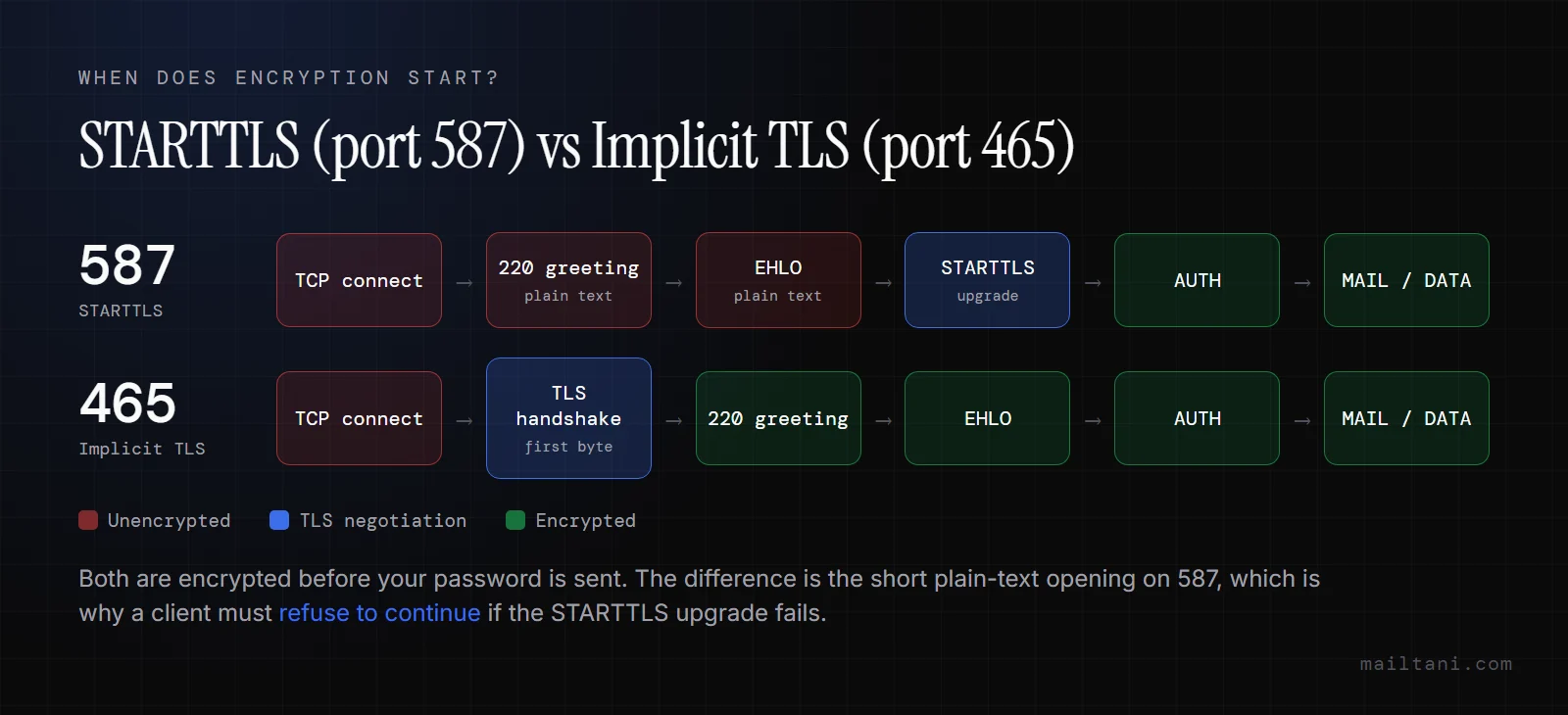
With STARTTLS, the SMTP session begins in plain SMTP. The server sends its greeting, the client asks which extensions are available, and then the client sends the STARTTLS command to switch into TLS before authentication and message submission continue.
That design is why port 587 remains the default for application submission. Providers, frameworks, and SMTP libraries expect it. In mixed-provider environments, that matters. If one app talks to SES, another to Resend, and a staging workflow uses Mailtrap, 587 is usually the setting that works across all three without custom handling.
The trade-off is in the handshake sequence. TLS is not active from the first byte, so the client has to request the upgrade and the server has to require it correctly. Cloudflare’s summary is the practical one: implicit TLS on port 465 removes the brief pre-upgrade window and aligns with RFC 8314’s preferred model, while STARTTLS on port 587 depends on both sides enforcing the upgrade so downgrade attempts cannot succeed, as explained in Cloudflare's SMTP port overview.
In production, the question is not whether STARTTLS is "good enough." The question is whether your client fails closed. A mailer that refuses to send unless TLS is negotiated is fine on 587. A mailer that falls back to plain SMTP is a bad configuration, even if the port number is technically correct.
How Implicit TLS works on port 465 (SMTPS)
With Implicit TLS, the TLS handshake starts immediately after the TCP connection opens. There is no plaintext SMTP greeting and no upgrade command. The client must speak TLS first, or the connection fails.
You'll also see port 465 called SMTPS or the SMTP SSL port. The names are historical: 465 was briefly assigned to "SMTP over SSL" in the 1990s, revoked, and then re-standardised by RFC 8314 in 2018 as the implicit-TLS submission port. In practice, when a provider dashboard says "SSL", it means port 465. When it says "TLS" or "STARTTLS", it means port 587.
That behavior makes port 465 less forgiving and often easier to reason about during troubleshooting. If the app is set to plain SMTP or STARTTLS while the server expects implicit TLS, the failure happens immediately. You do not get a half-working session. You get a clean break, which is often easier to diagnose in logs.
Port 465 also fits teams that want stricter defaults across providers. If the provider supports it consistently, implicit TLS removes one class of misconfiguration: clients that connect successfully but mishandle the STARTTLS upgrade. The downside is compatibility. Some libraries label 465 as "SSL," some call it "TLS," and some expose it as a separate secure transport mode. That UI inconsistency causes real deployment mistakes.
For a modern application, the decision is usually straightforward:
- Choose port 587 if you want the broadest compatibility across providers, SDKs, and hosted platforms.
- Choose port 465 if your provider supports it well and you want TLS to start immediately at connect time.
- Match the port to the encryption mode exactly. Port 587 expects STARTTLS. Port 465 expects implicit TLS.
In multi-provider setups, standardizing this choice matters more than teams expect. If production uses 587 with STARTTLS but staging uses 465 with implicit TLS, copy-pasted environment variables become a source of random failures. Pick one model per environment, document it clearly, and test the handshake directly when something looks off.
Comparing SMTP Ports 25, 465, 587, and 2525
Port choice affects more than whether a socket opens. It changes how your app negotiates TLS, how likely the connection is to get blocked on a hosted network, and how much operational drift you create once you add a second provider.
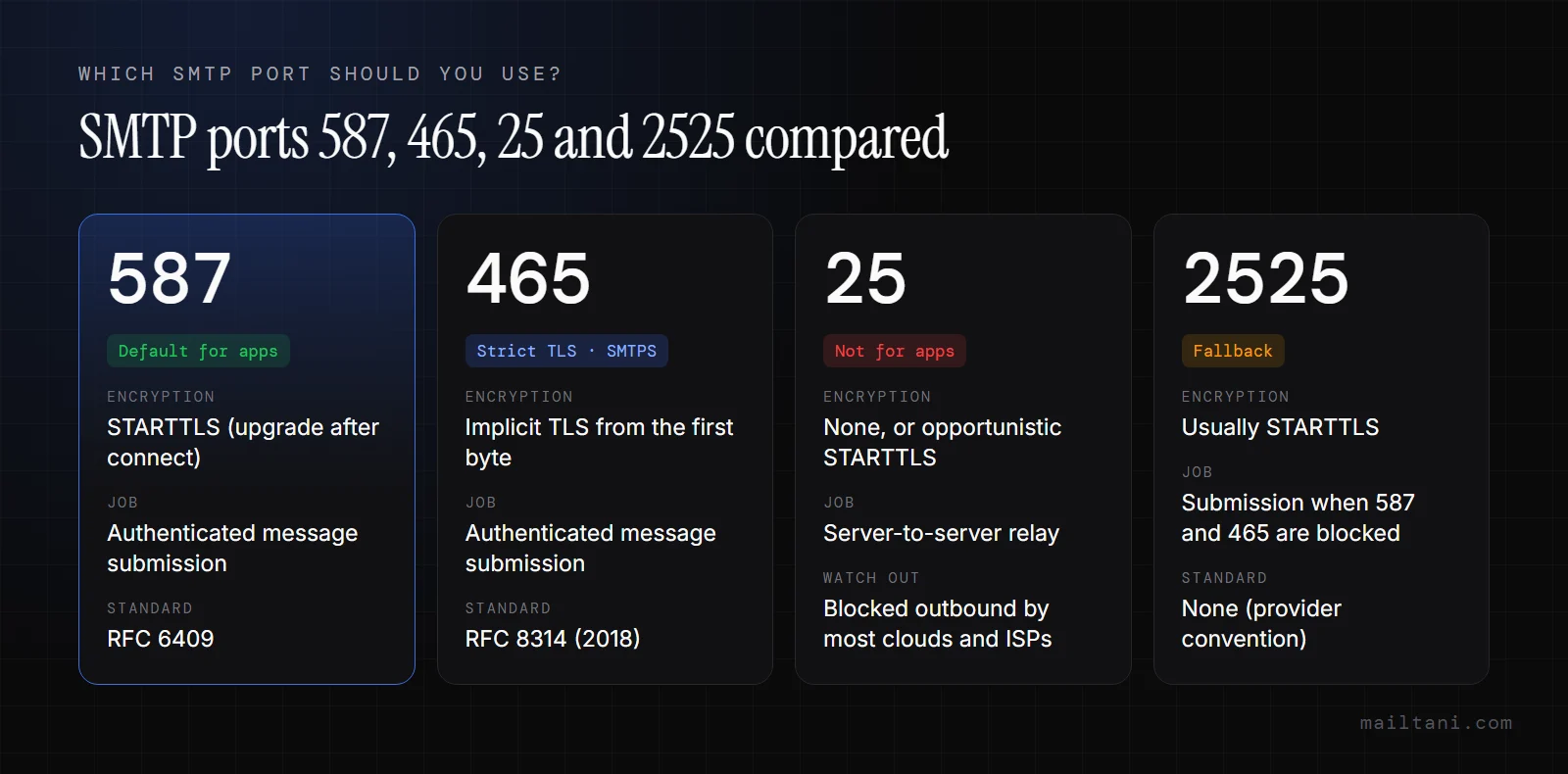
SMTP Port Comparison
| Port | Primary job | TLS behavior | Best use in a modern app |
|---|---|---|---|
| 25 | Server-to-server relay | Plain SMTP or STARTTLS if offered | Avoid for app submission |
| 465 | Secure submission | Implicit TLS from the first packet | Good fit if your provider and client both support it cleanly |
| 587 | Authenticated message submission | STARTTLS after connect | Default choice for most applications |
| 2525 | Alternate submission port | Usually STARTTLS | Fallback when 587 or 465 is blocked |
Debugging a send right now? Check the domain side before changing more code: MX record checker · email blacklist checker. Sending marketing email through SES, Resend or Mailtrap? Bring your own SMTP to mailtani. You keep your provider and pay no per-subscriber markup.
What each port means in practice
Port 25 still matters for mail transfer between servers. It is a poor default for an application sending through a provider. Cloud platforms, office networks, and residential ISPs often restrict it because abused port 25 traffic is a spam problem. Even if your credentials and hostname are correct, the connection may never leave the network.
Port 587 is the submission port built for apps, background workers, CRON jobs, and transactional mail pipelines. It usually gives the cleanest path across providers because authentication, policy enforcement, and TLS upgrade behavior are all expected here. If a team is standardizing one SMTP profile across SES, Resend, Mailtrap, or another provider, 587 is usually the least surprising option.
Port 465 is for implicit TLS. The encryption starts before SMTP commands are exchanged, which some teams prefer because failure is immediate if the client is misconfigured. That makes 465 easier to reason about in some environments, especially when you want a strict "TLS or fail" posture and your library exposes 465 correctly.
Port 2525 exists because production networks are messy. It is not the standards-first answer, but it is a useful escape hatch when a PaaS, VPS firewall, or corporate egress rule blocks the usual submission ports. In multi-provider setups, I treat 2525 as a documented fallback rather than a primary default.
For application mail, the real decision is usually between 587 as the standard path, 465 as the strict-TLS path, and 2525 as the recovery path when the network gets in the way.
The practical mapping looks like this:
- Use 587 for the default app configuration across environments and providers.
- Use 465 if you want implicit TLS and have verified that your SMTP library, runtime, and provider all agree on the mode.
- Keep 2525 available for environments where outbound filtering breaks normal submission.
- Reserve 25 for relay infrastructure, not app-level sending.
This matters more once you run more than one mail provider. A startup might send product email through SES, test flows through Mailtrap, and route certain transactional traffic through another provider. If one environment uses 587 with STARTTLS and another uses 465 with implicit TLS, copied environment variables turn into intermittent failures that look like "wrong password" or "TLS handshake error" in logs. Standardize the port and TLS mode per environment, then test each provider endpoint directly before blaming deliverability or credentials.
Why Port 587 Is the Modern Standard
Port 587 wins by solving the exact problem most applications have. Your app isn't acting like a mail server relaying messages across the internet. It's a client submitting outbound mail to a provider that will handle the rest.
It matches the job your app is doing
That distinction matters. Port 587 was established by RFC 2476 in 1999 as the designated port for secure message submission, and its role is different from port 25's older relay role. For authenticated app-to-provider delivery, that's the clean fit.
It also lines up with how providers want to protect their infrastructure. Authenticated submission reduces open relay abuse, supports SMTP authentication cleanly, and gives providers a predictable path for policy enforcement. That's one reason major services commonly publish 587 as the default submission setting.
The deliverability side is just as practical. As ISPs started blocking port 25, adoption of 587 accelerated, and modern tests show inbox rates 20-30% higher than port 25 because of ISP whitelisting and spam filter behavior, according to Mailtrap's explanation of ports 25, 465, and 587.
It balances compatibility and control
Port 465 has a cleaner encryption story at connect time. That's real. But in live environments, 587 usually gives you the least friction across frameworks, provider dashboards, hosted platforms, and restrictive firewalls.
That matters if you're running different providers for different workloads. Maybe your production app uses SES, your preview environment uses Mailtrap, and a side project uses Resend. The fewer custom exceptions you need in connection logic, the fewer hidden failures you ship.
A good default decision looks like this:
- Use port 587 for SMTP submission from the app.
- Require authentication.
- Enable STARTTLS and make sure the client doesn't continue without establishing it.
- Only switch to 465 when the provider supports it and you have a specific reason.
- Keep 2525 in reserve for network-path problems, not as the first answer.
Operational advice: Standardize on 587 across environments unless a provider or network forces a different choice. Consistency removes an entire class of setup mistakes.
In other words, port 587 is the modern standard because it fits the operational reality of how applications send mail today. Not because it's the most elegant conceptually, but because it works cleanly with authentication, provider policy, and real network conditions.
How to Test and Troubleshoot Your SMTP Connection
Most SMTP bugs stop being mysterious the moment you test the socket directly. Don't trust app logs alone. They often compress distinct failures into the same generic exception.
Test port 587 correctly
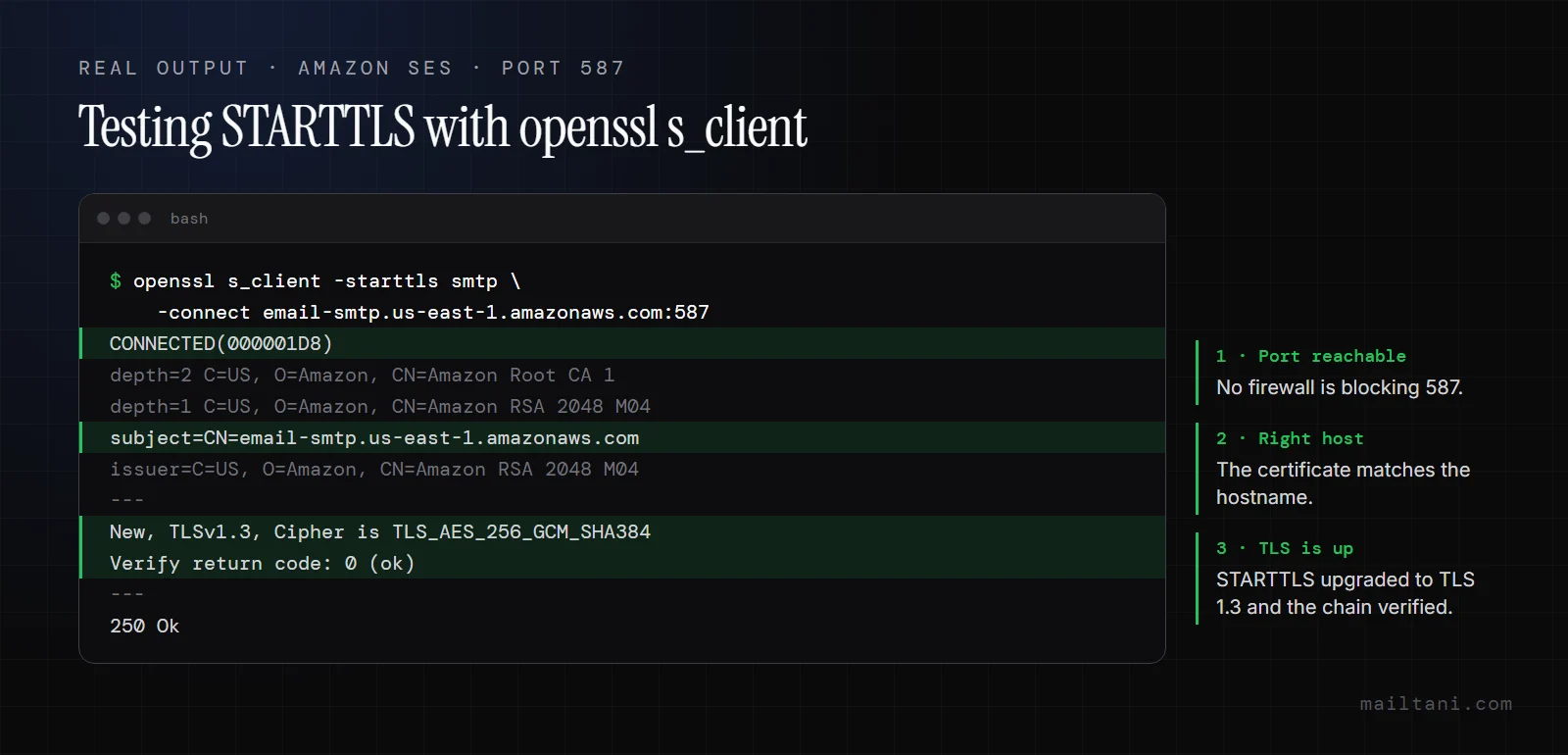
For port 587, you need to tell OpenSSL to perform the SMTP STARTTLS upgrade:
openssl s_client -starttls smtp -connect smtp.example.com:587
That exact pattern is the right way to verify a STARTTLS connection, and it helps catch one of the most common developer mistakes: the "must issue STARTTLS first" error that appears when a client talks to port 587 as if it were implicit TLS, as noted in Allegrow's SMTP port troubleshooting notes.
A healthy result usually tells you three things:
- The TCP connection opens
- The server presents a certificate
- TLS negotiation completes successfully
If the command hangs or times out, you likely have a network-path problem. If it connects but fails during negotiation, you're dealing with TLS mode, certificate, or protocol support.
Test port 465 correctly
For port 465, drop the STARTTLS flag and connect directly with TLS from the start:
openssl s_client -connect smtp.example.com:465
This is the right test for implicit TLS. If you try -starttls smtp here, you're testing the wrong behavior and the result won't tell you anything useful.
When this succeeds, you should see the certificate chain and the negotiated protocol. Developers often expect TLSv1.3 during verification, so pay attention to what the provider negotiates in your environment rather than assuming your app and provider agree by default.
A failed SMTP test is still useful. It tells you where the conversation broke.
Read the failures instead of guessing
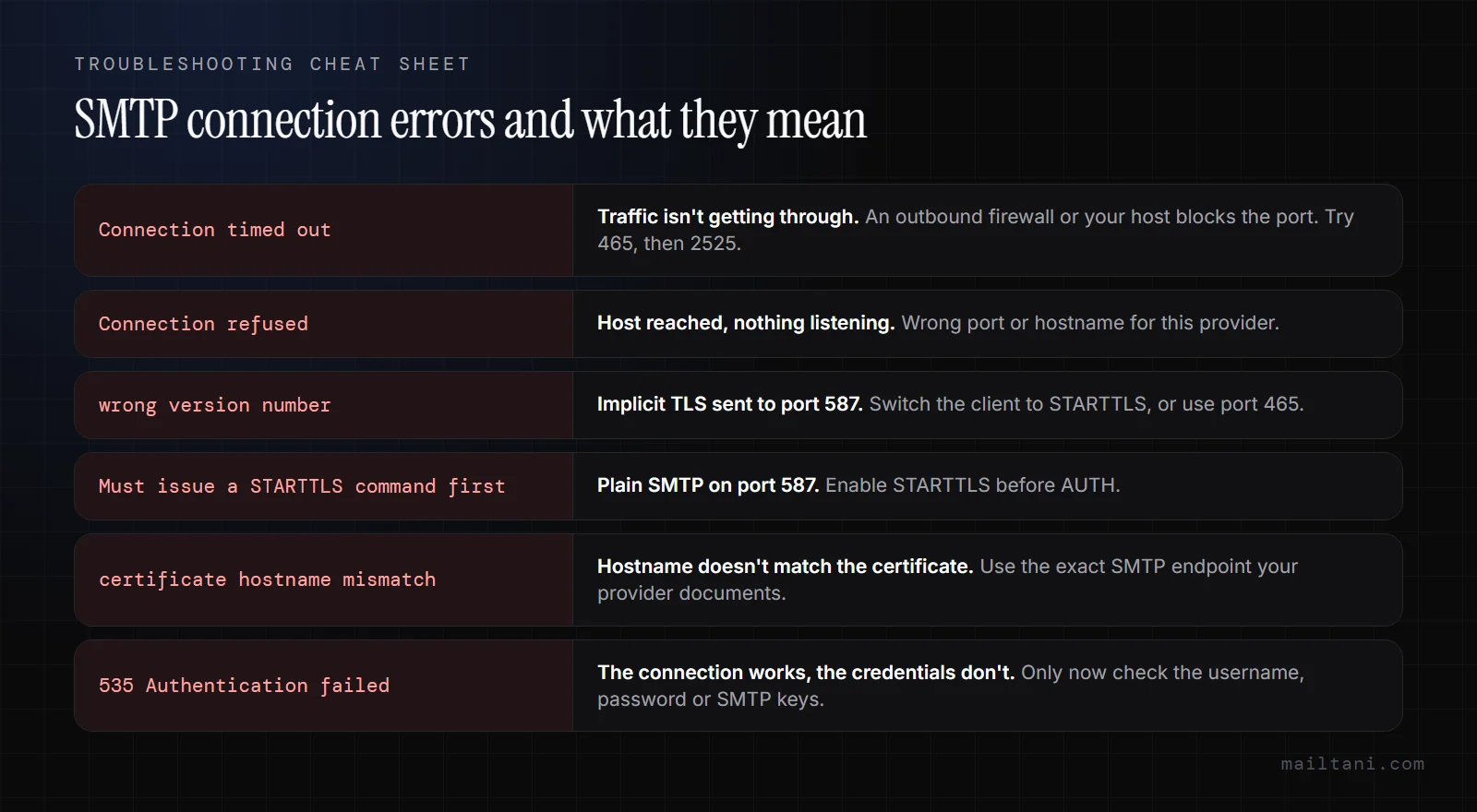
A few failures show up repeatedly in production setups:
- Connection refused: the host is reachable, but nothing is listening on that port, or a firewall is actively rejecting the connection.
- Timeout: traffic isn't getting through. Think outbound firewall, provider-side filtering, or a blocked route.
- Must issue STARTTLS first: you're on 587 but didn't perform the protocol upgrade.
- Certificate hostname mismatch: the server certificate doesn't match the hostname your client used.
- Handshake failure: the client and server couldn't agree on TLS settings, or the endpoint expected a different mode.
If you're rotating between multiple providers, certificate mismatches deserve special attention. The SMTP hostname has to match the provider endpoint you're targeting. Reusing a generic host label in code while swapping credentials is a fast way to create intermittent errors.
Later in the debugging flow, reputation checks can matter too. If mail connects and submits but behaves badly after acceptance, run the sending domain through an email blacklist checker so you don't confuse connection success with inbox success. If mail connects and submits fine but still isn't arriving, work through the email not working troubleshooting guide, which covers bounces, spam-folder placement and client-side failures.
A short walkthrough can help if you're debugging this live:
One last practical point. Test from the same network where the app runs. A successful command from your laptop doesn't prove the container, VM, or hosted worker has the same outbound access.
SMTP Port FAQ
What is the TLS port number for SMTP?
Port 587 is the standard SMTP port for TLS via STARTTLS. Port 465 is the SMTP port for implicit TLS, where encryption starts before any SMTP command.
Is port 587 TLS or SSL?
Port 587 uses TLS via STARTTLS: the connection starts in plain text and upgrades to TLS before login. "SSL" in mail clients almost always refers to port 465.
What port does SMTPS use?
SMTPS uses port 465, with implicit TLS from the first byte.
Should I use port 25 for sending email from my app?
No. Port 25 is for server-to-server relay, and many cloud hosts and ISPs block it outbound. Use 587 (or 465) for authenticated submission.
Why does port 2525 exist?
It isn't an official standard. Providers offer it as an alternative submission port for networks that block 587 and 465, such as some PaaS hosts and corporate firewalls.
Your SMTP Configuration Checklist
When you want the shortest path to a reliable setup, don't start with every port your provider mentions. Start with the most likely correct path, then fall back in a controlled order.
The checklist
- Use port 587 first. For almost every modern app, that's the best starting point for authenticated submission.
- Set the encryption mode to STARTTLS on 587. If your library says "TLS" and means "implicit TLS," confirm the behavior before saving the config.
- Only use 465 with implicit TLS. Never pair port 465 with a STARTTLS expectation.
- Reserve port 25 for relay scenarios. It isn't the right default for application-level sending.
- Add 2525 as a fallback path. Fortra notes that 35-40% of ISPs block port 25, and a fallback order of 587, then 465, then 2525 helps maintain connectivity across over 95% of global networks in its guidance on secure SMTP ports.
- Test with OpenSSL before changing app code again. Prove the network path and TLS handshake independently.
- Match the hostname to the provider endpoint. This prevents the certificate mismatch problems that show up in mixed-provider environments.
- Verify your domain's sending records. Use an SPF record generator to confirm SPF is aligned before chasing SMTP-layer issues.
- Keep environments consistent where possible. The fewer port-and-mode combinations your team supports, the fewer invisible misconfigurations you'll carry.
The decision rule that holds up
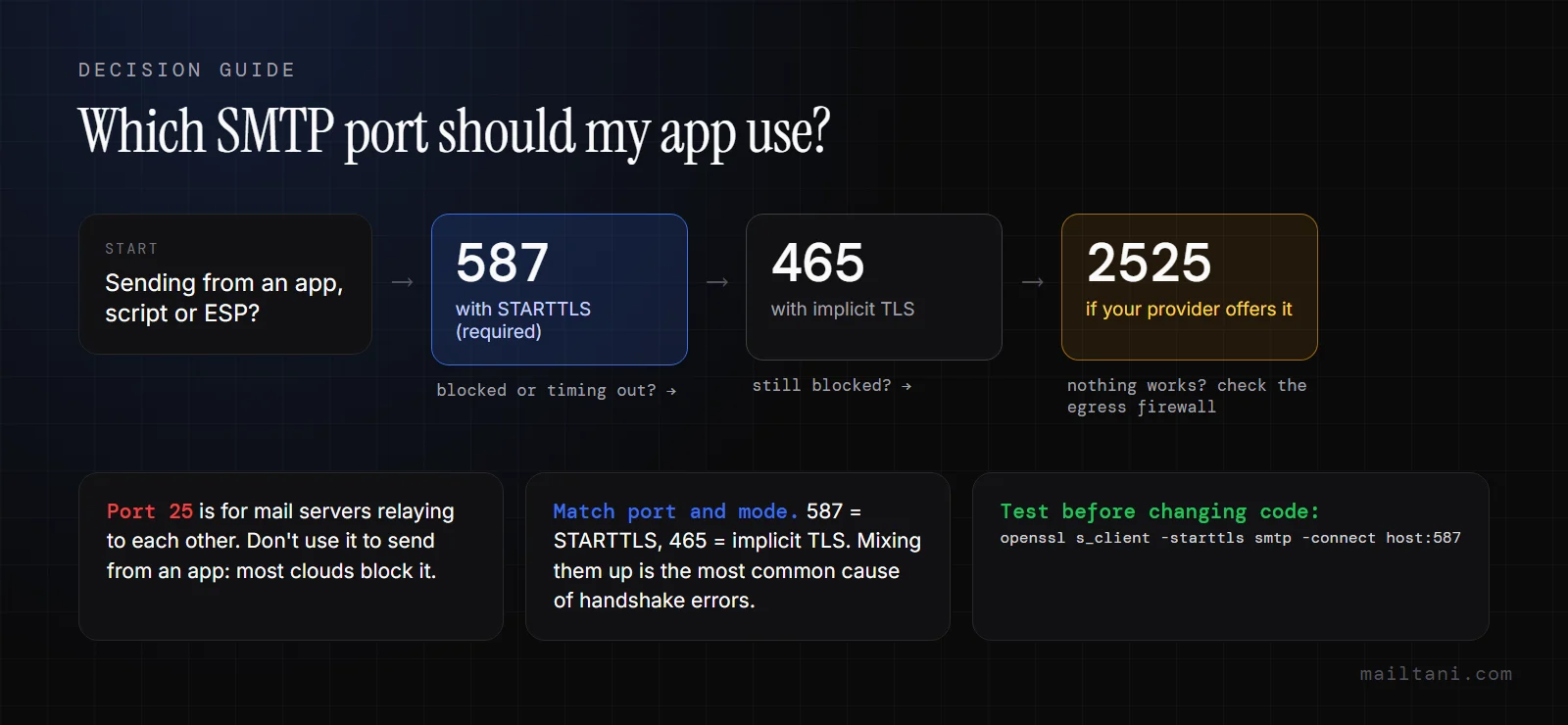
If you're integrating a new service and want one sane default, it's simple. Start on 587 with STARTTLS, authenticate explicitly, and verify the handshake manually if anything fails. Move to 465 only when you need implicit TLS or the provider's setup makes that the cleaner path. Use 2525 when the network, not the provider, is the blocker.
For teams that want a simpler setup flow across different providers, Mailtani's SMTP integration workflow is built around bringing your own sending infrastructure instead of hiding it behind a markup-heavy ESP layer.
Mailtani gives you the email marketing layer without taking ownership away from your infrastructure. You connect Amazon SES, Resend, or Mailtrap directly, keep your provider relationship, control your sender reputation, and avoid the usual platform markup. If you want a simpler way to run campaigns, automations, and sequences on top of the smtp setup you already trust, take a look at Mailtani.


